Breaking News

DZOFILM Expands Arles Cine Lens System With 25–75mm and 65–180mm T2.6 Zooms G.SKILL Launches Trident Z5 Royal NeoX Series DDR5 Memory with AMD EXPO Technology XERON Launches NEX A61 ARGB CPU Air Cooler Viltrox to Unveil New Lenses And Production Solutions at IBC2026 ASUS Announces WiFi 8 Router

Poster/Admin Login

logo

  • Share Us
    • Facebook
    • Twitter
  • Home
  • Home
  • News
  • Reviews
  • Essays
  • About
    • Submit News

    • Contact Us
    • Privacy

    • Promotion
    • Advertise

    • RSS Feed

Search form

LaCie d2 DL DVD±RW Recorder

Aug 3,2004 0

12. DVD+R DL - Page 1


Review Pages

1. Introduction
2. Transfer Rate Reading Tests
3. CD Error Correction Tests
4. DVD Error Correction Tests
5. Protected Disc Tests
6. DAE Tests
7. Protected AudioCDs
8. CD Recording Tests
9. DVD Recording Tests
10. KProbe/PlexTools Scans - Page 1
11. KProbe/PlexTools Scans - Page 2
12. DVD+R DL - Page 1
13. DVD+R DL - Page 2
14. BookType Setting / Firmware versions changes
15. Conclusion


LaCie d2 DL DVD±RW Recorder - Page 12

DVD+R DL - Page 1

- Writing Tests

We burned some DVD+R DL discs with DVD-Video content. The source disc was "Gladiator Movie - Special Edition" disc1 with a total size of 6.86GB. First we transferred the movie to the hard disc with DVD Decrypter in ISO format (single file). The following snapshot shows the media code for the Double Layer disc we used.
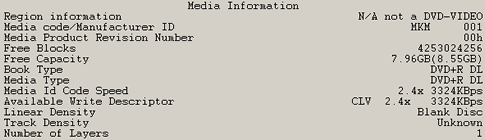
LaCie 's drive produced the same bug that was witnessed and discussed in the ND-2510A review. The Double Layer discs we used came from RITEK and MKM, and in both cases the drive recognised them as Single Layer discs. We then used Nero CDSpeed, and again the disc was recognised as Single Layer media.

However, disc capacity, media type and book type seems to be correct. Looks like NEC has to work on their next firmware release on this one.

Afterwards, we used CopyToDVD v3.0.0.16. The friendly wizard prompts us to choose from among the main options:

For our test, we used the "Movie & Pictures" option, and then the "Write DVD Video".

The software prompts us to select Video_TS/ISO image folder. We chose the "GLADIATOR.ISO" image and we selected the NEC ND-2510A burner (which is in fact the LaCie d2 drive).

After pressing "OK", the burning procedure started, without any unexpected delays. It should be noted that the Booktype setting could not be changed. The writing process was finished after 37:17minutes. The average speed was 2.38X as reported by the CopyToDVD software. The recorded disc was in DVD+R9 format.

For comparison reasons, we post some burning results from other DL writers, which all burned the same content ("Gladiator Movie - Special Edition" disc1), using CopyToDVD software:

Drive
Time (mins)
LaCie d2 DL

37:17

LG GSA-4120B

38:08

NEC 2510A
37:17
BenQ DW1600A DL
40:16
BenQ DW830A
39:14
LiteON SOHW-832S DVD+R DL BookType
38:33
LiteON SOHW-832S DVD-ROM BookType
38:36
SONY DRU-700A

38:39

The LaCie d2 DL and NEC ND-2510A drives were the fastest. Very good performance with Double Layer media from NEC.


Review Pages

1. Introduction
2. Transfer Rate Reading Tests
3. CD Error Correction Tests
4. DVD Error Correction Tests
5. Protected Disc Tests
6. DAE Tests
7. Protected AudioCDs
8. CD Recording Tests
9. DVD Recording Tests
10. KProbe/PlexTools Scans - Page 1
11. KProbe/PlexTools Scans - Page 2
12. DVD+R DL - Page 1
13. DVD+R DL - Page 2
14. BookType Setting / Firmware versions changes
15. Conclusion
 

Pages

  • « first
  • ‹ previous
  • …
  • 7
  • 8
  • 9
  • 10
  • 11
  • 12
  • 13
  • 14
  • 15
  • next ›
  • last »

Lacie

NEC Electronics

Tags: Lacie NEC Electronics
Previous Post
ASUS DRW-1604P
Next Post
Interview with Mr Frank Simonis of Philips

Related Posts

  • NEC Discloses 2016 Security Breach

  • NEC Develops Millimeter-wave Distributed Antenna Radio Unit for Indoor 5G Applications

  • NEC Develops Walkthrough Identity Verification System Using Iris Authentication Engine

  • NEC and Lenovo Make Three Flagship Devices Available in the US Market

  • D-Wave to Collaborate With NEC to Accelerate Commercial Quantum Computing

  • LaCie Showcses New Range of Rugged SSD Devices at the 2019 IBC Show

  • NEC Demos Flying Car Concept

  • LaCie Delivers New Portable USB-C SSD For Creatives

Latest Reviews

be quiet! Dark Power 14 IO
PC components

be quiet! Dark Power 14 IO

SanDisk High Endurance 512GB microSDXC
Cameras

SanDisk High Endurance 512GB microSDXC

Samsung PRO Ultimate 512GB microSDXC
Cameras

Samsung PRO Ultimate 512GB microSDXC

be quiet! Light Mount TKL
Consumer Electronics

be quiet! Light Mount TKL

be quiet! Light Loop IO LCD
Cooling Systems

be quiet! Light Loop IO LCD

Popular News

CORSAIR announces Vanguard Pro 96 and Vanguard 96 Gaming Keyboards

CORSAIR announces Vanguard Pro 96 and Vanguard 96 Gaming Keyboards

MSI Launches FORGE GK600 TKL WIRELESS Special Edition Compact Mechanical Keyboard

MSI Launches FORGE GK600 TKL WIRELESS Special Edition Compact Mechanical Keyboard

Panasonic Introduces the First Ultra-Telephoto Zoom Lens in the LUMIX S Series

Panasonic Introduces the First Ultra-Telephoto Zoom Lens in the LUMIX S Series

MSI’s Latest AMD X870E MAX & EVO Series Motherboards

MSI’s Latest AMD X870E MAX & EVO Series Motherboards

COLORFUL Launches iGame B850M ULTRA Series Micro-ATX Motherboards

COLORFUL Launches iGame B850M ULTRA Series Micro-ATX Motherboards

COLORFUL Presents Limited Edition Chitu MAG-60 Magnetic Keyboard Inspired by the Year of the Horse

COLORFUL Presents Limited Edition Chitu MAG-60 Magnetic Keyboard Inspired by the Year of the Horse

COLORFUL Presents iGame Z890 ULTRA-S W and iGame Z890M ULTRA Z Motherboards

COLORFUL Presents iGame Z890 ULTRA-S W and iGame Z890M ULTRA Z Motherboards

LIAN LI Launches 8.8” Universal Screen with Flexible Mounting Solution

LIAN LI Launches 8.8” Universal Screen with Flexible Mounting Solution

Main menu

  • Home
  • News
  • Reviews
  • Essays
  • About
    • Submit News

    • Contact Us
    • Privacy

    • Promotion
    • Advertise

    • RSS Feed
  • About
  • Privacy
  • Contact Us
  • Promotional Opportunities @ CdrInfo.com
  • Advertise on out site
  • Submit your News to our site
  • RSS Feed