Breaking News

ASUS Announces ProArt Router PRT-BE5000 and ProArt Switch PQG-U1080 CORSAIR Expands the Popular FRAME Series Case Lineup DeepCool Launches the LT360 VISION ARGB Noctua and Asetek Announce Flagship AIO Liquid Coolers Toshiba Begins Sampling of 30-34 TB SMR Nearline Hard Disk Drives

logo

  • Share Us
    • Facebook
    • Twitter
  • Home
  • Home
  • News
  • Reviews
  • Essays
  • Forum
  • Legacy
  • About
    • Submit News

    • Contact Us
    • Privacy

    • Promotion
    • Advertise

    • RSS Feed
    • Site Map

Search form

NeuNeo HVD108 DVD Player

Oct 21,2004 0

4. Connections


Review Pages

1. Introduction
2. Main Chipset
3. HDTV
4. Connections
5. Menus - page 1
6. Menus - Page 2
7. Menus - page 3
8. Menus - Page 4
9. Reading Tests
10. Error Correction
11. Conclusion


NeuNeo HVD108 DVD Player - Page 4

Connections

The HVD108 has almost everything that a standalone player should have. Although a SCART connection interface is missing, there are several other interfaces that cannot be found on similar devices at this price.

The package includes: 1 DVD Player, 1 Remote Control, 1 pair analog Video /Audio Cables and User Manual. Power 100 ~ 240 AC/50 ~ 60Hz.

On the rear left of the device, there is the 5.1CH output, which indicates that the player has a built-in decoder for analogue multichannel sound reproduction. Next to it, as seen in the screenshot below, is the stereo output.

The provided video connections include the Component Video (PbPrY), Composite and S-Video outputs. Between these there are the coaxial and optical digital outputs for digital multichannel audio reproduction.

However, we consider that the most important Video connection that the HVD108 provides is the following VGA/SVGA output, which is hard to find this type of device (for the price).

On the front and top of the player there are all the appropriate function controls for using the device without the need for a remote control.
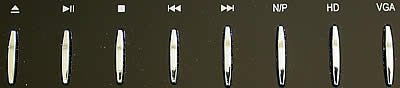
There is also a standby button on the top left, and a power switch at the back.

The indication under the AC input connector informs us that the unit can accept 100-240V AC.

The slim, loading tray is quite impressive, combining transparent plastic and metal. However it needs extra care while placing a disc, as the plastic tray seems to be a little on the fragile side.

Below you can see the included remote control for the device. All the usual buttons are there, and it shouldn't take you long to get used to it.


Review Pages

1. Introduction
2. Main Chipset
3. HDTV
4. Connections
5. Menus - page 1
6. Menus - Page 2
7. Menus - page 3
8. Menus - Page 4
9. Reading Tests
10. Error Correction
11. Conclusion


Pages

  • « first
  • ‹ previous
  • 1
  • 2
  • 3
  • 4
  • 5
  • 6
  • 7
  • 8
  • 9
  • …
  • next ›
  • last »

NeuNeo

Tags: NeuNeo
Previous Post
PowerColor X300
Next Post
Hercules DJ Console

Related Posts

  • NeuNeo DV308 MPEG4 DVD Player

  • NeuNeos High Definition DVD player hits the market

Latest Reviews

In the Age of AI Phishing, the Best User Experience Might Be the One That Feels Safest
Enterprise & IT

In the Age of AI Phishing, the Best User Experience Might Be the One That Feels Safest

SoundPeats C30
Consumer Electronics

SoundPeats C30

Why Streaming Live Casino Games Demands Smarter Tech
Enterprise & IT

Why Streaming Live Casino Games Demands Smarter Tech

Kioxia Exceria Plus G3 512GB microSD
Cameras

Kioxia Exceria Plus G3 512GB microSD

SoundPeats Cove Pro
Consumer Electronics

SoundPeats Cove Pro

Popular News

TEAMGROUP Launches EXPERT P34F Find My External SSD

TEAMGROUP Launches EXPERT P34F Find My External SSD

Samsung announces Galaxy Tab S11 and Galaxy S25 FE series

Samsung announces Galaxy Tab S11 and Galaxy S25 FE series

Viltrox Showcases Upcoming Lens Lineup and New TTL Flash at IBC 2025

Viltrox Showcases Upcoming Lens Lineup and New TTL Flash at IBC 2025

CORSAIR announces Vanguard Pro 96 and Vanguard 96 Gaming Keyboards

CORSAIR announces Vanguard Pro 96 and Vanguard 96 Gaming Keyboards

Panasonic Introduces the First Ultra-Telephoto Zoom Lens in the LUMIX S Series

Panasonic Introduces the First Ultra-Telephoto Zoom Lens in the LUMIX S Series

MSI Launches DATAMAG 40Gbps Magnetic Portable SSD

MSI Launches DATAMAG 40Gbps Magnetic Portable SSD

MSI Launches FORGE GK600 TKL WIRELESS Special Edition Compact Mechanical Keyboard

MSI Launches FORGE GK600 TKL WIRELESS Special Edition Compact Mechanical Keyboard

Viltrox Joins the L-Mount Alliance, Expanding Creative Possibilities

Viltrox Joins the L-Mount Alliance, Expanding Creative Possibilities

Main menu

  • Home
  • News
  • Reviews
  • Essays
  • Forum
  • Legacy
  • About
    • Submit News

    • Contact Us
    • Privacy

    • Promotion
    • Advertise

    • RSS Feed
    • Site Map
  • About
  • Privacy
  • Contact Us
  • Promotional Opportunities @ CdrInfo.com
  • Advertise on out site
  • Submit your News to our site
  • RSS Feed