Breaking News

G.SKILL Showcases DDR5-9200 1.1V 16GBx2 High-Speed CU-DIMM Memory Kit Sony Introduces BRAVIA 9 II and BRAVIA 7 II RGB TVs and the BRAVIA Theatre Trio Creative Announces Sound Blaster AE-X Acer Expands Gaming Portfolio With Predator Atlas 8 Handheld Powered by Intel COLORFUL Presents Limited Edition iGame GeForce RTX 5070 Ultra OC 12GB x 007 First Light Edition

logo

  • Share Us
    • Facebook
    • Twitter
  • Home
  • Home
  • News
  • Reviews
  • Essays
  • Forum
  • Legacy
  • About
    • Submit News

    • Contact Us
    • Privacy

    • Promotion
    • Advertise

    • RSS Feed
    • Site Map

Search form

OCZ Agility 3 240GB SSD review

Jun 22,2011 0

3. OCZ's Toolbox, firmware


Review Pages

1. Specifications
2. A closer look
3. OCZ's Toolbox, firmware
4. Benchmarks - page 1
5. Benchmarks - page 2
6. Final thoughts


The Agility 3 SSD is compatible with OCZ's Toolbox software utility.  Developed by OCZ and  SandForce, the software is packed full of features that you are going to find useful over the lifespan of the drive.

Through the software you can control all the main functions of your SSD, like formatting, completely erase your SSD, installing new software or password-protect your data.

Once we fired up the utility, we were surprised that OCZ's Toolbox could not identify the installed Agility 3 SSD:
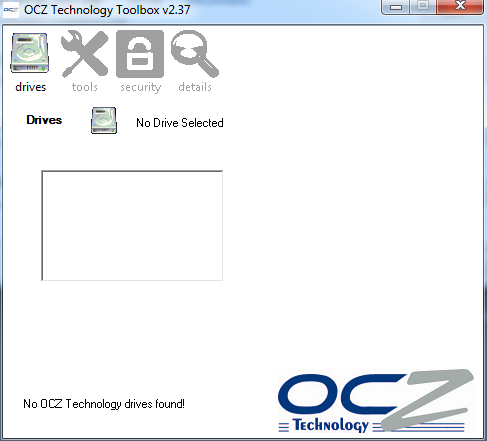
After some research we realized that the problem had to do with Intel's SATA drives. We uninstalled them and used the default SATA driver of Windows 7. After rebooting, the drive appeared at the software's list of installed drives with firmware firmware v2.06 installed:

A little bit later the software found a new firmware for the drive (v2.08), which we easily downloaded and installed it:

According to OCZ, the latest firmware (v2.08) has been designed with SandForce in order to address issues that caused blue screens on all SF2000 based drives. OCZ said that the issue was caused by the Intel RST driver. Despite the new firmware, some users are still complaining about problems with their SF2000 SSDs. If you are one of those, you'd better take a look at this page at OCZ's forum for more information.

Update: OCZ has released v2.09 firmware for all the owners of Vertex 3/Agility 3 SSD drives that are still experiencing blue screens. For additional inforamtion. visit OCZ's forums

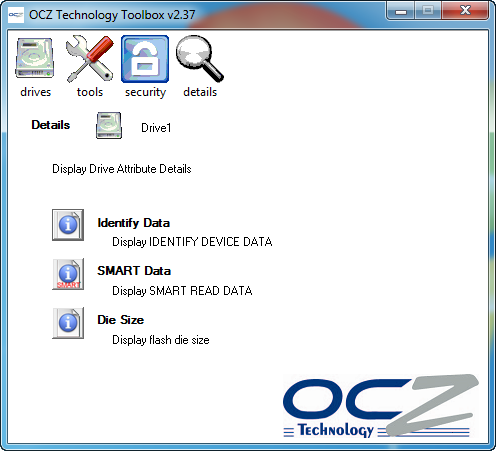
We didn't experience any additional problems during this test so let's see a few more screen shots from the Toolbox. Below you see the Secure Erase option, which permanently deletes everything stored in your SSD and wipes your drive clean:

Furthermore, the utility provides SMART Data reporting, a file in which everything related to the operation of your SSD is logged:
 

Review Pages

1. Specifications
2. A closer look
3. OCZ's Toolbox, firmware
4. Benchmarks - page 1
5. Benchmarks - page 2
6. Final thoughts
 

Pages

  • « first
  • ‹ previous
  • 1
  • 2
  • 3
  • 4
  • 5
  • 6
  • next ›
  • last »

OCZ Technology

Tags: OCZ Technology
Previous Post
Thermaltake Level 10 GT Review
Next Post
AC Ryan PlayOn!HD2 review

Related Posts

  • Toshiba completes acquisition of OCZ Technology Group's Assets and launches new subsidiary, OCZ Storage Solutions

  • Value-Optimized Toshiba RC100 NVMe SSDs Now Available

  • Toshiba Introduces New XS700 Series of Portable SSDs

  • Toshiba OCZ RD400 512GB M.2 PCIe SSD

  • Toshiba Introduces the Value-oriented OCZ TL100 SATA SSD Series

  • Toshiba Introduces the OCZ VX500 SATA SSD Series

  • OCZ RD400 NVMe SSD Series Released

  • OCZ Z-Drive 6000 And 6300 NVMe U.2 SSDs Released With Dual-port Functionality

Latest Reviews

Swit NP-FZ100 Battery
Cameras

Swit NP-FZ100 Battery

The Technology Stack Behind Modern Digital Gaming Platforms
Consumer Electronics

The Technology Stack Behind Modern Digital Gaming Platforms

be quiet! Dark Rock Pro 6
Cooling Systems

be quiet! Dark Rock Pro 6

How Online Casinos Use Encryption, Verification, and Risk Controls to Build User Trust
Enterprise & IT

How Online Casinos Use Encryption, Verification, and Risk Controls to Build User Trust

Why Low-Latency Infrastructure Matters More Than Raw Specs
Enterprise & IT

Why Low-Latency Infrastructure Matters More Than Raw Specs

Popular News

TEAMGROUP Launches EXPERT P34F Find My External SSD

TEAMGROUP Launches EXPERT P34F Find My External SSD

CORSAIR announces Vanguard Pro 96 and Vanguard 96 Gaming Keyboards

CORSAIR announces Vanguard Pro 96 and Vanguard 96 Gaming Keyboards

Samsung announces Galaxy Tab S11 and Galaxy S25 FE series

Samsung announces Galaxy Tab S11 and Galaxy S25 FE series

MSI Launches FORGE GK600 TKL WIRELESS Special Edition Compact Mechanical Keyboard

MSI Launches FORGE GK600 TKL WIRELESS Special Edition Compact Mechanical Keyboard

Viltrox Showcases Upcoming Lens Lineup and New TTL Flash at IBC 2025

Viltrox Showcases Upcoming Lens Lineup and New TTL Flash at IBC 2025

Panasonic Introduces the First Ultra-Telephoto Zoom Lens in the LUMIX S Series

Panasonic Introduces the First Ultra-Telephoto Zoom Lens in the LUMIX S Series

MSI Launches DATAMAG 40Gbps Magnetic Portable SSD

MSI Launches DATAMAG 40Gbps Magnetic Portable SSD

Viltrox Joins the L-Mount Alliance, Expanding Creative Possibilities

Viltrox Joins the L-Mount Alliance, Expanding Creative Possibilities

Main menu

  • Home
  • News
  • Reviews
  • Essays
  • Forum
  • Legacy
  • About
    • Submit News

    • Contact Us
    • Privacy

    • Promotion
    • Advertise

    • RSS Feed
    • Site Map
  • About
  • Privacy
  • Contact Us
  • Promotional Opportunities @ CdrInfo.com
  • Advertise on out site
  • Submit your News to our site
  • RSS Feed