
Breaking News

Nikon releases the Z5IIC full-frame mirrorless camera Announcing the New ASUS Googlebook 14 Razer Unveils Kiyo V2 Pro 4K Webcam Transcend Launches 64GB DDR5-6400 Embedded DRAM Modules for High-Speed Performance and Enhanced System Stability Hollyland Introduces LARK M3 Wireless Audio System

logo

  • Share Us
    • Facebook
    • Twitter
  • Home
  • Home
  • News
  • Reviews
  • Essays
  • About
    • Submit News

    • Contact Us
    • Privacy

    • Promotion
    • Advertise

    • RSS Feed

Search form

Plextor PX-712A

May 17,2004 0

21. SilentMode / SecuRec


Review Pages

1. Introduction
2. Data CD/DVD Reading Tests
3. CD Error Correction Tests
4. DVD Error Correction Tests
5. Protected Disc Tests
6. DAE Tests
7. CD Recording Tests
8. CD Writing Quality - Jitter Tests
9. CD Writing Quality - C1/C2 Error Measurements
10. Kprobe PI/PO Quality Tests for DVD+R/RW
11. DVD Recording Tests
12. VariREC Tests for CD Format
13. Kprobe PI/PO Quality Tests for DVD-R/RW
14. VariREC Tests for DVD Format
15. GigaRec Tests - Page 1
16. GigaRec Tests - Page 2
17. Q-Check Tests
18. PleXTools vs. SA300 - Page 1
19. PleXTools vs. SA300 - Page 2
20. PleXTools vs. SA300 - Page 3
21. SilentMode / SecuRec
22. BookType Setting Tests
23. Conclusion


Plextor PX-712A Dual DVD±RW recorder - Page 21

SilentMode / SecuRec

The last two important features of the PX-712A are SilentMode and SecuRec.

- SilentMode

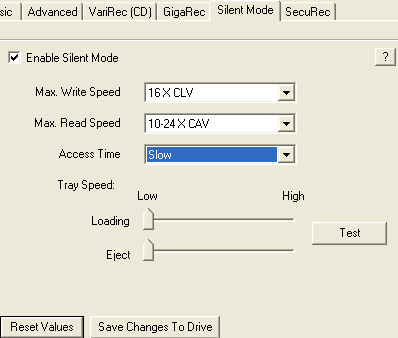
SilentMode is a very good feature, especially for those who seek quiet, noiseless operation from their PC. In short, what SilentMode does is described in the following screenshots:
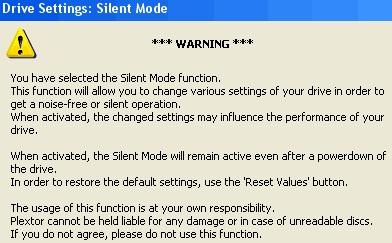
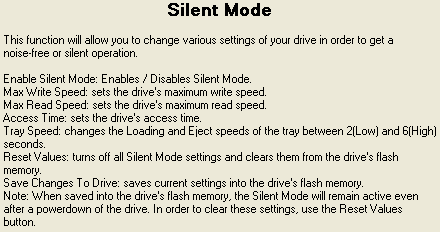
As you have read, the user can set the drive's maximum write/read speed, the access times and most important, the tray's loading/eject speed, producing even lower noise!
- SecuRec

This feature allows you to password-protect the contents of your written disc. SecuRec can be accessed under the "Drive Settings->SecuRec". There, you can enter the password you would like to use on your disc. In order to read the contents of a SecuRec protected disc, the SecuRec function needs to be activated with the corresponding password for the disc.

As we can see, the Label of the disc changed to "SecuRec_Disc).

In order to read the contents of a SecuRec protected disc, the SecuRec function needs to be activated with the corresponding password for the disc. The SecuRec function will automatically be de-activated once you have powered down, rebooted the system/drive or closed PlexTools. The password will also be removed once the SecuRec function has been manually de-activated.


Review Pages

1. Introduction
2. Data CD/DVD Reading Tests
3. CD Error Correction Tests
4. DVD Error Correction Tests
5. Protected Disc Tests
6. DAE Tests
7. CD Recording Tests
8. CD Writing Quality - Jitter Tests
9. CD Writing Quality - C1/C2 Error Measurements
10. Kprobe PI/PO Quality Tests for DVD+R/RW
11. DVD Recording Tests
12. VariREC Tests for CD Format
13. Kprobe PI/PO Quality Tests for DVD-R/RW
14. VariREC Tests for DVD Format
15. GigaRec Tests - Page 1
16. GigaRec Tests - Page 2
17. Q-Check Tests
18. PleXTools vs. SA300 - Page 1
19. PleXTools vs. SA300 - Page 2
20. PleXTools vs. SA300 - Page 3
21. SilentMode / SecuRec
22. BookType Setting Tests
23. Conclusion


Pages

  • « first
  • ‹ previous
  • …
  • 15
  • 16
  • 17
  • 18
  • 19
  • 20
  • 21
  • 22
  • 23
  • next ›
  • last »

Tags:
Previous Post
Kiss DP-1000 DVD player
Next Post
Asus A8V motherboard preview

Related Posts

Latest Reviews

Fanxiang MP83 M.2 NVMe SSD Enclosure
Enterprise & IT

Fanxiang MP83 M.2 NVMe SSD Enclosure

Ugreen CM642 USB4.0 Enclosure
PC components

Ugreen CM642 USB4.0 Enclosure

be quiet! Dark Power 14 IO
PC components

be quiet! Dark Power 14 IO

SanDisk High Endurance 512GB microSDXC
Cameras

SanDisk High Endurance 512GB microSDXC

Samsung PRO Ultimate 512GB microSDXC
Cameras

Samsung PRO Ultimate 512GB microSDXC

Popular News

MSI’s Latest AMD X870E MAX & EVO Series Motherboards

MSI’s Latest AMD X870E MAX & EVO Series Motherboards

COLORFUL Launches iGame B850M ULTRA Series Micro-ATX Motherboards

COLORFUL Launches iGame B850M ULTRA Series Micro-ATX Motherboards

COLORFUL Presents Limited Edition Chitu MAG-60 Magnetic Keyboard Inspired by the Year of the Horse

COLORFUL Presents Limited Edition Chitu MAG-60 Magnetic Keyboard Inspired by the Year of the Horse

COLORFUL Presents iGame Z890 ULTRA-S W and iGame Z890M ULTRA Z Motherboards

COLORFUL Presents iGame Z890 ULTRA-S W and iGame Z890M ULTRA Z Motherboards

COLORFUL Launches iGame B850I MINI OC V14 Motherboard

COLORFUL Launches iGame B850I MINI OC V14 Motherboard

COLORFUL Expands B850 Motherboard Lineup with New CVN, Battle-Ax, and MEOW Models

COLORFUL Expands B850 Motherboard Lineup with New CVN, Battle-Ax, and MEOW Models

ASRock Adds Support for One Sub-Channel DRAM Module on Intel DDR5 Motherboards

ASRock Adds Support for One Sub-Channel DRAM Module on Intel DDR5 Motherboards

Exceed the Infinite with New ASRock X870E Taichi White Motherboard

Exceed the Infinite with New ASRock X870E Taichi White Motherboard

Main menu

  • Home
  • News
  • Reviews
  • Essays
  • About
    • Submit News

    • Contact Us
    • Privacy

    • Promotion
    • Advertise

    • RSS Feed
  • About
  • Privacy
  • Contact Us
  • Promotional Opportunities @ CdrInfo.com
  • Advertise on out site
  • Submit your News to our site
  • RSS Feed
