Breaking News

CORSAIR Launches ThermalProtect PCIe 5.1 600W 12V-2x6 Cable to Help Protect GPUs from Overheating Logitech announces G512 X Gaming Keyboard ASUS Announces TUF Gaming Platinum Power Supply Series TerraMaster announces D1 SSD Rugged Enclosure COLORFUL Introduces New BATTLE-AX B860M and B760M Motherboards with Wi-Fi 7 and Next-Gen CPU Support

logo

  • Share Us
    • Facebook
    • Twitter
  • Home
  • Home
  • News
  • Reviews
  • Essays
  • Forum
  • Legacy
  • About
    • Submit News

    • Contact Us
    • Privacy

    • Promotion
    • Advertise

    • RSS Feed
    • Site Map

Search form

Primera Composer - Signature III

Feb 18,2002 0

8. Movements of the Robotic Arm


Review Pages

1. Big toys for big boys ;-)
2. Installation
3. Installation (2)
4. Printing Software
5. Printing Performance
6. Composer CD Duplicator
7. Composer CDR Software
8. Movements of the Robotic Arm
9. Tests of the Composer/Signature III
10. Conclusion


Primera Composer/Signature III System - Page 8

Movements of the Robotic Arm

As you have figured out by now the Composer's main weapon is the robotic arm, which moves in various ways and picks-up the empty/burned/printed CDs. Let's see how the robotic arm's movements work. Below is a diagram which shows what is the logic behind the movements of the robotic arm:
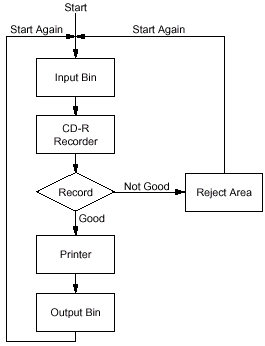
Yes I know that you probably have understood the above diagram but let's also see how the system works with many pictures ;)

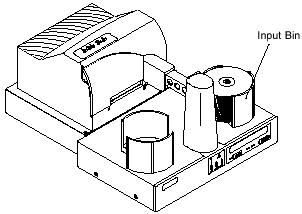
1st Phase: Pickup the CD from the "Input Bin":

In this phase the robotic arm moves above the "Input Bin", lowers down and grabs an empty CD.
>>

2nd Phase: Move above the empty CD tray and place the CD:

In this phase the robotic arm moves to the right above the opened CD tray. It stops, lowers down and finally places the CD in the empty tray. The CD tray closes and the burning starts. If in the same time you are printing a CD then the robotic arm moves back to the center in order to pickup the printed CD and move it in the "Output Bin":

The Robotic Arm moves above the empty CD tray >> >> The Robotic Arm lowers and drops the CD

3rd Phase: Pickup the burned CD and move it in the CD Printer/Output Bin/Reject area:

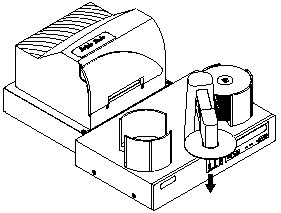
After the CD burning procedure the CD tray opens, the robotic arm lowers down, pickups the CD and moves it either to the center (CD printer) or directly in the "Output BIN" or in the reject area (if the CD is bad).
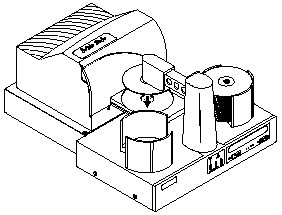
The Robotic arm moves the CD in the CD printer>> The CD is moved in the CD Printer

The burned CD is faulty so the robotic arm moves the CD in the reject area>>The CD is bad and rejected

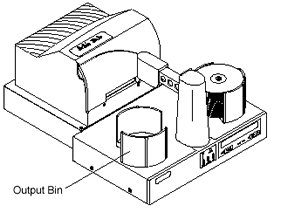
>>The burned/printed CD is good and moved in the Output BIN


Review Pages

1. Big toys for big boys ;-)
2. Installation
3. Installation (2)
4. Printing Software
5. Printing Performance
6. Composer CD Duplicator
7. Composer CDR Software
8. Movements of the Robotic Arm
9. Tests of the Composer/Signature III
10. Conclusion


Pages

  • « first
  • ‹ previous
  • …
  • 2
  • 3
  • 4
  • 5
  • 6
  • 7
  • 8
  • 9
  • 10
  • next ›
  • last »

Tags:
Previous Post
Sanyo CRD-BP1500P CD-RW
Next Post
Iomega Predator USB CD-RW

Related Posts

Latest Reviews

Why Low-Latency Infrastructure Matters More Than Raw Specs
Enterprise & IT

Why Low-Latency Infrastructure Matters More Than Raw Specs

In the Age of AI Phishing, the Best User Experience Might Be the One That Feels Safest
Enterprise & IT

In the Age of AI Phishing, the Best User Experience Might Be the One That Feels Safest

SoundPeats C30
Consumer Electronics

SoundPeats C30

Why Streaming Live Casino Games Demands Smarter Tech
Enterprise & IT

Why Streaming Live Casino Games Demands Smarter Tech

Kioxia Exceria Plus G3 512GB microSD
Cameras

Kioxia Exceria Plus G3 512GB microSD

Popular News

TEAMGROUP Launches EXPERT P34F Find My External SSD

TEAMGROUP Launches EXPERT P34F Find My External SSD

Samsung announces Galaxy Tab S11 and Galaxy S25 FE series

Samsung announces Galaxy Tab S11 and Galaxy S25 FE series

Viltrox Showcases Upcoming Lens Lineup and New TTL Flash at IBC 2025

Viltrox Showcases Upcoming Lens Lineup and New TTL Flash at IBC 2025

CORSAIR announces Vanguard Pro 96 and Vanguard 96 Gaming Keyboards

CORSAIR announces Vanguard Pro 96 and Vanguard 96 Gaming Keyboards

MSI Launches FORGE GK600 TKL WIRELESS Special Edition Compact Mechanical Keyboard

MSI Launches FORGE GK600 TKL WIRELESS Special Edition Compact Mechanical Keyboard

Panasonic Introduces the First Ultra-Telephoto Zoom Lens in the LUMIX S Series

Panasonic Introduces the First Ultra-Telephoto Zoom Lens in the LUMIX S Series

MSI Launches DATAMAG 40Gbps Magnetic Portable SSD

MSI Launches DATAMAG 40Gbps Magnetic Portable SSD

Viltrox Joins the L-Mount Alliance, Expanding Creative Possibilities

Viltrox Joins the L-Mount Alliance, Expanding Creative Possibilities

Main menu

  • Home
  • News
  • Reviews
  • Essays
  • Forum
  • Legacy
  • About
    • Submit News

    • Contact Us
    • Privacy

    • Promotion
    • Advertise

    • RSS Feed
    • Site Map
  • About
  • Privacy
  • Contact Us
  • Promotional Opportunities @ CdrInfo.com
  • Advertise on out site
  • Submit your News to our site
  • RSS Feed