
Primera SignaturePro CD Printer
5. Printing Performance
Review Pages
2. Installation - Page 1
3. Installation - Page 2
4. Printing Software
5. Printing Performance
6. Conclusion
Primera Signature Pro CD-R Printer - Page 5
Printing Performance
 We
checked the printing quality of PrimerPro in the various printing resolutions
offered. We were also interested in the printing time needed for each resolution
selected. The printable media used were Taiyo Yuden white top CD-R printable
media, especially for Primera's Signature Pro. The settings we used for all
the CDs we printed are shown below:
We
checked the printing quality of PrimerPro in the various printing resolutions
offered. We were also interested in the printing time needed for each resolution
selected. The printable media used were Taiyo Yuden white top CD-R printable
media, especially for Primera's Signature Pro. The settings we used for all
the CDs we printed are shown below:
Orientation: Portrait
Tray Selection: CD Tray
Paper size: CD
Resolution: Fast /Normal /Best 600 dpi, Presentation 1200dpi, Super Photo 2400
dpi
Ink Cartridge: Color
Color matching: PrimaColor
Image Controls: Default settings
Dither Mode: Optimized for Photos
Ink saturation: 50%
Black text with black cartridge only: Yes
Rotate 180 degrees: No
Manual load: No
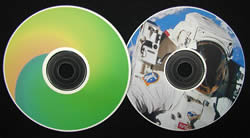
The results were not far from what we expected. The overall print quality varies according to the resolution selected. The best label was printed when the Super Photo 2400 dpi resolution was selected. The result looks very good and this must be the option if you need a photo alike print. The second best label performance was the 1200 dpi print. Printing with the Best 600 dpi selection also gave a good result as the colors were alive almost as when we printed in 2400 dpi. The difference here was that we could track some print lines as it was expected due to respectively poor resolution. The Normal and Fast 600dpi results had a lower but sufficient quality and the printing speeds were very high. Lastly, the Fast 600 dpi option should be mainly used for text labels. In the following chart there are the printing times in seconds for the different test speeds.
|
Resolution (d.p.i)
|
Time (seconds)
|
|
2400
|
167
|
|
1200
|
109
|
|
600 Best
|
93
|
|
600 Normal
|
66
|
|
600 Fast
|
19
|
The printing quality is strongly related to the kind of the media we used. The results were different when we printed on CDs with different top surface from Vivastar AG. The printed label seemed more faded and the colors were not very clear. Notice that Taiyo Yuden CDs have a White Top surface and Vivastar AG have a kind of silver color top.
In the chart below there is showed the time that SEIKO Precision CD Printer 4000 needs for printing the same label at the printing resolutions supported. Of course, a straight comparison between these two inkjet printers should affect both the printing speeds among with the quality of the provided result. Also those printers do not support the me printing resolutions and printing settings. However, we take a general idea:
|
Resolution (d.p.i)
|
Time (seconds)
|
|
1440
|
311
|
|
720
|
204
|
For the above prints in the SEIKO Precision CD Printer 4000 we chose the Custom Mode option, and the support of sRGB coloring. Comparing the above two charts we could say that PrimerPro is faster than SEIKO CD 4000, in all the related printing resolutions. On the other hand, CD labels made by SEIKO were slightly more “alive” and seemed to be closer to the prototype image.
Review Pages
2. Installation - Page 1
3. Installation - Page 2
4. Printing Software
5. Printing Performance
6. Conclusion





