
Breaking News

Xiaomi and Leica Camera AG Present the Xiaomi 17 Series Sandisk and SK hynix Begin Global Standardization of Next-Generation Memory Solution, High Bandwidth Flash (HBF) Samsung Brings Satellite Communication Support to Galaxy Smartphones Across the Globe vivo Announces MWC 2026 Attendance and sets to Showcase New Flagship X300 Ultra Razer Elevates Everyday Carry with the Laptop Sleeve 16” with Wireless Charging

logo

  • Share Us
    • Facebook
    • Twitter
  • Home
  • Home
  • News
  • Reviews
  • Essays
  • Forum
  • Legacy
  • About
    • Submit News

    • Contact Us
    • Privacy

    • Promotion
    • Advertise

    • RSS Feed
    • Site Map

Search form

RikoMagic V5 Android Media Player review

Jan 13,2018 0

3. User interface


Review Pages

1. Meet the Rikomagic V5 media player
2. Closer look, firmware update
3. User interface
4. KODI
5. Audio and video playback tests
6. Summary


Once the device is pluggged into your TV and boot up, you'll see a possibly already familiar Rikomagic GUI, which is generally easy to use and understand.
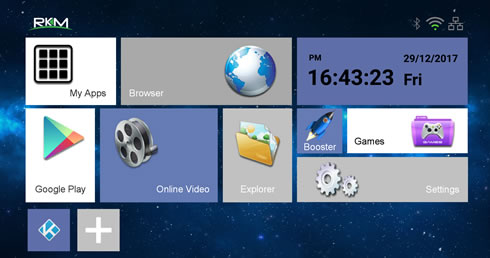
The player comes with many apps pre-installed. Pressing the "+ "icon will allow you to add shortcuts from installed apps.

The built-in File Manager looks handy and and supports network SMB folders:
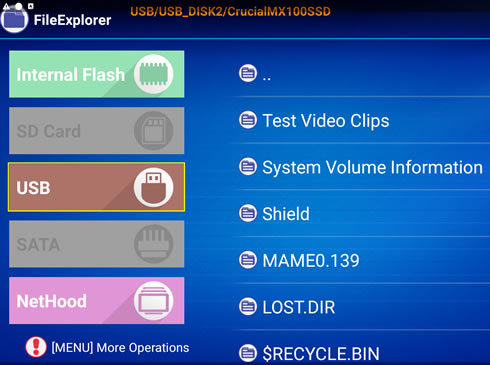
The player is running on the Android 5.1.1 OS:

The "Settings" section includes options for almost everything:
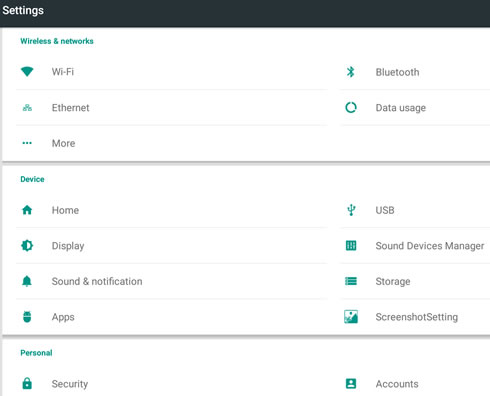
Under "Diplay" section you can set the resolution of the video output. The device supports up to 4K @ 60Hz (our A/V receiver outputs only 30p, so the highest option is not displayed)

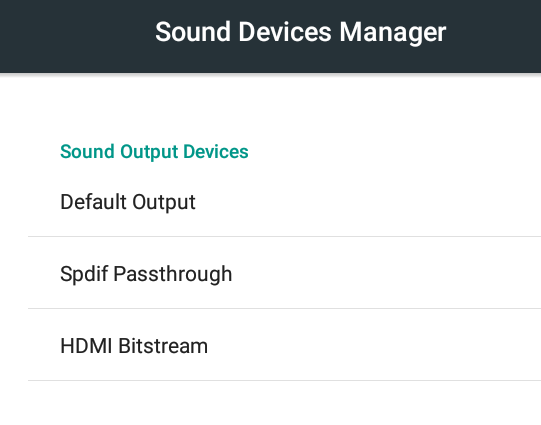
Under "Sound Devices Manager" section you can select the PCM downsample or HDMI bitstream options, in case you want to leave the sound sound decoding job to your A/V system:
Both 2.4G and 5G Wi-Fi networks are supported:

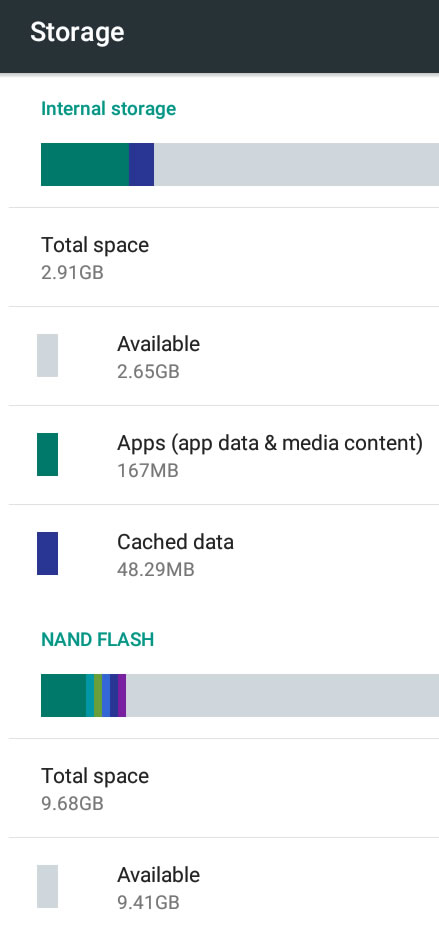
Following the instalation, you will be left with 9.81GB of free space to get any new apps installed:
 

Review Pages

1. Meet the Rikomagic V5 media player
2. Closer look, firmware update
3. User interface
4. KODI
5. Audio and video playback tests
6. Summary


Pages

  • « first
  • ‹ previous
  • 1
  • 2
  • 3
  • 4
  • 5
  • 6
  • next ›
  • last »

rikomagic

Tags: rikomagic
Previous Post
Crucial MX500 500GB SSD review
Next Post
Crucial BX300 480GB SSD review

Related Posts

  • RikoMagic MK22 Android Media Player review

Latest Reviews

Kioxia Exceria Plus G3 512GB microSD
Cameras

Kioxia Exceria Plus G3 512GB microSD

SoundPeats Cove Pro
Consumer Electronics

SoundPeats Cove Pro

Asustor AS5404T 4-Bay NAS System
Enterprise & IT

Asustor AS5404T 4-Bay NAS System

be quiet! Pure Power 13M 1200W
PC components

be quiet! Pure Power 13M 1200W

Server-Side Gaming Why Canadian Online Casinos Are Abandoning Local Clients for HTML5 Clouds
Enterprise & IT

Server-Side Gaming Why Canadian Online Casinos Are Abandoning Local Clients for HTML5 Clouds

Popular News

COLORFUL Introduces CVN B850I GAMING FROZEN Motherboard

COLORFUL Introduces CVN B850I GAMING FROZEN Motherboard

COLORFUL Presents CVN X870 ARK FROZEN Motherboard for AMD Ryzen 9000 CPUs

COLORFUL Presents CVN X870 ARK FROZEN Motherboard for AMD Ryzen 9000 CPUs

TEAMGROUP Launches EXPERT P34F Find My External SSD

TEAMGROUP Launches EXPERT P34F Find My External SSD

Samsung announces Galaxy Tab S11 and Galaxy S25 FE series

Samsung announces Galaxy Tab S11 and Galaxy S25 FE series

Viltrox Showcases Upcoming Lens Lineup and New TTL Flash at IBC 2025

Viltrox Showcases Upcoming Lens Lineup and New TTL Flash at IBC 2025

CORSAIR announces Vanguard Pro 96 and Vanguard 96 Gaming Keyboards

CORSAIR announces Vanguard Pro 96 and Vanguard 96 Gaming Keyboards

Panasonic Introduces the First Ultra-Telephoto Zoom Lens in the LUMIX S Series

Panasonic Introduces the First Ultra-Telephoto Zoom Lens in the LUMIX S Series

MSI Launches DATAMAG 40Gbps Magnetic Portable SSD

MSI Launches DATAMAG 40Gbps Magnetic Portable SSD

Main menu

  • Home
  • News
  • Reviews
  • Essays
  • Forum
  • Legacy
  • About
    • Submit News

    • Contact Us
    • Privacy

    • Promotion
    • Advertise

    • RSS Feed
    • Site Map
  • About
  • Privacy
  • Contact Us
  • Promotional Opportunities @ CdrInfo.com
  • Advertise on out site
  • Submit your News to our site
  • RSS Feed




