Breaking News

TerraMaster Prime Day 2026 Sale Offers Up to 25% Off XPG Launches INFINITY Fans and MAESTRO Air Coolers Noctua introduces NL-LC1 all-in-one liquid coolers SAMA S50 Rethinks Compact ATX Cases Viltrox Launches AF 28mm F4.5 Chip L-mount Lens

logo

  • Share Us
    • Facebook
    • Twitter
  • Home
  • Home
  • News
  • Reviews
  • Essays
  • Forum
  • Legacy
  • About
    • Submit News

    • Contact Us
    • Privacy

    • Promotion
    • Advertise

    • RSS Feed
    • Site Map

Search form

Super DVD Creator

Apr 26,2006 0

5. Disc Burner


Review Pages

1. Introduction
2. Video Disc Builder
3. Convert video to Vob
4. DVD Menu Creator
5. Disc Burner
6. Super DVD Creator Quality Test
7. Conclusion


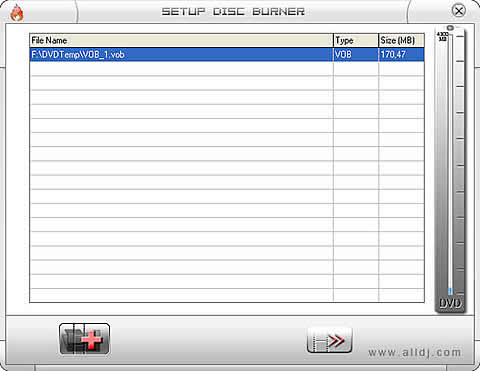
Disc burner is, as you would except after reading through the previous pages, also very simple. Just select your vob files while the progress bar on the right indicates the free space available on the disc.


While selecting the vob files to Burn them

Press the ">>" button to burn your disc.


Review Pages

1. Introduction
2. Video Disc Builder
3. Convert video to Vob
4. DVD Menu Creator
5. Disc Burner
6. Super DVD Creator Quality Test
7. Conclusion


Pages

  • « first
  • ‹ previous
  • 1
  • 2
  • 3
  • 4
  • 5
  • 6
  • 7
  • next ›
  • last »

Super

DVD

Creator

Tags: Super DVD Creator
Previous Post
JingTing Force (JTS-0005)
Next Post
Interview With Nero's Marketing Director Mr Patrick Peeters

Related Posts

  • DVDs Still Find an Audience

  • New Data Storage Method Could Boost Capacity Of Optical Storage Media

  • U.K. Physical Media Market To Keep Falling In Q3 2015

  • Optical Disc Sales Down

  • DVD And Blu-ray Discs Remain Popular in Britain

  • DVD Writer and Media Market Keeps Shrinking

  • DVD And Blu-ray Discs Remain Preferred Sources of Video Content

  • DVD FLLC To Run 2013 Market Inspection Tests

Latest Reviews

Swit NP-FZ100 Battery
Cameras

Swit NP-FZ100 Battery

The Technology Stack Behind Modern Digital Gaming Platforms
Consumer Electronics

The Technology Stack Behind Modern Digital Gaming Platforms

be quiet! Dark Rock Pro 6
Cooling Systems

be quiet! Dark Rock Pro 6

How Online Casinos Use Encryption, Verification, and Risk Controls to Build User Trust
Enterprise & IT

How Online Casinos Use Encryption, Verification, and Risk Controls to Build User Trust

Why Low-Latency Infrastructure Matters More Than Raw Specs
Enterprise & IT

Why Low-Latency Infrastructure Matters More Than Raw Specs

Popular News

CORSAIR announces Vanguard Pro 96 and Vanguard 96 Gaming Keyboards

CORSAIR announces Vanguard Pro 96 and Vanguard 96 Gaming Keyboards

TEAMGROUP Launches EXPERT P34F Find My External SSD

TEAMGROUP Launches EXPERT P34F Find My External SSD

MSI Launches FORGE GK600 TKL WIRELESS Special Edition Compact Mechanical Keyboard

MSI Launches FORGE GK600 TKL WIRELESS Special Edition Compact Mechanical Keyboard

Samsung announces Galaxy Tab S11 and Galaxy S25 FE series

Samsung announces Galaxy Tab S11 and Galaxy S25 FE series

Viltrox Showcases Upcoming Lens Lineup and New TTL Flash at IBC 2025

Viltrox Showcases Upcoming Lens Lineup and New TTL Flash at IBC 2025

Panasonic Introduces the First Ultra-Telephoto Zoom Lens in the LUMIX S Series

Panasonic Introduces the First Ultra-Telephoto Zoom Lens in the LUMIX S Series

MSI Launches DATAMAG 40Gbps Magnetic Portable SSD

MSI Launches DATAMAG 40Gbps Magnetic Portable SSD

Viltrox Joins the L-Mount Alliance, Expanding Creative Possibilities

Viltrox Joins the L-Mount Alliance, Expanding Creative Possibilities

Main menu

  • Home
  • News
  • Reviews
  • Essays
  • Forum
  • Legacy
  • About
    • Submit News

    • Contact Us
    • Privacy

    • Promotion
    • Advertise

    • RSS Feed
    • Site Map
  • About
  • Privacy
  • Contact Us
  • Promotional Opportunities @ CdrInfo.com
  • Advertise on out site
  • Submit your News to our site
  • RSS Feed