Breaking News

TerraMaster Launches Storage Upgrade Season with Up to 30% Off During Prime Big Deal Days COLORFUL Launches iGame Guard G114 140W GaN Multi-Port Charger INNO3D TOWER WORKSTATION AWS-511Z-R1 Thermal Grizzly and Noctua introduce WireView Pro II Noctua Edition GPU monitoring device Nikon releases the Z5IIC full-frame mirrorless camera

logo

  • Share Us
    • Facebook
    • Twitter
  • Home
  • Home
  • News
  • Reviews
  • Essays
  • About
    • Submit News

    • Contact Us
    • Privacy

    • Promotion
    • Advertise

    • RSS Feed

Search form

Thermaltake Golden Orb II

Jul 19,2005 0

2. Installation


Review Pages

1. Introduction
2. Installation
3. Performance
4. Conclusion


As mentioned before, the installation of the Golden Orb II is not difficult. Unfortunately however, it's also not a fast, at least not for the AMD processors, since the motherboard has to come out from the case and the Thermaltake back plate needs to be installed from scratch. The default AMD backplate will not do, since the Golden Orb uses special mounting screws.

Lets have a brief look at the CPU and motherboard we used for our tests...

The well known, and quite tested AMD 3500+

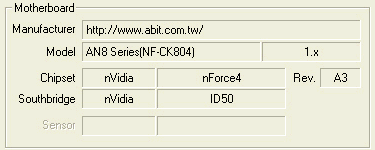
and the Abit Fatality AN8 motherboard

Now lets move to the motherboard and the cooler components from scratch... We took the motherboard out of the PC case in order to remove the default back plate and install Thermaltake's. Note that you need to peel off the protective strip from the adhesive pad on the plate, before installing onto the motherboard.
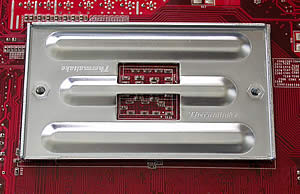
and this is how it should look after mounting the plate..

the back plate carries the manufacturers brand name on it...

We cleaned the CPU of any previous thermal compound that was still on it, making sure we didn't leave any traces whatsoever.
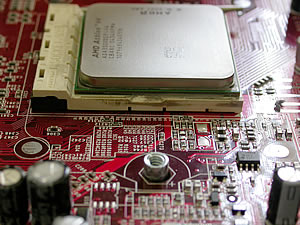
notice the mounting points that protrude from the thermaltake backplate..

Next step is to screw in the two standoffs on which will be mounted the Thermaltake cooler. This is needed for AMD based processors....

the standoffs needed for the AMD processors...

..while with Intel, we use the brackets provided with the cooler.

mounting the cooler on the thermaltake brackets...

For Intel motherboards, no backplate is needed at all...

the screws needed for the AMD processors...

Nearly done. Place the Cooler on the CPU after first having applied the thermal compound provided by Thermaltake which comes in the package. Move the cooler in a circular motion so that the thermal paste spreads evenly and once the cooler is secured in place, no air bubbles will have been trapped in thin layer of paste between the copper base and the CPU. Then screw the cooler to the standoffs as shown in the pictures below indicates..

the first installation could prove a little bit harder, more pressure must be applied...

A closer look at the procedure...

Not much left to do now but plug in the 3 pin power connector to the motherboard and the cooler is all set and ready to work...
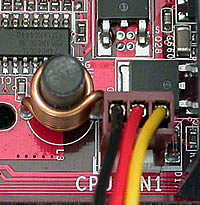
the 3 pin connector...

And the outcome of this installation...

The blue glow of the fan is really impressive..

As one can see from this page, the installation of a Golden Orb II is easy though it may be more time consuming than with other coolers. Whether it's an Intel or AMD CPU, the motherboard needs to be removed in order to install the cooler. This is one of the minuses of the Thermaltake Cooler, but its performance more than makes up for it, as we will see in the following page.


Review Pages

1. Introduction
2. Installation
3. Performance
4. Conclusion


Pages

  • « first
  • ‹ previous
  • 1
  • 2
  • 3
  • 4
  • next ›
  • last »

Thermaltake

Tags: Thermaltake
Previous Post
DVD Burners Roundup
Next Post
AMD Athlon64 4000+

Related Posts

  • Thermaltake Launches AW360/420 AIO Liquid Cooler and WAir CPU Cooler for Workstations

  • Begin the Racing Journey with the Thermaltake GR300 Racing Simulator Cockpit

  • Thermaltake Unveils the Massive EXTREME with Cross-flow Fan

  • Thermaltake Releases the Toughpower TF3 1300W with Support for RTX50 Series GPUs

  • Thermaltake Unveils G6 Direct Drive Racing Wheel Bundle and GM5 3DOF Motion System

  • Thermaltake Launches the TT150 LED Bag in Different Sizes and New Colors

  • Thermaltake New TH V2 Ultra EX ARGB Sync AIO – Snow Edition is Now Available Worldwide

  • Thermaltake Coolers Support New-Gen Intel and AMD CPUs

Latest Reviews

Fanxiang MP83 M.2 NVMe SSD Enclosure
Enterprise & IT

Fanxiang MP83 M.2 NVMe SSD Enclosure

Ugreen CM642 USB4.0 Enclosure
PC components

Ugreen CM642 USB4.0 Enclosure

be quiet! Dark Power 14 IO
PC components

be quiet! Dark Power 14 IO

SanDisk High Endurance 512GB microSDXC
Cameras

SanDisk High Endurance 512GB microSDXC

Samsung PRO Ultimate 512GB microSDXC
Cameras

Samsung PRO Ultimate 512GB microSDXC

Popular News

MSI’s Latest AMD X870E MAX & EVO Series Motherboards

MSI’s Latest AMD X870E MAX & EVO Series Motherboards

COLORFUL Launches iGame B850M ULTRA Series Micro-ATX Motherboards

COLORFUL Launches iGame B850M ULTRA Series Micro-ATX Motherboards

COLORFUL Presents Limited Edition Chitu MAG-60 Magnetic Keyboard Inspired by the Year of the Horse

COLORFUL Presents Limited Edition Chitu MAG-60 Magnetic Keyboard Inspired by the Year of the Horse

COLORFUL Presents iGame Z890 ULTRA-S W and iGame Z890M ULTRA Z Motherboards

COLORFUL Presents iGame Z890 ULTRA-S W and iGame Z890M ULTRA Z Motherboards

COLORFUL Launches iGame B850I MINI OC V14 Motherboard

COLORFUL Launches iGame B850I MINI OC V14 Motherboard

COLORFUL Expands B850 Motherboard Lineup with New CVN, Battle-Ax, and MEOW Models

COLORFUL Expands B850 Motherboard Lineup with New CVN, Battle-Ax, and MEOW Models

ASRock Adds Support for One Sub-Channel DRAM Module on Intel DDR5 Motherboards

ASRock Adds Support for One Sub-Channel DRAM Module on Intel DDR5 Motherboards

Exceed the Infinite with New ASRock X870E Taichi White Motherboard

Exceed the Infinite with New ASRock X870E Taichi White Motherboard

Main menu

  • Home
  • News
  • Reviews
  • Essays
  • About
    • Submit News

    • Contact Us
    • Privacy

    • Promotion
    • Advertise

    • RSS Feed
  • About
  • Privacy
  • Contact Us
  • Promotional Opportunities @ CdrInfo.com
  • Advertise on out site
  • Submit your News to our site
  • RSS Feed