Breaking News

Sony Introduces New Colour to INZONE H9 II Headset and INZONE E9 In-ear Headphones Club 3D announces new products for October 2026 Razer Unveils All-New Wolverine V4 Line ASUS Republic of Gamers Ships ROG Rapture GT-BN98 Router GMK Unveils TriggerKey, a New Mechanical Key System for Greater Precision and Comfort

logo

  • Share Us
    • Facebook
    • Twitter
  • Home
  • Home
  • News
  • Reviews
  • Essays
  • About
    • Submit News

    • Contact Us
    • Privacy

    • Promotion
    • Advertise

    • RSS Feed

Search form

Thermaltake PurePower PST520W

Oct 4,2005 0

2. A Closer Look


Review Pages

1. Introduction
2. A Closer Look
3. Installation
4. Performance
5. Conclusion


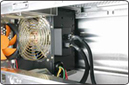
Thermaltake are in the habit of using 12cm fans for their power units, since they produce less noise and have similar air flow like the noisy 80cm ones. In this P.S.U., you can see a 12cm fan that lights up blue when the P.S.U. is powered.


There is no extra fan in the back, since there is no need for one. The “Honeycomb” air ventilation will do the job the way it did with the PurePower 500W unit. However, there is no way to control the speed of this fan manually, as it is automatically done by a small temperature sensor that lies in the center of the fan.

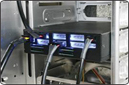
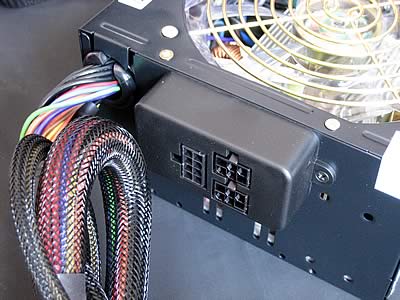
This is the famous P.S.T. that Thermaltake is so proud of. All peripherals, except the VGA cards, are powered by this unit. You can see small leds on the front panel of the P.S.T., indicating the safe operation of different voltage rails.

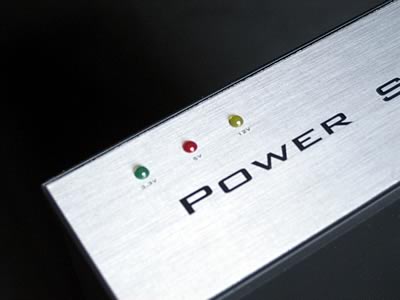
The small P.S.T. unit can be used to power up only low power consumption units; at least that’s what Thermatake suggests. However, we tried to power up two hard disks and a DVD burner, and we had no problem with doing so. But, in any case, if you want a 100% stable system, it would be wiser if you did not undertake such a task with your home PC.
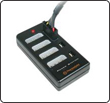
At the back of the P.S.U. you will only find the PCI-Express slots, the 24/20-pin connector, the 4-pin +12V connector and the P.S.T. connector. Power is transferred from the main P.S.U. to the P.S.T., and then all the other peripherals are powered by the 5 .25” P.S.T. This is a very clever way to get all these cables out of the way, leaving more space for the VGA cards and the CPU. Of course, you can use only the cables that you need, depending on the peripherals you have installed, and keep the other cables in a safe place out of the box, just in case you need them in the future.
 

Review Pages

1. Introduction
2. A Closer Look
3. Installation
4. Performance
5. Conclusion


Pages

  • « first
  • ‹ previous
  • 1
  • 2
  • 3
  • 4
  • 5
  • next ›
  • last »

Thermaltake

Tags: Thermaltake
Previous Post
AOpen Aeolus 7800GTX SLI
Next Post
Plextor PX-716SA

Related Posts

  • Thermaltake Launches AW360/420 AIO Liquid Cooler and WAir CPU Cooler for Workstations

  • Begin the Racing Journey with the Thermaltake GR300 Racing Simulator Cockpit

  • Thermaltake Unveils the Massive EXTREME with Cross-flow Fan

  • Thermaltake Releases the Toughpower TF3 1300W with Support for RTX50 Series GPUs

  • Thermaltake Unveils G6 Direct Drive Racing Wheel Bundle and GM5 3DOF Motion System

  • Thermaltake Launches the TT150 LED Bag in Different Sizes and New Colors

  • Thermaltake New TH V2 Ultra EX ARGB Sync AIO – Snow Edition is Now Available Worldwide

  • Thermaltake Coolers Support New-Gen Intel and AMD CPUs

Latest Reviews

Fanxiang MP83 M.2 NVMe SSD Enclosure
Enterprise & IT

Fanxiang MP83 M.2 NVMe SSD Enclosure

Ugreen CM642 USB4.0 Enclosure
PC components

Ugreen CM642 USB4.0 Enclosure

be quiet! Dark Power 14 IO
PC components

be quiet! Dark Power 14 IO

SanDisk High Endurance 512GB microSDXC
Cameras

SanDisk High Endurance 512GB microSDXC

Samsung PRO Ultimate 512GB microSDXC
Cameras

Samsung PRO Ultimate 512GB microSDXC

Popular News

MSI’s Latest AMD X870E MAX & EVO Series Motherboards

MSI’s Latest AMD X870E MAX & EVO Series Motherboards

COLORFUL Launches iGame B850M ULTRA Series Micro-ATX Motherboards

COLORFUL Launches iGame B850M ULTRA Series Micro-ATX Motherboards

COLORFUL Presents Limited Edition Chitu MAG-60 Magnetic Keyboard Inspired by the Year of the Horse

COLORFUL Presents Limited Edition Chitu MAG-60 Magnetic Keyboard Inspired by the Year of the Horse

COLORFUL Launches iGame B850I MINI OC V14 Motherboard

COLORFUL Launches iGame B850I MINI OC V14 Motherboard

COLORFUL Presents iGame Z890 ULTRA-S W and iGame Z890M ULTRA Z Motherboards

COLORFUL Presents iGame Z890 ULTRA-S W and iGame Z890M ULTRA Z Motherboards

COLORFUL Launches the iGame X870E VULCAN W OC Motherboard

COLORFUL Launches the iGame X870E VULCAN W OC Motherboard

COLORFUL Expands B850 Motherboard Lineup with New CVN, Battle-Ax, and MEOW Models

COLORFUL Expands B850 Motherboard Lineup with New CVN, Battle-Ax, and MEOW Models

ASRock Adds Support for One Sub-Channel DRAM Module on Intel DDR5 Motherboards

ASRock Adds Support for One Sub-Channel DRAM Module on Intel DDR5 Motherboards

Main menu

  • Home
  • News
  • Reviews
  • Essays
  • About
    • Submit News

    • Contact Us
    • Privacy

    • Promotion
    • Advertise

    • RSS Feed
  • About
  • Privacy
  • Contact Us
  • Promotional Opportunities @ CdrInfo.com
  • Advertise on out site
  • Submit your News to our site
  • RSS Feed