Breaking News

Samsung Introduces Galaxy Tab S12 Series PlayStation Plus Monthly Games for October 2026 Logitech announces Zone Vibe Pro Headset Razer Expands Sanrio Collection With Pompompurin Eared Headset And Kuromi Earbuds TerraMaster Launches Storage Upgrade Season with Up to 30% Off During Prime Big Deal Days

logo

  • Share Us
    • Facebook
    • Twitter
  • Home
  • Home
  • News
  • Reviews
  • Essays
  • About
    • Submit News

    • Contact Us
    • Privacy

    • Promotion
    • Advertise

    • RSS Feed

Search form

Vantec iCEBERQ6

Apr 19,2007 0

3. Installation - 1


Review Pages

1. Introduction
2. Retail package
3. Installation - 1
4. Installation - 2
5. Tests
6. Conclusion


Before installing Vantec's iCEBERQ6, you have to remove the existing cooling system. It shouldn't be too hard...

Our card is now totally "naked". You can see the 4 memory chips and the big GPU core.

The first step is to install the memory heatsinks. Peel off a piece of thermal patch and apply it to one of the provided heatsinks.

Remove the protective tape from thermal patch and affix the heatsink to one of the memory chips on the VGA card.

Do the same for the remaining memory chips. All four memory chips are now covered with the memory heatsinks.
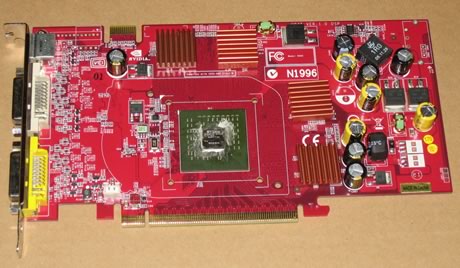
Next step is to install the iCEBERQ6 cooler. First you have to remove the protective film from the copper base. As you can see, there are several holes located around the main GPU cooler. They are numbered (1,2,3,4) indicating the positions where you should install the mounting screws. Vantec has an application chart included in the retail package, indicating the best positions for each VGA card. While the chart indicated we should use holes numbered with 3, this didn't line up with our VGA card so we had to find for ourselves the correct holes to use.

Next step, after correctly installed the mounting screws, is to place the cushion spacer:


Review Pages
1. Introduction
2. Retail package
3. Installation - 1
4. Installation - 2
5. Tests
6. Conclusion


Pages

  • « first
  • ‹ previous
  • 1
  • 2
  • 3
  • 4
  • 5
  • 6
  • next ›
  • last »

coolers

Vantec

Tags: coolers Vantec
Previous Post
Linux Hardware Monitoring
Next Post
Foxconn P9657AB

Related Posts

  • Akasa presents Maxwell Pro, the most powerful case for cooling Mini-ITX motherboards

  • Thermaltake at CES 2020

  • CORSAIR Offers Components for 3rd Gen AMD Ryzen Threadripper Builds

  • Noctua Showcased Many New Prototypes at Computex 2019

  • Corsair Introduces Hydro X Series

  • Noctua NF-P12

  • Swiftech Apex Ultra H20-220

  • Thermaltake T2000 Notebook Cooler

Latest Reviews

Fanxiang MP83 M.2 NVMe SSD Enclosure
Enterprise & IT

Fanxiang MP83 M.2 NVMe SSD Enclosure

Ugreen CM642 USB4.0 Enclosure
PC components

Ugreen CM642 USB4.0 Enclosure

be quiet! Dark Power 14 IO
PC components

be quiet! Dark Power 14 IO

SanDisk High Endurance 512GB microSDXC
Cameras

SanDisk High Endurance 512GB microSDXC

Samsung PRO Ultimate 512GB microSDXC
Cameras

Samsung PRO Ultimate 512GB microSDXC

Popular News

MSI’s Latest AMD X870E MAX & EVO Series Motherboards

MSI’s Latest AMD X870E MAX & EVO Series Motherboards

COLORFUL Launches iGame B850M ULTRA Series Micro-ATX Motherboards

COLORFUL Launches iGame B850M ULTRA Series Micro-ATX Motherboards

COLORFUL Presents Limited Edition Chitu MAG-60 Magnetic Keyboard Inspired by the Year of the Horse

COLORFUL Presents Limited Edition Chitu MAG-60 Magnetic Keyboard Inspired by the Year of the Horse

COLORFUL Launches iGame B850I MINI OC V14 Motherboard

COLORFUL Launches iGame B850I MINI OC V14 Motherboard

COLORFUL Presents iGame Z890 ULTRA-S W and iGame Z890M ULTRA Z Motherboards

COLORFUL Presents iGame Z890 ULTRA-S W and iGame Z890M ULTRA Z Motherboards

COLORFUL Expands B850 Motherboard Lineup with New CVN, Battle-Ax, and MEOW Models

COLORFUL Expands B850 Motherboard Lineup with New CVN, Battle-Ax, and MEOW Models

ASRock Adds Support for One Sub-Channel DRAM Module on Intel DDR5 Motherboards

ASRock Adds Support for One Sub-Channel DRAM Module on Intel DDR5 Motherboards

Exceed the Infinite with New ASRock X870E Taichi White Motherboard

Exceed the Infinite with New ASRock X870E Taichi White Motherboard

Main menu

  • Home
  • News
  • Reviews
  • Essays
  • About
    • Submit News

    • Contact Us
    • Privacy

    • Promotion
    • Advertise

    • RSS Feed
  • About
  • Privacy
  • Contact Us
  • Promotional Opportunities @ CdrInfo.com
  • Advertise on out site
  • Submit your News to our site
  • RSS Feed