Breaking News

ASUS Announces ProArt Router PRT-BE5000 and ProArt Switch PQG-U1080 CORSAIR Expands the Popular FRAME Series Case Lineup DeepCool Launches the LT360 VISION ARGB Noctua and Asetek Announce Flagship AIO Liquid Coolers Toshiba Begins Sampling of 30-34 TB SMR Nearline Hard Disk Drives

logo

  • Share Us
    • Facebook
    • Twitter
  • Home
  • Home
  • News
  • Reviews
  • Essays
  • Forum
  • Legacy
  • About
    • Submit News

    • Contact Us
    • Privacy

    • Promotion
    • Advertise

    • RSS Feed
    • Site Map

Search form

Vantec PSU

Jul 18,2006 0

3. Installation


Review Pages

1. Introduction
2. Connectors
3. Installation
4. Benchmarks
5. Conclusion


The installation of the ION 2 Power supply unit was easy and the time needed from putting in the first screw to pressing the power button was only a few minutes.

First of all, we removed the old PSU from our test PC and put the ION 2 in its place...
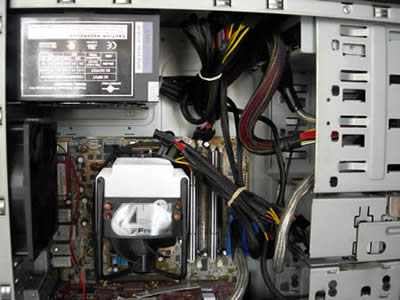
No difficulties until now, as only some screwing and unscrewing was needed. Ensure that the PSU seated correctly and installed firmly in the case (this may vary depending on the case).
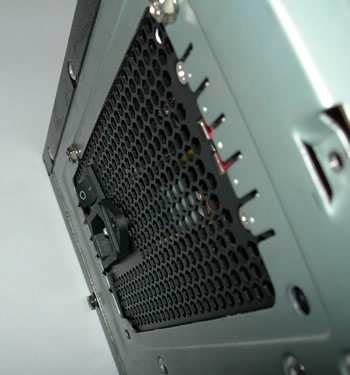
When installed in our PC case, the PSU fan is located on the bottom of the PSU, facing the motherboard. The fan draws air from the case, blows it across the PSU components and out the perforations at the rear.
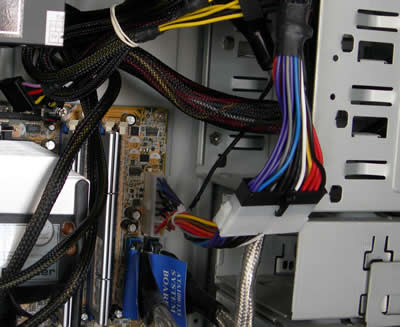
We then installed the Universal adaptor, in order for the 24 pin cable to plug into our motherboard which has a 20-pin connector. This adds a few cm of extra cable inside the case though.
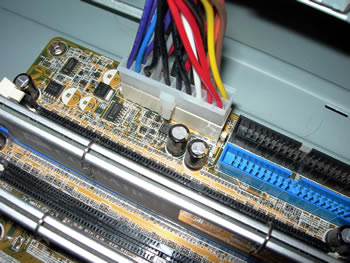
The connector firmly placed on the motherboard...
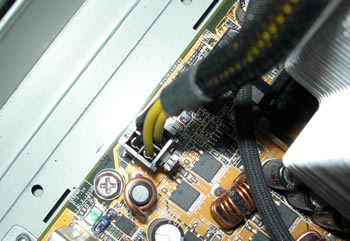
Next step was to plug the 4-pin power cable onto the motherboard.
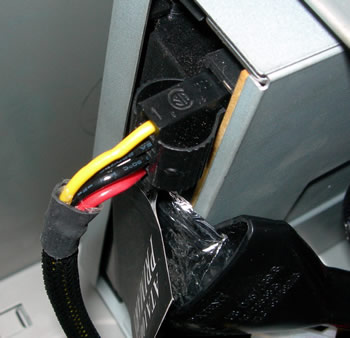
And finally, we plug in the molex cables to each device. We installed the cables from top to bottom, starting with the DVD drive...
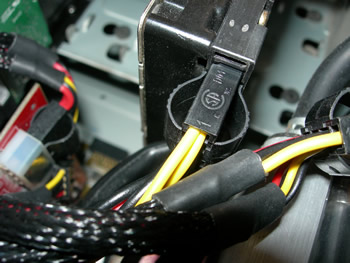
..moving on to the HDD drives, and finally the GPU card.
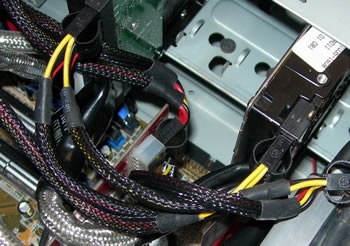
As one may notice here, the cables cause a bit of a clutter, due to the nature of the the layout of components in the case. The test machine was an AMD 3500+ CPU with an ASUS A8N deluxe (AGP 8x) motherboard, an ATI X800 graphics card, two hard drives and an optical drive.
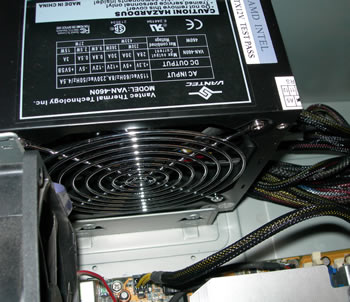
The case used was a HEROICHI MIDI TOWER PRO. The pre-sleeved cables do make a difference though, and airflow is not restricted as much as it would be with standard cabling (no sleeves).


Review Pages

1. Introduction
2. Connectors
3. Installation
4. Benchmarks
5. Conclusion


Pages

  • « first
  • ‹ previous
  • 1
  • 2
  • 3
  • 4
  • 5
  • next ›
  • last »

Vantec

Tags: Vantec
Previous Post
Seagate ST380811AS
Next Post
Logitech G5

Related Posts

  • Vantec iCEBERQ6

  • Vantec NST-530U2 External Enclosure

  • New NexStar DX for DVD Burners

  • Vantec NexStar 3 eSATA

  • Vantec AVOX Jukebox Review

  • Vantec AVOX Jukebox

  • Vantec NexStar 3

  • Vantec ICEBERQ 5

Latest Reviews

In the Age of AI Phishing, the Best User Experience Might Be the One That Feels Safest
Enterprise & IT

In the Age of AI Phishing, the Best User Experience Might Be the One That Feels Safest

SoundPeats C30
Consumer Electronics

SoundPeats C30

Why Streaming Live Casino Games Demands Smarter Tech
Enterprise & IT

Why Streaming Live Casino Games Demands Smarter Tech

Kioxia Exceria Plus G3 512GB microSD
Cameras

Kioxia Exceria Plus G3 512GB microSD

SoundPeats Cove Pro
Consumer Electronics

SoundPeats Cove Pro

Popular News

TEAMGROUP Launches EXPERT P34F Find My External SSD

TEAMGROUP Launches EXPERT P34F Find My External SSD

Samsung announces Galaxy Tab S11 and Galaxy S25 FE series

Samsung announces Galaxy Tab S11 and Galaxy S25 FE series

Viltrox Showcases Upcoming Lens Lineup and New TTL Flash at IBC 2025

Viltrox Showcases Upcoming Lens Lineup and New TTL Flash at IBC 2025

CORSAIR announces Vanguard Pro 96 and Vanguard 96 Gaming Keyboards

CORSAIR announces Vanguard Pro 96 and Vanguard 96 Gaming Keyboards

Panasonic Introduces the First Ultra-Telephoto Zoom Lens in the LUMIX S Series

Panasonic Introduces the First Ultra-Telephoto Zoom Lens in the LUMIX S Series

MSI Launches DATAMAG 40Gbps Magnetic Portable SSD

MSI Launches DATAMAG 40Gbps Magnetic Portable SSD

MSI Launches FORGE GK600 TKL WIRELESS Special Edition Compact Mechanical Keyboard

MSI Launches FORGE GK600 TKL WIRELESS Special Edition Compact Mechanical Keyboard

Viltrox Joins the L-Mount Alliance, Expanding Creative Possibilities

Viltrox Joins the L-Mount Alliance, Expanding Creative Possibilities

Main menu

  • Home
  • News
  • Reviews
  • Essays
  • Forum
  • Legacy
  • About
    • Submit News

    • Contact Us
    • Privacy

    • Promotion
    • Advertise

    • RSS Feed
    • Site Map
  • About
  • Privacy
  • Contact Us
  • Promotional Opportunities @ CdrInfo.com
  • Advertise on out site
  • Submit your News to our site
  • RSS Feed