Breaking News

Akasa introduces Euler CMX Compact Fanless Mini‑ITX Case WD Unifies its Professional Content Creator Storage Portfolio Under the G-DRIVE Brand Samsung Introduces the New Bixby in One UI 8.5 Razer Unveils the Huntsman Signature Edition CORSAIR Introduces Limited-Edition FRAME 4000D Nova and Galaxy cases with Color-Shift Finishes

logo

  • Share Us
    • Facebook
    • Twitter
  • Home
  • Home
  • News
  • Reviews
  • Essays
  • Forum
  • Legacy
  • About
    • Submit News

    • Contact Us
    • Privacy

    • Promotion
    • Advertise

    • RSS Feed
    • Site Map

Search form

Zidoo X9 Media Player review

Mar 19,2015 0

6. KODI, HDMI recording


Review Pages

1. Specifications
2. Unboxing the player
3. User Interface, settings
4. Benchmarks
5. Video/Audio playback tests - video player
6. KODI, HDMI recording
7. Summary


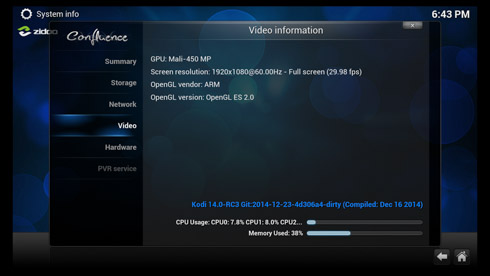
The player supposedly uses a hardware-accelerated KODI that can support up to 4K H.265 video playback. The box comes with Kodi 14.0-RC3 Zidoo edition and the interface runs at 1920x1080@60Hz. Probably Zidoo needs to upgrade this to the latest 14.1 builds:

The 'Audio' output settings tab includes options to output Dolby Digital (AC3), DTS, TrueHD and DTS-HD files:

While things should work just fine in theory, we had several problems with the audio files. In some cases the type of the audio file was detected but with many audio cuts, while other files had no audio at all.

We connected a USB3.0 device loaded with many video/audio test files to the Android player and got the following results:

Audio format
Results
Dolby Digital 5.1 (AC3/THX/TrueHD) Playback is jerky and video/sound not in sync
Dolby Digital+ 7.1 KODI crashes
Dolby TrueHD 7.1
DTS 5.1 Playback is jerky and video/sound not in sync
DTS-HD MA 7.1 Playback is jerky and video/sound not in sync

As it seems KODI support needs improvement.

- HDMI recording

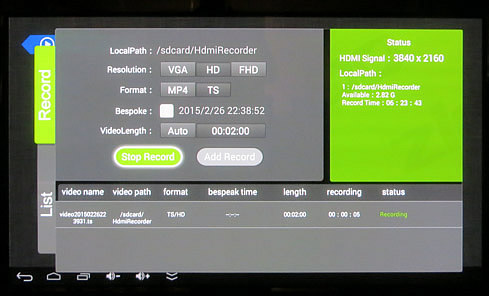
HDMI input is the main selling point of the device, and you need to plug a device at the HDMI-in in order the corresponding app to open, bringing you the following user interface. Here you can set the recording path to the internal flash or external USB storage. You can send select the resolution (VGA, 720p or 1080p), the video container (MP4 or TS), and optionally the start time, and the length of the recording:

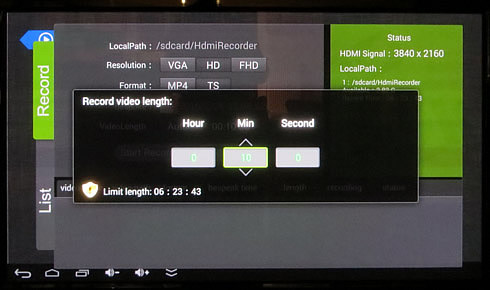
The player uses only the internal memory to record. In our case, for the HD/TS format, we were given around 6 hours and 23 minutes of recording. You can set the recording time as shown below:
By starting the recording, the app minimizes and you can bring it back by using the the menu button of the remote. A small Rec icon is displayed at the top right corner of the window. Of course you cannot use other functions of the media player during the recording process:
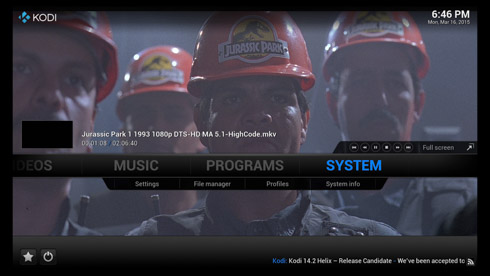
For our tests we used the Eweat EW902 media player as an input source and we tried to record the 'Jurassic Park 1' 1993 1080p DTS-HD MA 5.1-HighCode movie, playbacked in the default Eweat media player.

The produced file had a resolution of 1920x1080x30fps and 2-channel AAC (121Kbps) audio. Of course, do not expect the quality of the backup video to be as high as the original but generally, it should be considered as acceptable. We also noticed that the produced video had several black border pixels , so it didn't fit in the current playback window.

For an 1h .24m recording session we ended up with a 39.128MB TS file.


Review Pages
1. Specifications
2. Unboxing the player
3. User Interface, settings
4. Benchmarks
5. Video/Audio playback tests - video player
6. KODI, HDMI recording
7. Summary


Pages

  • « first
  • ‹ previous
  • 1
  • 2
  • 3
  • 4
  • 5
  • 6
  • 7
  • next ›
  • last »

Zidoo

Tags: Zidoo
Previous Post
AMD Radeon R7 240GB SSD review
Next Post
Toshiba TransMemory Pro 64GB USB 3.0 Flash Drive Review

Related Posts

  • Zidoo Z9S 4K Media Player review

  • Zidoo Launches New ZIDOO Z9S and ZIDOO Z10 4K Android TV Media Players

  • Zidoo X7 TV quad core processor TV Box Debuts for $69

  • Zidoo's Android Media Players To Get Full Blu-Ray Menu Navigation

  • Zidoo X9S and Zidoo Media Players Will Be BaSed On New RTD1295 Processor

  • Zidoo X1II Android Media Player review

  • Zidoo X6 Pro Media Player review

  • New Zidoo X9S Android Media Player Coming Next Month

Latest Reviews

Kioxia Exceria Plus G3 512GB microSD
Cameras

Kioxia Exceria Plus G3 512GB microSD

SoundPeats Cove Pro
Consumer Electronics

SoundPeats Cove Pro

Asustor AS5404T 4-Bay NAS System
Enterprise & IT

Asustor AS5404T 4-Bay NAS System

be quiet! Pure Power 13M 1200W
PC components

be quiet! Pure Power 13M 1200W

Server-Side Gaming Why Canadian Online Casinos Are Abandoning Local Clients for HTML5 Clouds
Enterprise & IT

Server-Side Gaming Why Canadian Online Casinos Are Abandoning Local Clients for HTML5 Clouds

Popular News

COLORFUL Introduces CVN B850I GAMING FROZEN Motherboard

COLORFUL Introduces CVN B850I GAMING FROZEN Motherboard

COLORFUL Presents CVN X870 ARK FROZEN Motherboard for AMD Ryzen 9000 CPUs

COLORFUL Presents CVN X870 ARK FROZEN Motherboard for AMD Ryzen 9000 CPUs

TEAMGROUP Launches EXPERT P34F Find My External SSD

TEAMGROUP Launches EXPERT P34F Find My External SSD

Samsung announces Galaxy Tab S11 and Galaxy S25 FE series

Samsung announces Galaxy Tab S11 and Galaxy S25 FE series

Viltrox Showcases Upcoming Lens Lineup and New TTL Flash at IBC 2025

Viltrox Showcases Upcoming Lens Lineup and New TTL Flash at IBC 2025

CORSAIR announces Vanguard Pro 96 and Vanguard 96 Gaming Keyboards

CORSAIR announces Vanguard Pro 96 and Vanguard 96 Gaming Keyboards

Panasonic Introduces the First Ultra-Telephoto Zoom Lens in the LUMIX S Series

Panasonic Introduces the First Ultra-Telephoto Zoom Lens in the LUMIX S Series

MSI Launches DATAMAG 40Gbps Magnetic Portable SSD

MSI Launches DATAMAG 40Gbps Magnetic Portable SSD

Main menu

  • Home
  • News
  • Reviews
  • Essays
  • Forum
  • Legacy
  • About
    • Submit News

    • Contact Us
    • Privacy

    • Promotion
    • Advertise

    • RSS Feed
    • Site Map
  • About
  • Privacy
  • Contact Us
  • Promotional Opportunities @ CdrInfo.com
  • Advertise on out site
  • Submit your News to our site
  • RSS Feed