Breaking News

CORSAIR Expands Its Gaming Ecosystem at Computex 2026 with Advanced Hall Effect Technology, Stream Deck-Integrated Performance, and All-Day Audio CORSAIR Unveils the Latest Innovation in Cases, Cooling, Power Supplies and More for DIY PC Builders at COMPUTEX 2026 be quiet! unveils new power, cooling, and peripheral lineup Micron Powers AI Everywhere at COMPUTEX 2026 Delkin Devices Launches New microSD Express Cards Optimized for Nintendo Switch 2 Gaming

logo

  • Share Us
    • Facebook
    • Twitter
  • Home
  • Home
  • News
  • Reviews
  • Essays
  • Forum
  • Legacy
  • About
    • Submit News

    • Contact Us
    • Privacy

    • Promotion
    • Advertise

    • RSS Feed
    • Site Map

Search form

Zidoo X9 Media Player review

Mar 19,2015 0

2. Unboxing the player


Review Pages

1. Specifications
2. Unboxing the player
3. User Interface, settings
4. Benchmarks
5. Video/Audio playback tests - video player
6. KODI, HDMI recording
7. Summary


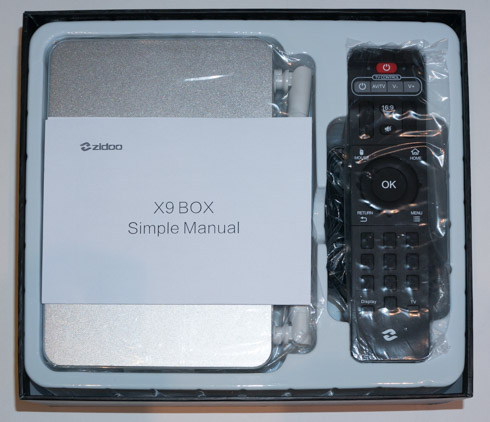
The Zidoo X9 can be purchased online at Geekbuying and Amazon for $139.99 and $129, respectively.. Below you see the retail box of the device:

Zidoo have provided everything you need to get started. Inside the box,  you have:

  • 1 x Zidoo X9 box
  • 1 x Chinese / English instruction manual
  • 1 x IR remote
  • 1 x 12v 2A power adapter (110~240V 50cm )
  • 1 x HDMI cable (60cm)

We were surprised to see no batteries included.

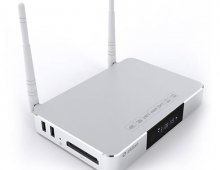
Roughly the size of a 7 inch tablet (187 x 127 x 27 mm ), the X9 crams all of its internals into a unibody aluminum chassis. The metal case is finished nicely, with subtly chamfered edges.

The front panel includes just a small LCD panel in the center, which is used to communicate the device status such as boot, in addition to displaying the time during operation. With the latest available firmware installed you cannot dim or even disable the LCD display for those who fight find it a bit flashy when they watch movies.

At the bottom, we will find the product ID and ventilation holes.

Most of the available ports are located at the back. Flanked by two large WiFi antennas (not removable), the ports are the power switch, 10/100 Ethernet (no 1Gigabit), Optical Audio, the Reset Button, HDMI In, Composite Video out, HDMI Out and DC In.

On the sides of the unit, one side houses 2 USB 2.0 ports, 1 USB3.0 port, some vents and the microSD card slot.


The remote control is looks typical and its layout should be familiar to anyone who had already access to other Android TV players. Using a remote wireless keyboard instead would make typing experience easier.


Review Pages

1. Specifications
2. Unboxing the player
3. User Interface, settings
4. Benchmarks
5. Video/Audio playback tests - video player
6. KODI, HDMI recording
7. Summary


Pages

  • « first
  • ‹ previous
  • 1
  • 2
  • 3
  • 4
  • 5
  • 6
  • 7
  • next ›
  • last »

Zidoo

Tags: Zidoo
Previous Post
AMD Radeon R7 240GB SSD review
Next Post
Toshiba TransMemory Pro 64GB USB 3.0 Flash Drive Review

Related Posts

  • Zidoo Z9S 4K Media Player review

  • Zidoo Launches New ZIDOO Z9S and ZIDOO Z10 4K Android TV Media Players

  • Zidoo X7 TV quad core processor TV Box Debuts for $69

  • Zidoo's Android Media Players To Get Full Blu-Ray Menu Navigation

  • Zidoo X9S and Zidoo Media Players Will Be BaSed On New RTD1295 Processor

  • Zidoo X1II Android Media Player review

  • Zidoo X6 Pro Media Player review

  • New Zidoo X9S Android Media Player Coming Next Month

Latest Reviews

Swit NP-FZ100 Battery
Cameras

Swit NP-FZ100 Battery

The Technology Stack Behind Modern Digital Gaming Platforms
Consumer Electronics

The Technology Stack Behind Modern Digital Gaming Platforms

be quiet! Dark Rock Pro 6
Cooling Systems

be quiet! Dark Rock Pro 6

How Online Casinos Use Encryption, Verification, and Risk Controls to Build User Trust
Enterprise & IT

How Online Casinos Use Encryption, Verification, and Risk Controls to Build User Trust

Why Low-Latency Infrastructure Matters More Than Raw Specs
Enterprise & IT

Why Low-Latency Infrastructure Matters More Than Raw Specs

Popular News

TEAMGROUP Launches EXPERT P34F Find My External SSD

TEAMGROUP Launches EXPERT P34F Find My External SSD

CORSAIR announces Vanguard Pro 96 and Vanguard 96 Gaming Keyboards

CORSAIR announces Vanguard Pro 96 and Vanguard 96 Gaming Keyboards

MSI Launches FORGE GK600 TKL WIRELESS Special Edition Compact Mechanical Keyboard

MSI Launches FORGE GK600 TKL WIRELESS Special Edition Compact Mechanical Keyboard

Samsung announces Galaxy Tab S11 and Galaxy S25 FE series

Samsung announces Galaxy Tab S11 and Galaxy S25 FE series

Viltrox Showcases Upcoming Lens Lineup and New TTL Flash at IBC 2025

Viltrox Showcases Upcoming Lens Lineup and New TTL Flash at IBC 2025

Panasonic Introduces the First Ultra-Telephoto Zoom Lens in the LUMIX S Series

Panasonic Introduces the First Ultra-Telephoto Zoom Lens in the LUMIX S Series

MSI Launches DATAMAG 40Gbps Magnetic Portable SSD

MSI Launches DATAMAG 40Gbps Magnetic Portable SSD

Viltrox Joins the L-Mount Alliance, Expanding Creative Possibilities

Viltrox Joins the L-Mount Alliance, Expanding Creative Possibilities

Main menu

  • Home
  • News
  • Reviews
  • Essays
  • Forum
  • Legacy
  • About
    • Submit News

    • Contact Us
    • Privacy

    • Promotion
    • Advertise

    • RSS Feed
    • Site Map
  • About
  • Privacy
  • Contact Us
  • Promotional Opportunities @ CdrInfo.com
  • Advertise on out site
  • Submit your News to our site
  • RSS Feed