Breaking News

SAMA Introduces the S32 WOOD, a Compact M-ATX Case Bundled with an 80 PLUS Gold PSU Thypoch Completes Simera-C Cine Prime Lineup with New 100mm T1.9 Lens CORSAIR Launches the RM1200e Power Supply with Built-in PinProtect GPU Overcurrent Protection and Platinum-certified Efficiency CORSAIR Changes the Game with PureVector, a Science-Based Personalized Aiming Technology, Launching Exclusively in the SABRE v3 PRO PureVector Mouse Series AMD FSR Upscaling 4.1 Boosts Frames and Image Quality on More Devices

logo

  • Share Us
    • Facebook
    • Twitter
  • Home
  • Home
  • News
  • Reviews
  • Essays
  • About
    • Submit News

    • Contact Us
    • Privacy

    • Promotion
    • Advertise

    • RSS Feed

Search form

Asus Xonar DX

Jun 23,2008 0

4. ASIO mode


Review Pages

1. Introducing the Asus Xonar DX audio card
2. Inside the box
3. Installation
4. ASIO mode
5. Test Configuration
6. Test Results 16bit
7. Test Results 24bit
8. Comparison tests 16bit
9. Comparison tests 24bit
10. Conclusion


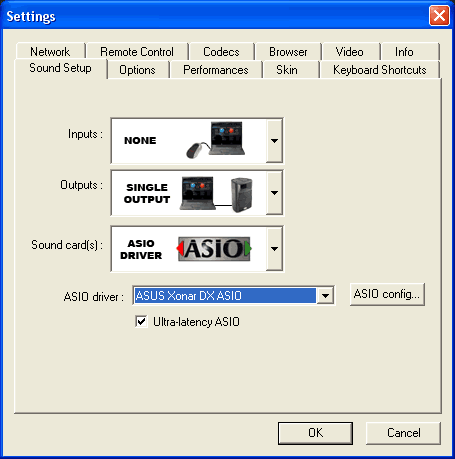
Asus Xonar DX supports the ASIO mode for both Windows XP and Windows VISTA. The ASIO mode can be used under special Audio software, like Atomix Virtual DJ, Traktor DJ and other DJ related software. For our tests, we used the latest version of Virtual DJ (v5.1 Pro) that worked flawlessly without any problems.

Under the settings->Sound Setup you have to select ASIO driver and tick the Ultra-latency ASIO:
The ASIO bit-depth setting can be either 16 or 24-bit depending your taste, although most DJ software will work just fine at 16bit.
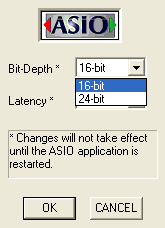
The latency can go from 2ms~200ms. Obviously 2ms is the lowest and best setting for DJ use:

Since the Asus Xonar DX card supports multiple Audio outputs, you could use another port for monitoring during DJying. You should simply use the corresponding icon under outputs.

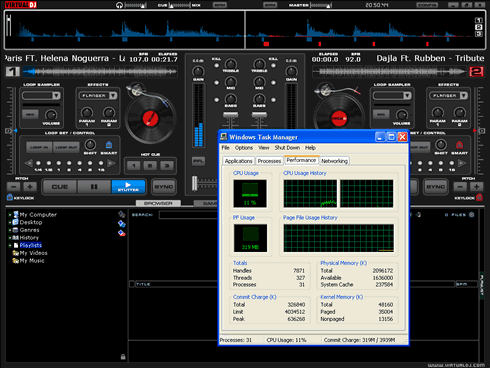
Time for some quick tests. We used the maximum quality settings under VDJ

And with a C2D processor, we noticed a CPU usage as low as 15%, even when keylock mode was activated.
 

Review Pages

1. Introducing the Asus Xonar DX audio card
2. Inside the box
3. Installation
4. ASIO mode
5. Test Configuration
6. Test Results 16bit
7. Test Results 24bit
8. Comparison tests 16bit
9. Comparison tests 24bit
10. Conclusion


Pages

  • « first
  • ‹ previous
  • 1
  • 2
  • 3
  • 4
  • 5
  • 6
  • 7
  • 8
  • 9
  • next ›
  • last »

Asus Xonar DX

Tags: Asus Xonar DX
Previous Post
CPU Coolers Roundup June 2008
Next Post
LG L246WH-BN

Related Posts

  • ASUS EXPEDITION GTX1050TI-4G review

  • ASUS STRIX R9 380X OC review

  • Asus Maximus IV Gene-Z review

  • Asus SaberTooth P67 B3 review

  • Asus P6T Deluxe Vs Foxconn Renaissance

  • Asus Rampage Extreme

  • Asus P5Q Deluxe

  • Asus EN9600GT Top

Latest Reviews

be quiet! Light Wings Pro IO fan
Cooling Systems

be quiet! Light Wings Pro IO fan

Why Intelligent Firmware Matters More Than Peak Throughput in NAS Systems
Enterprise & IT

Why Intelligent Firmware Matters More Than Peak Throughput in NAS Systems

Fanxiang MP83 M.2 NVMe SSD Enclosure
Enterprise & IT

Fanxiang MP83 M.2 NVMe SSD Enclosure

Ugreen CM642 USB4.0 Enclosure
PC components

Ugreen CM642 USB4.0 Enclosure

be quiet! Dark Power 14 IO
PC components

be quiet! Dark Power 14 IO

Popular News

MSI’s Latest AMD X870E MAX & EVO Series Motherboards

MSI’s Latest AMD X870E MAX & EVO Series Motherboards

COLORFUL Launches iGame B850M ULTRA Series Micro-ATX Motherboards

COLORFUL Launches iGame B850M ULTRA Series Micro-ATX Motherboards

COLORFUL Presents Limited Edition Chitu MAG-60 Magnetic Keyboard Inspired by the Year of the Horse

COLORFUL Presents Limited Edition Chitu MAG-60 Magnetic Keyboard Inspired by the Year of the Horse

COLORFUL Launches iGame B850I MINI OC V14 Motherboard

COLORFUL Launches iGame B850I MINI OC V14 Motherboard

COLORFUL Launches the iGame X870E VULCAN W OC Motherboard

COLORFUL Launches the iGame X870E VULCAN W OC Motherboard

COLORFUL Presents iGame Z890 ULTRA-S W and iGame Z890M ULTRA Z Motherboards

COLORFUL Presents iGame Z890 ULTRA-S W and iGame Z890M ULTRA Z Motherboards

COLORFUL Expands B850 Motherboard Lineup with New CVN, Battle-Ax, and MEOW Models

COLORFUL Expands B850 Motherboard Lineup with New CVN, Battle-Ax, and MEOW Models

ASRock Adds Support for One Sub-Channel DRAM Module on Intel DDR5 Motherboards

ASRock Adds Support for One Sub-Channel DRAM Module on Intel DDR5 Motherboards

Main menu

  • Home
  • News
  • Reviews
  • Essays
  • About
    • Submit News

    • Contact Us
    • Privacy

    • Promotion
    • Advertise

    • RSS Feed
  • About
  • Privacy
  • Contact Us
  • Promotional Opportunities @ CdrInfo.com
  • Advertise on out site
  • Submit your News to our site
  • RSS Feed