Breaking News

Circular Expands Blood Pressure Insights with Blood Pressure Premium Samsung Launches Odyssey G6 World’s First 1,100Hz Gaming Monitor Lexar Introduces JumpDrive A50V and C50V Dashcam USB Drives Lexar ARES RGB 2nd Gen DDR5 Passes AMD EXPO Ultra Low Latency Certification Tests Thypoch Introduces New Sculptor AF Lens Series with 23mm f1.4 Prime for Fujifilm X-Mount

logo

  • Share Us
    • Facebook
    • Twitter
  • Home
  • Home
  • News
  • Reviews
  • Essays
  • About
    • Submit News

    • Contact Us
    • Privacy

    • Promotion
    • Advertise

    • RSS Feed

Search form

Pioneer DJS Software

Dec 20,2007 0

3. Main Features


Review Pages

1. Introduction
2. Installation
3. Main Features
4. Preferences
5. Working with the software - Conclusion


As you can see in the following screenshots, the software follows the design and philosophy of Pioneer's DJ decks and mixers. Let's summarize the basic elements of the software window as seen below.

The two Jog wheels control the spinning CDs and allows users to make adjustments onto their mixing, while they could theoretically be used for scratching effects, although this is not easy through a software application.

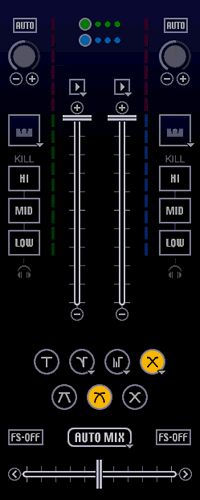
The cross fader slider is accurate and the user has the ability to adjust the curve of the audio channel switch, using the buttons placed just below the cross fader. This is a useful feature, and is also found in Pioneer's Pro equipment; it could make mixing easier depending on your style.

Of course, you can alternatively use the two sliders, placed in the middle of the software window, instead of using the cross fader.

Zooming in at the deck, many options and buttons are available. The playing speed can be adjusted with the big vertical slider on the right side of each deck. We did not experience any difficulties while playing some MP3 files, and the speed was accurately adjusted according to the mix.

Other buttons include the Play/Pause and CUE buttons, as well as the for/rev buttons. Both the CUE and Play/Pause buttons follow the concept found on Pioneers Pro decks.

The middle section is occupied with the mixer slider and kill frequencies buttons, and of course gain. In use, these buttons responded quite well and accurately, offering more creativity in the mix.
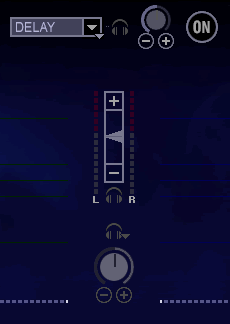
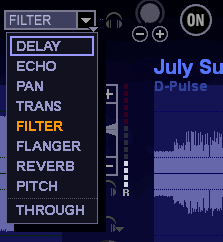
Lastly, at the top, we find the headphone volume and many effects. These effects can be triggered on the fly while mixing.
At top right, there are several buttons that open up to different areas of the software with different functions, like the Music Management window:

Click To Enlarge!
Click To Enlarge

The Ripping function, from CD-DA sources:

Click To Enlarge!
Click To Enlarge

Ripping is a somewhat easy function. When any CD is inserted, all its contents are displayed:

Click To Enlarge!
Click To Enlarge!

Then select the desired track and press rip.


Click To Enlarge!


Review Pages

1. Introduction
2. Installation
3. Main Features
4. Preferences
5. Working with the software - Conclusion


Pages

  • « first
  • ‹ previous
  • 1
  • 2
  • 3
  • 4
  • 5
  • next ›
  • last »

Pioneer

Sound

DJ

Tags: Pioneer Sound DJ
Previous Post
Gainward 8800GT
Next Post
Daemon Tools Image Drive

Related Posts

  • Pioneer announces microSD for dashcam

  • Pioneer Japan announces BDR-WX01DM for US market

  • Pioneer Japan announces new optical storage drives for JIS X6257 archive format

  • Pioneer Japan updates its CD-DVD Software utility

  • Pioneer Japan announces new BDR-X13J-X external BD Writer and BDR-WX01DM for archiving

  • Pioneer Japan releases new firmware updates for external Blu-Ray Recorders

  • Pioneer BDR-XD08UMB-S External Blu-Ray Recorder

  • Pioneer Japan updates firmware for their X13 lineup (30-01-2023)

Latest Reviews

NAS Security Is a Matter of Configuration Best Practices for Protecting Systems and Data
Enterprise & IT

NAS Security Is a Matter of Configuration Best Practices for Protecting Systems and Data

GMK TriggerKey
Gadgets

GMK TriggerKey

The Best Online Casino Games to Play on a Browser
Enterprise & IT

The Best Online Casino Games to Play on a Browser

be quiet! Light Wings Pro IO fan
Cooling Systems

be quiet! Light Wings Pro IO fan

Why Intelligent Firmware Matters More Than Peak Throughput in NAS Systems
Enterprise & IT

Why Intelligent Firmware Matters More Than Peak Throughput in NAS Systems

Popular News

MSI’s Latest AMD X870E MAX & EVO Series Motherboards

MSI’s Latest AMD X870E MAX & EVO Series Motherboards

COLORFUL Launches iGame B850M ULTRA Series Micro-ATX Motherboards

COLORFUL Launches iGame B850M ULTRA Series Micro-ATX Motherboards

COLORFUL Launches iGame B850I MINI OC V14 Motherboard

COLORFUL Launches iGame B850I MINI OC V14 Motherboard

COLORFUL Presents Limited Edition Chitu MAG-60 Magnetic Keyboard Inspired by the Year of the Horse

COLORFUL Presents Limited Edition Chitu MAG-60 Magnetic Keyboard Inspired by the Year of the Horse

COLORFUL Launches the iGame X870E VULCAN W OC Motherboard

COLORFUL Launches the iGame X870E VULCAN W OC Motherboard

COLORFUL Presents iGame Z890 ULTRA-S W and iGame Z890M ULTRA Z Motherboards

COLORFUL Presents iGame Z890 ULTRA-S W and iGame Z890M ULTRA Z Motherboards

COLORFUL Launches iGame X870E ULTRA-S V14 Motherboard

COLORFUL Launches iGame X870E ULTRA-S V14 Motherboard

COLORFUL Expands B850 Motherboard Lineup with New CVN, Battle-Ax, and MEOW Models

COLORFUL Expands B850 Motherboard Lineup with New CVN, Battle-Ax, and MEOW Models

Main menu

  • Home
  • News
  • Reviews
  • Essays
  • About
    • Submit News

    • Contact Us
    • Privacy

    • Promotion
    • Advertise

    • RSS Feed
  • About
  • Privacy
  • Contact Us
  • Promotional Opportunities @ CdrInfo.com
  • Advertise on out site
  • Submit your News to our site
  • RSS Feed