Breaking News

Viltrox Unveils New 35mm and 55mm F1.8 EVO Lenses for Sony FE and Nikon Z Mounts ASRock Adds Support for One Sub-Channel DRAM Module on Intel DDR5 Motherboards ASRock Unveils New PRO Series Full Modular PSUs for Practical Excellence ASUS Showcases Comprehensive AI-Powered Creator Workflows at NAB Show 2026 SanDisk at NAB 2026

logo

  • Share Us
    • Facebook
    • Twitter
  • Home
  • Home
  • News
  • Reviews
  • Essays
  • Forum
  • Legacy
  • About
    • Submit News

    • Contact Us
    • Privacy

    • Promotion
    • Advertise

    • RSS Feed
    • Site Map

Search form

Pioneer DJS Software

Dec 20,2007 0

4. Preferences


Review Pages

1. Introduction
2. Installation
3. Main Features
4. Preferences
5. Working with the software - Conclusion


After ripping a track, you can Edit several attributes of each audio file, such as the file name, set CUE points so you will be able to track them quickly while performing, as well as setting different mix in and mix out for each track.

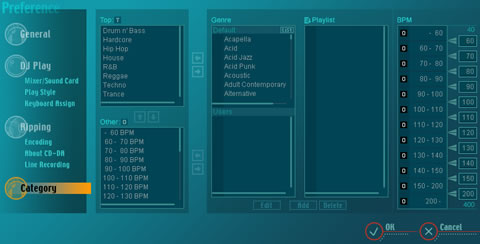
Genre is useful for proper music management. It allows you to categorize each track accordingly and make it easier to search while playing.
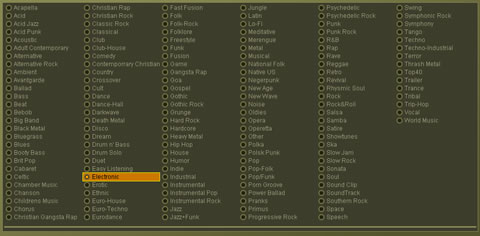
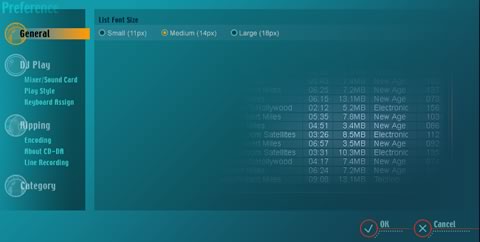
General preferences include typical settings related to the software's interface, such as the font size.
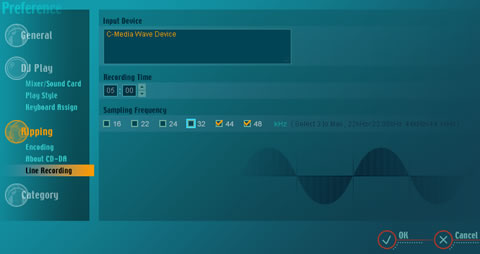
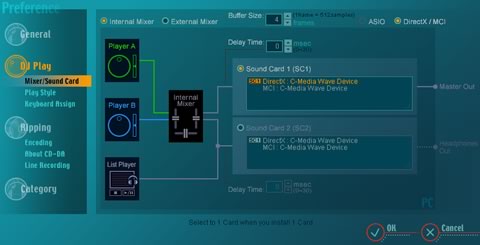
Possibly, the most important settings here are those related to your mixer and sound card. A helpful illustration lets you configure your soundcard (or cards) easily. The software works with a single or dual sound card configuration, even when using the internal mixer of the software. Note, that in order to have a monitor function (head phones), a second sound card is required.
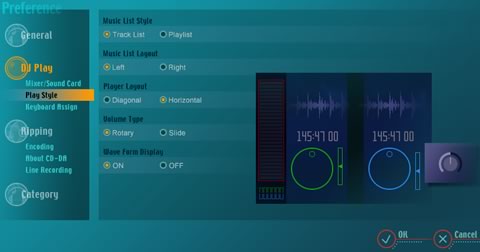
Since the Pioneer DJs software does not work with external controllers, it is essential to assign keyboard buttons for the basic functions of your preference. This will give you more freedom while mixing, since using only your PC mouse does not allow you to control/trigger many buttons/functions simultaneously, as you may require during mixing. What we would like here, is the inclusion of a shortcut for the cross fader slider that would allow us to instantly switch between the two tracks ("cut").

If you have time and patience, you can also categorize your tracks according to genre and BPM, an extra help when mixing live and there's not much time available to choose and throw the next track in the mix.
 

Review Pages

1. Introduction
2. Installation
3. Main Features
4. Preferences
5. Working with the software - Conclusion


Pages

  • « first
  • ‹ previous
  • 1
  • 2
  • 3
  • 4
  • 5
  • next ›
  • last »

Pioneer

Sound

DJ

Tags: Pioneer Sound DJ
Previous Post
Gainward 8800GT
Next Post
Daemon Tools Image Drive

Related Posts

  • Pioneer announces microSD for dashcam

  • Pioneer Japan announces BDR-WX01DM for US market

  • Pioneer Japan announces new optical storage drives for JIS X6257 archive format

  • Pioneer Japan updates its CD-DVD Software utility

  • Pioneer Japan announces new BDR-X13J-X external BD Writer and BDR-WX01DM for archiving

  • Pioneer Japan releases new firmware updates for external Blu-Ray Recorders

  • Pioneer BDR-XD08UMB-S External Blu-Ray Recorder

  • Pioneer Japan updates firmware for their X13 lineup (30-01-2023)

Latest Reviews

In the Age of AI Phishing, the Best User Experience Might Be the One That Feels Safest
Enterprise & IT

In the Age of AI Phishing, the Best User Experience Might Be the One That Feels Safest

SoundPeats C30
Consumer Electronics

SoundPeats C30

Why Streaming Live Casino Games Demands Smarter Tech
Enterprise & IT

Why Streaming Live Casino Games Demands Smarter Tech

Kioxia Exceria Plus G3 512GB microSD
Cameras

Kioxia Exceria Plus G3 512GB microSD

SoundPeats Cove Pro
Consumer Electronics

SoundPeats Cove Pro

Popular News

TEAMGROUP Launches EXPERT P34F Find My External SSD

TEAMGROUP Launches EXPERT P34F Find My External SSD

Samsung announces Galaxy Tab S11 and Galaxy S25 FE series

Samsung announces Galaxy Tab S11 and Galaxy S25 FE series

Viltrox Showcases Upcoming Lens Lineup and New TTL Flash at IBC 2025

Viltrox Showcases Upcoming Lens Lineup and New TTL Flash at IBC 2025

CORSAIR announces Vanguard Pro 96 and Vanguard 96 Gaming Keyboards

CORSAIR announces Vanguard Pro 96 and Vanguard 96 Gaming Keyboards

Panasonic Introduces the First Ultra-Telephoto Zoom Lens in the LUMIX S Series

Panasonic Introduces the First Ultra-Telephoto Zoom Lens in the LUMIX S Series

MSI Launches FORGE GK600 TKL WIRELESS Special Edition Compact Mechanical Keyboard

MSI Launches FORGE GK600 TKL WIRELESS Special Edition Compact Mechanical Keyboard

MSI Launches DATAMAG 40Gbps Magnetic Portable SSD

MSI Launches DATAMAG 40Gbps Magnetic Portable SSD

Viltrox Joins the L-Mount Alliance, Expanding Creative Possibilities

Viltrox Joins the L-Mount Alliance, Expanding Creative Possibilities

Main menu

  • Home
  • News
  • Reviews
  • Essays
  • Forum
  • Legacy
  • About
    • Submit News

    • Contact Us
    • Privacy

    • Promotion
    • Advertise

    • RSS Feed
    • Site Map
  • About
  • Privacy
  • Contact Us
  • Promotional Opportunities @ CdrInfo.com
  • Advertise on out site
  • Submit your News to our site
  • RSS Feed