Breaking News

CORSAIR Changes the Game with PureVector, a Science-Based Personalized Aiming Technology, Launching Exclusively in the SABRE v3 PRO PureVector Mouse Series AMD FSR Upscaling 4.1 Boosts Frames and Image Quality on More Devices TerraMaster TerraSync Update COLORFUL Launches iGame X870E ULTRA-S V14 Motherboard SWIT Packs 210Wh and 200W Output into Compact MINO-A Gold Mount Battery Series

logo

  • Share Us
    • Facebook
    • Twitter
  • Home
  • Home
  • News
  • Reviews
  • Essays
  • About
    • Submit News

    • Contact Us
    • Privacy

    • Promotion
    • Advertise

    • RSS Feed

Search form

Spire Thermal Eclipse II review

May 31,2010 0

2. A closer look, installation


Review Pages

1. Features
2. A closer look, installation
3. How we test
4. Results
5. Summary


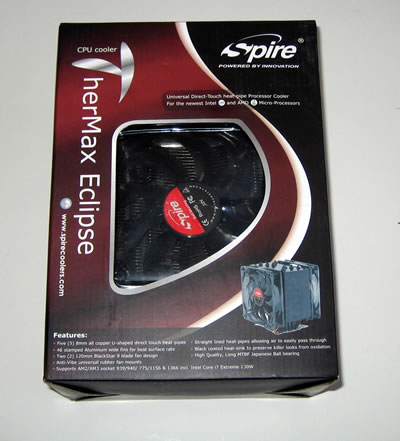
The Spire Thermal Eclipse II retails for about ~ $53, which is a decent price for a heatsink of this category. The device is packaged into well-designed carbon box:
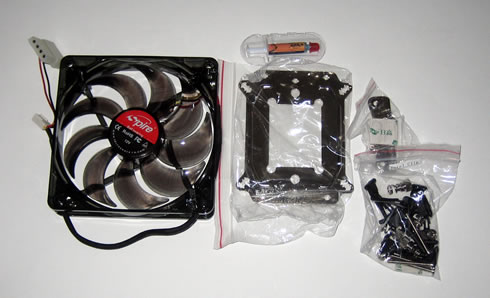
The package includes the TherMax Eclipse II heat-sink, two BlackStar 120mm DC Fans, 8 anti-vibe rubber fan mounts, BlueFrost thermal interface compound, Intel universal mounting set, AMD universal mounting set, Motherboard back-plate, user installation manual and a warranty registration card:
The Thermal Eclipse II is a medium-sized heastink measuring 131×70×152 mm (l × w × h). It stands 155mm tall and weighs 830gr, which means that your motherboard will have to bear with more than 1kg of weight with the the dual fans installed.

The Spire heatsink is constructed around five 8mm diameter copper heatpipes. It has exposed heatpipes at the base and an "X" pattern that positions heatpipes in the path of higher velocity air. The heatpipes assemble the base of the cooler, following the popular and effective direct touch design. The produced heat is transferred directly from the cpu to the heatpipes and to the 46 stamped aluminum wide fins.
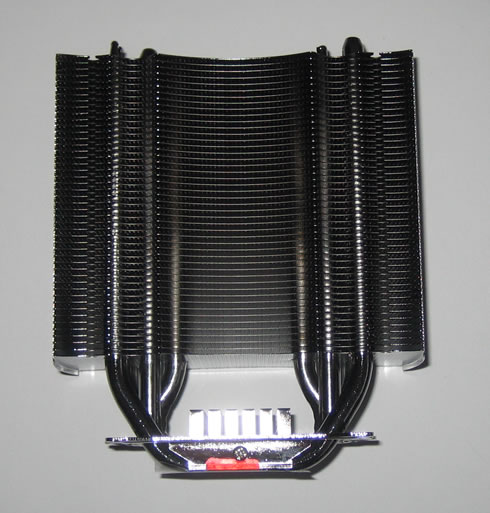
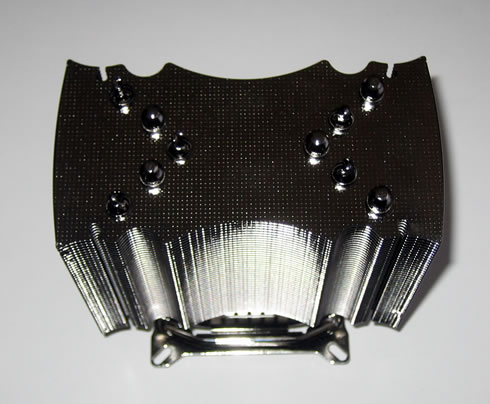
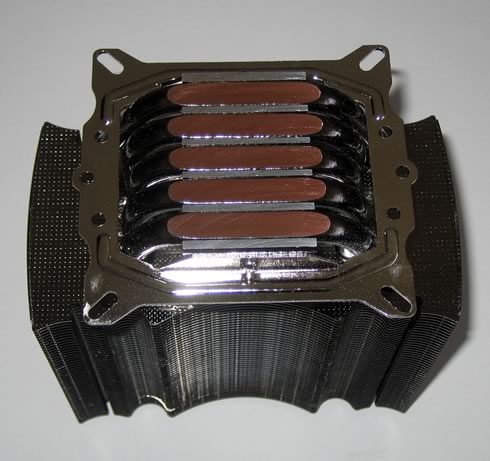
Below you can see the base of the heatsink. The 5 heatpipes are stacked side-by-side at the bottom of the heatsink, with a small 3mm wide strip between each. The base is flat the five heatpipes are all flattened to slightly different levels:
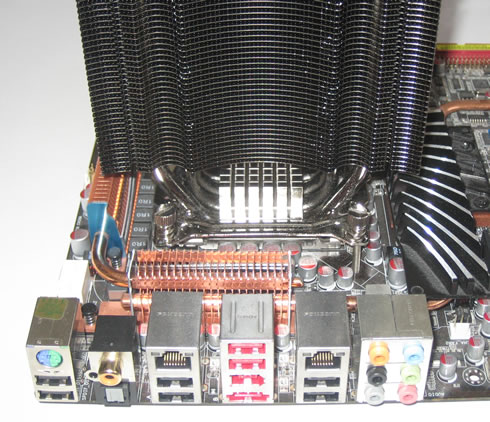
Installing this cpu cooler wont' take you much. First of all you need to remove motherboard from the PC case. Then you will use the bundled back plate and fasten it using four screws.

The heatsink mounts to both Intel and AMD motherboards using a permanently attached metal bracket.

Apply thermal paste, carefully place the heatsink on the right place secure it using the four spring loaded bolts.
The two cpu fans are secured via rubber vibration absorbing mounting posts. Both 120mm fans are non-PWM, so they rotate at a fixed 2200RPM all the time:

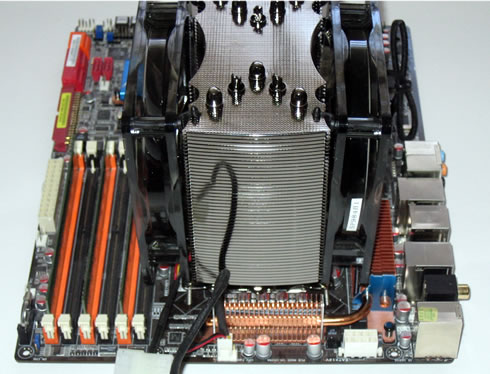
Here is how our system look like after installing the Thermal Eclipse II heatsink with both 120mmm fans mounted. As you can see its volume is bigger now but hopefully, the surrounding area is free enough to make installation easier. There is also free space left right above the memory banks:
 

Review Pages

1. Features
2. A closer look, installation
3. How we test
4. Results
5. Summary


Pages

  • « first
  • ‹ previous
  • 1
  • 2
  • 3
  • 4
  • 5
  • next ›
  • last »

Spire

Tags: Spire
Previous Post
Tuniq Propeller 120 review
Next Post
ProlimaTech Armageddon CPU Heatsink review

Related Posts

  • Spire launches UD50C White PC chassis

  • Spire Unveils Cutting-Edge ARGB Cooling Fan Set: A 25-Year Legacy of Excellence in PC Cooling

  • Introducing Spire’s New Ergonomic Workstations and Desk Peripherals

  • SPIRE PC announces EagleForce series 80PLUS certified

  • Spire Thermal Stone Keeps Your Hands Warm

  • Spire Previews Coolers For The Upcoming Intel 1156 Core i5 Platform

  • Spire PowerFuse

  • Spire MegaPodIII

Latest Reviews

Fanxiang MP83 M.2 NVMe SSD Enclosure
Enterprise & IT

Fanxiang MP83 M.2 NVMe SSD Enclosure

Ugreen CM642 USB4.0 Enclosure
PC components

Ugreen CM642 USB4.0 Enclosure

be quiet! Dark Power 14 IO
PC components

be quiet! Dark Power 14 IO

SanDisk High Endurance 512GB microSDXC
Cameras

SanDisk High Endurance 512GB microSDXC

Samsung PRO Ultimate 512GB microSDXC
Cameras

Samsung PRO Ultimate 512GB microSDXC

Popular News

MSI’s Latest AMD X870E MAX & EVO Series Motherboards

MSI’s Latest AMD X870E MAX & EVO Series Motherboards

COLORFUL Launches iGame B850M ULTRA Series Micro-ATX Motherboards

COLORFUL Launches iGame B850M ULTRA Series Micro-ATX Motherboards

COLORFUL Presents Limited Edition Chitu MAG-60 Magnetic Keyboard Inspired by the Year of the Horse

COLORFUL Presents Limited Edition Chitu MAG-60 Magnetic Keyboard Inspired by the Year of the Horse

COLORFUL Launches iGame B850I MINI OC V14 Motherboard

COLORFUL Launches iGame B850I MINI OC V14 Motherboard

COLORFUL Launches the iGame X870E VULCAN W OC Motherboard

COLORFUL Launches the iGame X870E VULCAN W OC Motherboard

COLORFUL Presents iGame Z890 ULTRA-S W and iGame Z890M ULTRA Z Motherboards

COLORFUL Presents iGame Z890 ULTRA-S W and iGame Z890M ULTRA Z Motherboards

COLORFUL Expands B850 Motherboard Lineup with New CVN, Battle-Ax, and MEOW Models

COLORFUL Expands B850 Motherboard Lineup with New CVN, Battle-Ax, and MEOW Models

ASRock Adds Support for One Sub-Channel DRAM Module on Intel DDR5 Motherboards

ASRock Adds Support for One Sub-Channel DRAM Module on Intel DDR5 Motherboards

Main menu

  • Home
  • News
  • Reviews
  • Essays
  • About
    • Submit News

    • Contact Us
    • Privacy

    • Promotion
    • Advertise

    • RSS Feed
  • About
  • Privacy
  • Contact Us
  • Promotional Opportunities @ CdrInfo.com
  • Advertise on out site
  • Submit your News to our site
  • RSS Feed