Breaking News

Fanatec and Trak Racer showcase the future of simulation at SimRacing Expo Frankfurt 2026 Razer Unveils the Barracuda V2 Pro ASUS Republic of Gamers Announces Bulwark Dock DG310 Akasa Announces Fermi CM5 Fanless Case for Raspberry Pi Compute Module 5 LG Electronics Advances the LG Sound Suite Experience With New DTS

logo

  • Share Us
    • Facebook
    • Twitter
  • Home
  • Home
  • News
  • Reviews
  • Essays
  • About
    • Submit News

    • Contact Us
    • Privacy

    • Promotion
    • Advertise

    • RSS Feed

Search form

Spire Thermal Eclipse II review

May 31,2010 0

3. How we test


Review Pages

1. Features
2. A closer look, installation
3. How we test
4. Results
5. Summary


We test the CPU coolers in the following test bed:

  • CPU: Intel Core7-920 Retail
  • Case: Open Air testbed
  • Motherboard: Asus P6T Deluxe Bios 1403
  • Memory: 3x1GB Crucial PC3-1066
  • PSU: OCZ 720W
  • HDD: WD 80JB
  • Operating system Windows XP with all the latest updates installed
  • Software: OCCT v2.0.1 & CoreTemp 0.99.3
  • Thermal Paste: Tuniq TX-2
  • Idle time: ~30min
  • Load time: ~30min
  • RPM speed controllable via SmartFan BIOS or via external hardware controller

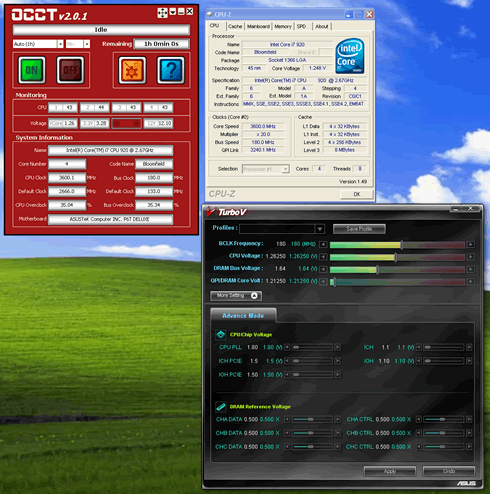
We produced the highest possible temperature using the OCCT v2.0.1 software with a custom 30mins (mixed) operation.
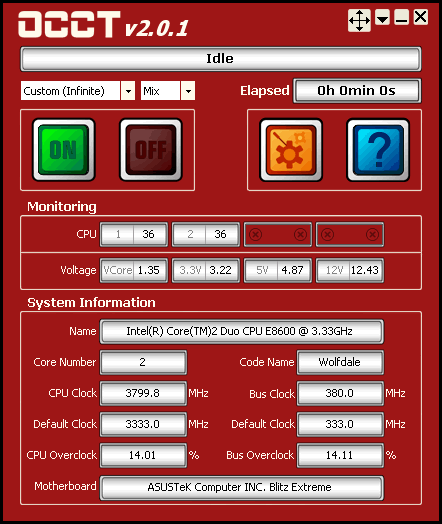
We left both CPU cores running at full load for 30 minutes. All temperatures were logged using the CoreTemp 0.99.3 and the software itself. We took the measurements with the CPU running both at at stock speeds and under overclocking:

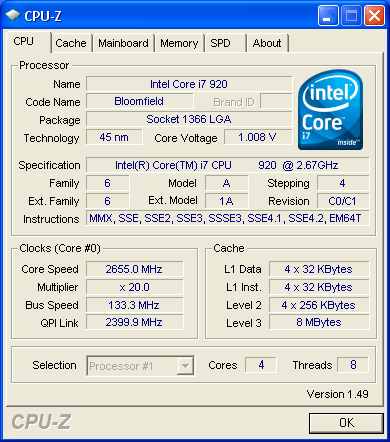
  • Intel Core i7-920 @ 2.66GHz
  • Vcore: 1.1000V
  • Other BIOS values: Auto

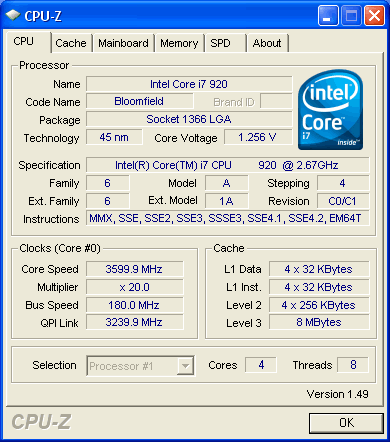
  • Intel Core i7-920 @ 3.60GHz
  • Vcore: 1.26250V
  • DDR3 Voltage: 1.66V
  • Other BIOS values: Auto

For the noise tests we used a Precision Gold N09AQ Environment Meter. All measurements were made at 30cm distance from the cpu cooler running at full speed.

 

Review Pages

1. Features
2. A closer look, installation
3. How we test
4. Results
5. Summary


Pages

  • « first
  • ‹ previous
  • 1
  • 2
  • 3
  • 4
  • 5
  • next ›
  • last »

Spire

Tags: Spire
Previous Post
Tuniq Propeller 120 review
Next Post
ProlimaTech Armageddon CPU Heatsink review

Related Posts

  • Spire launches UD50C White PC chassis

  • Spire Unveils Cutting-Edge ARGB Cooling Fan Set: A 25-Year Legacy of Excellence in PC Cooling

  • Introducing Spire’s New Ergonomic Workstations and Desk Peripherals

  • SPIRE PC announces EagleForce series 80PLUS certified

  • Spire Thermal Stone Keeps Your Hands Warm

  • Spire Previews Coolers For The Upcoming Intel 1156 Core i5 Platform

  • Spire PowerFuse

  • Spire MegaPodIII

Latest Reviews

Fanxiang MP83 M.2 NVMe SSD Enclosure
Enterprise & IT

Fanxiang MP83 M.2 NVMe SSD Enclosure

Ugreen CM642 USB4.0 Enclosure
PC components

Ugreen CM642 USB4.0 Enclosure

be quiet! Dark Power 14 IO
PC components

be quiet! Dark Power 14 IO

SanDisk High Endurance 512GB microSDXC
Cameras

SanDisk High Endurance 512GB microSDXC

Samsung PRO Ultimate 512GB microSDXC
Cameras

Samsung PRO Ultimate 512GB microSDXC

Popular News

MSI’s Latest AMD X870E MAX & EVO Series Motherboards

MSI’s Latest AMD X870E MAX & EVO Series Motherboards

COLORFUL Launches iGame B850M ULTRA Series Micro-ATX Motherboards

COLORFUL Launches iGame B850M ULTRA Series Micro-ATX Motherboards

COLORFUL Presents Limited Edition Chitu MAG-60 Magnetic Keyboard Inspired by the Year of the Horse

COLORFUL Presents Limited Edition Chitu MAG-60 Magnetic Keyboard Inspired by the Year of the Horse

COLORFUL Launches iGame B850I MINI OC V14 Motherboard

COLORFUL Launches iGame B850I MINI OC V14 Motherboard

COLORFUL Launches the iGame X870E VULCAN W OC Motherboard

COLORFUL Launches the iGame X870E VULCAN W OC Motherboard

COLORFUL Presents iGame Z890 ULTRA-S W and iGame Z890M ULTRA Z Motherboards

COLORFUL Presents iGame Z890 ULTRA-S W and iGame Z890M ULTRA Z Motherboards

COLORFUL Expands B850 Motherboard Lineup with New CVN, Battle-Ax, and MEOW Models

COLORFUL Expands B850 Motherboard Lineup with New CVN, Battle-Ax, and MEOW Models

ASRock Adds Support for One Sub-Channel DRAM Module on Intel DDR5 Motherboards

ASRock Adds Support for One Sub-Channel DRAM Module on Intel DDR5 Motherboards

Main menu

  • Home
  • News
  • Reviews
  • Essays
  • About
    • Submit News

    • Contact Us
    • Privacy

    • Promotion
    • Advertise

    • RSS Feed
  • About
  • Privacy
  • Contact Us
  • Promotional Opportunities @ CdrInfo.com
  • Advertise on out site
  • Submit your News to our site
  • RSS Feed