
Breaking News

ASUS ProArt RTX Spark Windows PCs Available for Immediate Pre-Order Kioxia Introduces E1.L QLC-based SSDs for Hyperscale Data Centers CORSAIR Launches the HS80 v2 MAX WIRELESS Gaming Headset Sony Announces the World's First Eclipsa Audio Certified Microphone1 for Smartphones Razer Unveils the Basilisk V4 Line

logo

  • Share Us
    • Facebook
    • Twitter
  • Home
  • Home
  • News
  • Reviews
  • Essays
  • About
    • Submit News

    • Contact Us
    • Privacy

    • Promotion
    • Advertise

    • RSS Feed

Search form

Asus Extreme N6800GT

Mar 30,2005 0

3. A closer look


Review Pages

1. Introduction
2. Features
3. A closer look
4. Test System
5. 3DMark05
6. 3DMark 2003
7. Codecreatures
8. Aquamark3 / 3DMark 2001
9. Half life 2
10. Doom 3
11. Far Cry
12. Thief 3
13. Colin McRae 05
14. Ground Control II
15. Overclocking
16. Conclusion


Asus Extreme N6800GT - 03 - A closer look

The Asus EN6800GT uses a special HSF for cooling. The cooler used is designed by Asus and it's a slim version of the reference Nvidia 6800 Ultra HSF.

The front side of the card.(click for hi-res).

That way, the 6800GT no longer takes up two slots to fit on your motherboard but still gets enough cooling to prevent it from overheating. The HSF covers both the GPU and memory parts as all memory parts are located on the front of the graphics card.

The back side of the card.(click for hi-res).

On the picture above you can clearly spot the SLI connector. For more information about SLI, you should read our Asus A8V SLI Deluxe article.
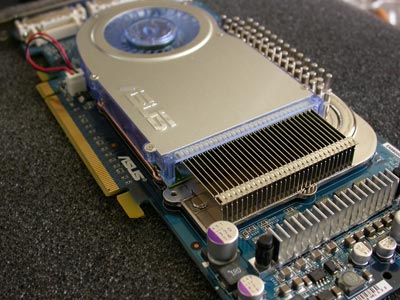
 

The fansink is constructed from both plastic and metallic parts. A small led located close to the fan, will highlight the card and light up your case with a bright blue light.

As in all mid and high end graphics cards using the PCI-Express bus, the EN6800GT needs power to operate safely and will not boot unless you have plugged in the PCI-E 8-pin power connector.

The new power connector

The output signals of the Asus EN6800GT consists of two DVI-I and a D-sub port. If your monitor doesn't use the DVI-I connector, you'll have to use the DVI-to-VGA adaptor bundled along with the card.
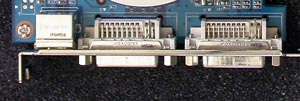
Dual DVI-I output and a single D-sub found on the card's rear


Review Pages

1. Introduction
2. Features
3. A closer look
4. Test System
5. 3DMark05
6. 3DMark 2003
7. Codecreatures
8. Aquamark3 / 3DMark 2001
9. Half life 2
10. Doom 3
11. Far Cry
12. Thief 3
13. Colin McRae 05
14. Ground Control II
15. Overclocking
16. Conclusion


Pages

  • « first
  • ‹ previous
  • 1
  • 2
  • 3
  • 4
  • 5
  • 6
  • 7
  • 8
  • 9
  • …
  • next ›
  • last »

ASUS

Tags: ASUS
Previous Post
Sony SCD-XA9000ES
Next Post
Freecom FHD2 Pro

Related Posts

  • ASUS ProArt RTX Spark Windows PCs Available for Immediate Pre-Order

  • ASUS Announces New 64GB Configuration of ASUS Ascent GX10

  • Announcing the New ASUS Googlebook 14

  • ASUS Announces Ascent QN10 Mini PC

  • ASUS Announces WiFi 8 Router

  • Asus announces ExpertBook B3 G2 and ExpertBook P3 G2

  • ASUS Announces Prime AP304 PC Case

  • ASUS Announces ProArt Display OLED PA279CDV and PA329CDV

Latest Reviews

Fanxiang MP83 M.2 NVMe SSD Enclosure
Enterprise & IT

Fanxiang MP83 M.2 NVMe SSD Enclosure

Ugreen CM642 USB4.0 Enclosure
PC components

Ugreen CM642 USB4.0 Enclosure

be quiet! Dark Power 14 IO
PC components

be quiet! Dark Power 14 IO

SanDisk High Endurance 512GB microSDXC
Cameras

SanDisk High Endurance 512GB microSDXC

Samsung PRO Ultimate 512GB microSDXC
Cameras

Samsung PRO Ultimate 512GB microSDXC

Popular News

MSI’s Latest AMD X870E MAX & EVO Series Motherboards

MSI’s Latest AMD X870E MAX & EVO Series Motherboards

COLORFUL Launches iGame B850M ULTRA Series Micro-ATX Motherboards

COLORFUL Launches iGame B850M ULTRA Series Micro-ATX Motherboards

COLORFUL Presents Limited Edition Chitu MAG-60 Magnetic Keyboard Inspired by the Year of the Horse

COLORFUL Presents Limited Edition Chitu MAG-60 Magnetic Keyboard Inspired by the Year of the Horse

COLORFUL Launches iGame B850I MINI OC V14 Motherboard

COLORFUL Launches iGame B850I MINI OC V14 Motherboard

COLORFUL Presents iGame Z890 ULTRA-S W and iGame Z890M ULTRA Z Motherboards

COLORFUL Presents iGame Z890 ULTRA-S W and iGame Z890M ULTRA Z Motherboards

COLORFUL Launches the iGame X870E VULCAN W OC Motherboard

COLORFUL Launches the iGame X870E VULCAN W OC Motherboard

COLORFUL Expands B850 Motherboard Lineup with New CVN, Battle-Ax, and MEOW Models

COLORFUL Expands B850 Motherboard Lineup with New CVN, Battle-Ax, and MEOW Models

ASRock Adds Support for One Sub-Channel DRAM Module on Intel DDR5 Motherboards

ASRock Adds Support for One Sub-Channel DRAM Module on Intel DDR5 Motherboards

Main menu

  • Home
  • News
  • Reviews
  • Essays
  • About
    • Submit News

    • Contact Us
    • Privacy

    • Promotion
    • Advertise

    • RSS Feed
  • About
  • Privacy
  • Contact Us
  • Promotional Opportunities @ CdrInfo.com
  • Advertise on out site
  • Submit your News to our site
  • RSS Feed
