Breaking News

Sony Announces the Launch of Xperia 1 VIII Kioxia Unveils High Performance KIOXIA XG10 Series SSDs for PC OEMs AMD Expands AMD Ryzen PRO 9000 Series Processor Lineup Thypoch enters autofocus market with Voyager 24-50mm f/2.8 for Sony E-mount PlayStation Plus Game Catalog for May 2026

logo

  • Share Us
    • Facebook
    • Twitter
  • Home
  • Home
  • News
  • Reviews
  • Essays
  • Forum
  • Legacy
  • About
    • Submit News

    • Contact Us
    • Privacy

    • Promotion
    • Advertise

    • RSS Feed
    • Site Map

Search form

Asus Maximus Extreme

Mar 28,2008 0

3. BIOS settings


Review Pages

1. Features, specifications
2. The package
3. BIOS settings
4. Testing configuration
5. Benchmarks - EVEREST Ultimate Edition
6. Benchmarks - SiSoftware Sandra
7. Benchmarks - PCMark05, 3DMark 06
8. Benchmarks - Science Mark 2.0, Pov-Ray
9. Benchmarks - MAXON CINEBENCH
10. Benchmarks - SuperPI
11. Benchmarks - SYSmark 2007 Preview, WorldBench
12. Lost Planet: Extreme Condition
13. Overclocking
14. Asus AI Gear 3
15. Summary


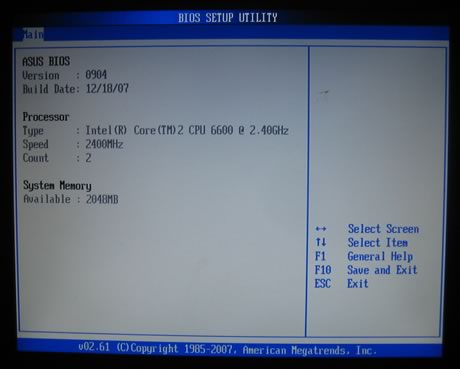
The BIOS interface follows what Asus has been using for sometime now. In order to get the best results, we used the BIOS update software to upgrade to the latest 0904 beta version. The update procedure is pretty straight forward.

This BIOS interface is probably the best we've ever seen, compared to what other mainboad makers offer. It is separated in several tabs, each one having sub-menus with different options. The first tab includes information about the date, the SATA drives and the system.
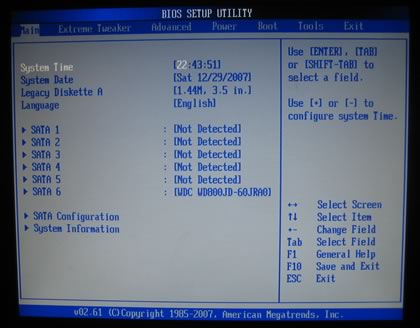
On the second tab named "AI Tweaker", users will find tons of features. The motherboard includes an auto overclocking system, called Ai Overclock Tuner, with three different settings:

  • Manual (Allows you to individually set overclocking parameters)
  • Auto (Loads the standard settings for the system)
  • X.M.P (Loads the optimal settings for the system)
  • CPU Level Up (Allows you to select a CPU level, and the related parameters will be adjusted automatically)
  • Memory Level Up (Allows you to select a memory level, and the related parameters will be adjusted automatically)

The CPU Level Up allows easy overclocking with pre-defined settings, starting from E6700/X6800/E6850 and finally the "crazy" level.
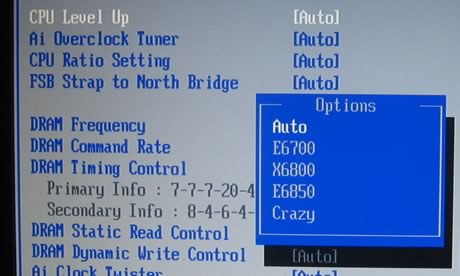
The FSB Strap to North Bridge settings can be left to the default value, or set to frequencies up to 400MHz, when used with the upcoming Intel processors.

There are many memory dividers to play with, from 1:1 to 1:2. The memory dividers are affected from the selected FSB, so in order to have the highest possible options, leave the FSB to auto. We can see that the BIOS recognizes the memory timings and displays them automatically.
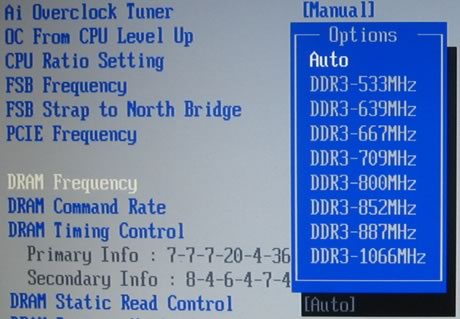
Let's set now the Ai Overclock Tuner in Manual mode.
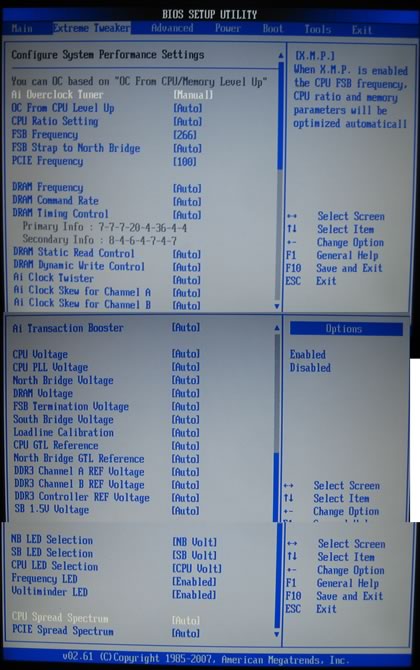
There are several modes for memory regulation in order to either enhance the system's or performance or choose more stable options. The voltage control is not the same with what we saw with the Asus P5E3 Deluxe, since now the menus follow the drop down form, allowing you to choose the available voltages rather than manually typing of value (with 0.02V interval). Here is a list with all the available voltages and frequencies:

  • FSB from 200~800MHz with 1MHz step
  • Frequency bus PCI-E from 100~150MHz with 1MHz step
  • CPU Voltage: 1.10000V~2.40000V with 0.0025V interval
  • CPU PLL Voltage: 1.50V~3.00V with 0.02V interval
  • FSB Termination: 1.20V~2.00V with 0.02V interval
  • DRAM Voltage: 1.50V~3.04V with 0.02V interval
  • NB Voltage: 1.25V~2.05V with 0.02V interval
  • SB Voltage: 1.05V~1.225V with 0.025V interval
  • SB 1.5 Volt: 1.50V~2.05V with 0.05V interval

Compared with Asus P5E3 Deluxe, most voltages have been pumped up, - good news for serious overclockers. Passing to the Advanced tab, we can find more settings for SpeedStep, C1E support and of course the CPU multiplier:

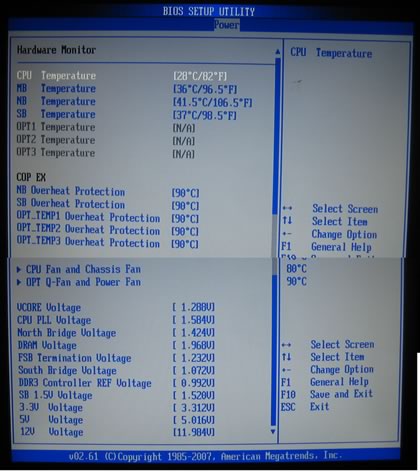
Under the Power tab, you can find the usual temperature readings, with NB and SB temperatures. The voltage reporting is also very informing and useful.
 

Review Pages

1. Features, specifications
2. The package
3. BIOS settings
4. Testing configuration
5. Benchmarks - EVEREST Ultimate Edition
6. Benchmarks - SiSoftware Sandra
7. Benchmarks - PCMark05, 3DMark 06
8. Benchmarks - Science Mark 2.0, Pov-Ray
9. Benchmarks - MAXON CINEBENCH
10. Benchmarks - SuperPI
11. Benchmarks - SYSmark 2007 Preview, WorldBench
12. Lost Planet: Extreme Condition
13. Overclocking
14. Asus AI Gear 3
15. Summary


Pages

  • « first
  • ‹ previous
  • 1
  • 2
  • 3
  • 4
  • 5
  • 6
  • 7
  • 8
  • 9
  • …
  • next ›
  • last »

ASUS

Tags: ASUS
Previous Post
Krusell Mobile Cases
Next Post
LITEON DH-20A4P EZ-DUB

Related Posts

  • ASUS Announces ProArt GeForce RTX 5090 Graphics Card

  • ASUS Announces ProArt Display OLED PA27USD and PA32USD

  • ASUS Announces TUF Gaming Platinum Power Supply Series

  • ASUS Announces ProArt PA40SU USB4 SSD Enclosure

  • ASUS Showcases Comprehensive AI-Powered Creator Workflows at NAB Show 2026

  • ASUS Announces ProArt Router PRT-BE5000 and ProArt Switch PQG-U1080

  • ASUS Announces Intel Core Ultra 200S Plus Series Support on W880, Z890, Q870, B860 and H810 Motherboards

  • ASUS Unveils Complete Portfolio Support for Intel Core 200S Series

Latest Reviews

How Online Casinos Use Encryption, Verification, and Risk Controls to Build User Trust
Enterprise & IT

How Online Casinos Use Encryption, Verification, and Risk Controls to Build User Trust

Why Low-Latency Infrastructure Matters More Than Raw Specs
Enterprise & IT

Why Low-Latency Infrastructure Matters More Than Raw Specs

In the Age of AI Phishing, the Best User Experience Might Be the One That Feels Safest
Enterprise & IT

In the Age of AI Phishing, the Best User Experience Might Be the One That Feels Safest

SoundPeats C30
Consumer Electronics

SoundPeats C30

Why Streaming Live Casino Games Demands Smarter Tech
Enterprise & IT

Why Streaming Live Casino Games Demands Smarter Tech

Popular News

TEAMGROUP Launches EXPERT P34F Find My External SSD

TEAMGROUP Launches EXPERT P34F Find My External SSD

CORSAIR announces Vanguard Pro 96 and Vanguard 96 Gaming Keyboards

CORSAIR announces Vanguard Pro 96 and Vanguard 96 Gaming Keyboards

Samsung announces Galaxy Tab S11 and Galaxy S25 FE series

Samsung announces Galaxy Tab S11 and Galaxy S25 FE series

Viltrox Showcases Upcoming Lens Lineup and New TTL Flash at IBC 2025

Viltrox Showcases Upcoming Lens Lineup and New TTL Flash at IBC 2025

MSI Launches FORGE GK600 TKL WIRELESS Special Edition Compact Mechanical Keyboard

MSI Launches FORGE GK600 TKL WIRELESS Special Edition Compact Mechanical Keyboard

Panasonic Introduces the First Ultra-Telephoto Zoom Lens in the LUMIX S Series

Panasonic Introduces the First Ultra-Telephoto Zoom Lens in the LUMIX S Series

MSI Launches DATAMAG 40Gbps Magnetic Portable SSD

MSI Launches DATAMAG 40Gbps Magnetic Portable SSD

Viltrox Joins the L-Mount Alliance, Expanding Creative Possibilities

Viltrox Joins the L-Mount Alliance, Expanding Creative Possibilities

Main menu

  • Home
  • News
  • Reviews
  • Essays
  • Forum
  • Legacy
  • About
    • Submit News

    • Contact Us
    • Privacy

    • Promotion
    • Advertise

    • RSS Feed
    • Site Map
  • About
  • Privacy
  • Contact Us
  • Promotional Opportunities @ CdrInfo.com
  • Advertise on out site
  • Submit your News to our site
  • RSS Feed