
Asus Maximus IV Gene-Z review
5. Overclocking, Built-in graphics
Review Pages
2. Package, board layout
3. BIOS, bundled software
4. Benchmarks
5. Overclocking, Built-in graphics
6. Final words
- Overcloking
The Asus Maximus IV Gene-Z offers overclocking options either through the BIOS or Windows. The BIOS, includes two pre-defined modes for our Intel i5-2500K (3.3GHz ) processor: 4.20GHz and 4.60GHz. Both options worked great; the BIOS settings were automatically adjusted and gave us a totally stable system. Quick and stable overclocking options offered by Asus to amateur users:

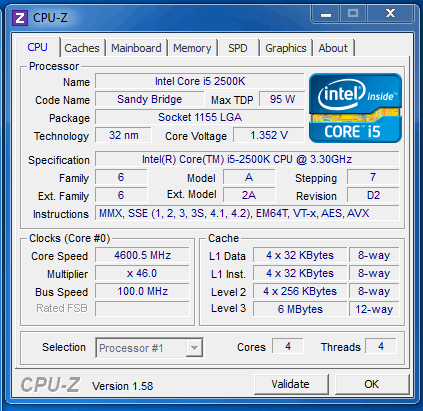
Let's try to overclock the processor through Windows using the TurboV EVOsoftware, which allow you to make adjustments on-the-fly. After some attempts, we got a stable operation with the CPU voltage set to 1.410V with a 50X multiplier (5GHz):
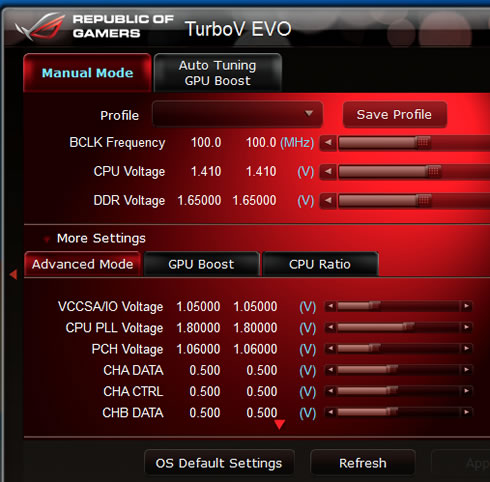

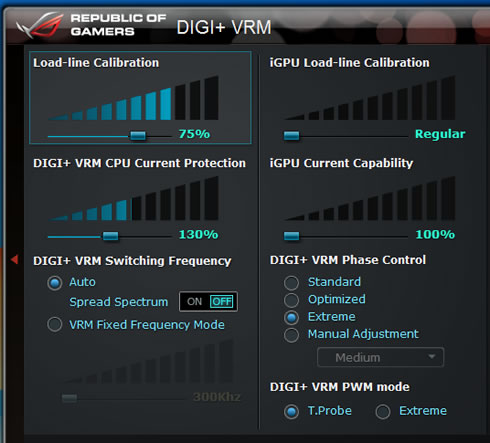
Of course, you should also play around with the Digi+VRM in order to maintain stability. Below you see our settings:
WIth system was very stable with our CPU running at 5.0GHz, although the produced heat was very high and the temperature was increased despite the large cpu cooler of our system:


With the CPU running at 5GHz, the The PCMark7 score was boosted from 3178 up to 3572 points (without SSD acceleration):
PCMark 7 |
|
| Asus Maximus IV GeneZ Intel i5-2500K @ 5.0GHz with DDR3-2133 | |
| Asus Maximus IV GeneZ Intel i5-2500K @ 1.6-3.7GHz with DDR3-2133 | 3178 |
The same 5GHz overclocking can be achieved though BIOS, so if you are interested have a look to the following screen shots (1 2 3 4 5)
You can also use the "Auto" overclocking function of the AI Suite II. The "Auto System Level Up" feature will automatically both the CPU and GPU of your processor:

The system performs some performance tunning tests in order to determine the optimum settings that produce a stable operation. There are two presets for Auto Tuning: Fast and Extreme.

The "Fast mode" resulted to a nice 4.32GHz with a 42X multiplier and 103 BCLK. In addition, the Intel HD3000 on-board graphics core was overclocked from the 850MHz to 1450MHz:

The "Extreme Mode" gave a more generous 4.89GHz for the CPU and 1450MHz for the GPU - all with a simple touch of a button. Nice work Asus!

- Intel HD3000 graphics
The Sandy-Bridge processors from Intel feature an improved integrated graphics chip, the Intel HD Graphics 3000. Do not expect a performance comparable to a discrete graphics solution - these graphics are just enough for office and some basic gaming.
Alike the actual cores of the CPU, the integrated HD Graphics 3000 can dynamically adjust its clock rate upon increased load (Turbo Boost). The Intel HD Graphics 3000 has 12 Execution Units (comparable to pipelines). Despite the same number than in the GMA HD, they have been improved and are now clearly faster than in the predecessor.
The default clock speed for both HD 3000 on the desktop is 850MHz; however, the GPU can turbo up to 1100MHz.
Furthermore, the HD Graphics 3000 got a unit dedicated to decoding and encoding of HD videos. In addition it supports DirectX 10.1, Shader Model 5.0 and HDMI 1.4 (support of 3D displays).
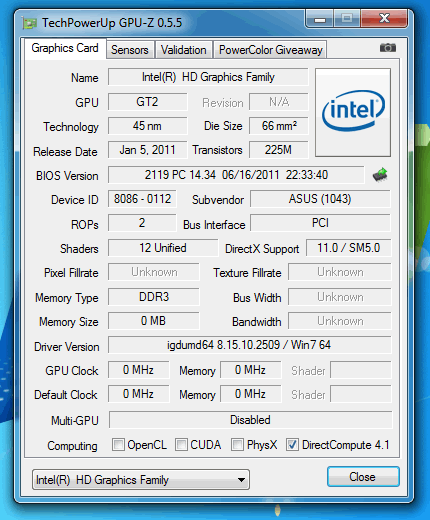
As we saw at the introduction, the Asus Maximus IV GeneZ offers an HDMI output that allows you to drive graphics to your monitor, powered by the CPU's Intel HD3000 graphics core. The GPU-Z utility doesn't give much information about the GPU clock:
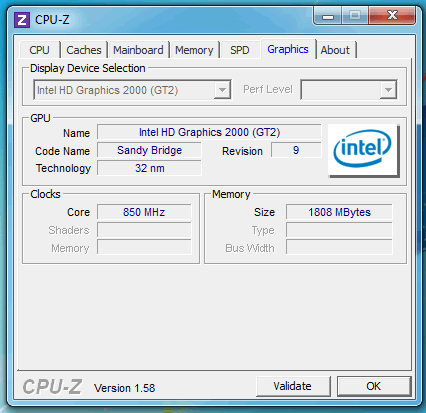
However, the CPU-Z confirmed the 850MHz speed of the GPU core:
In order to give you an idea of the performance of the Intel HD Graphics 3000, we used the PCMark7 to benchmark it and compared it to the performance of the same Asus system with the graphics powered by an Nvidia GT430 discrete graphics card. It is obvious that he Intel HD Graphics 3000 will not give you the same performance, and has been designed for casual mainstream gaming:
| PCMark 7 Test | Asus Maximus IV GeneZ (With Nvidia GT430) |
Asus Maximus IV GeneZ (With Intel HD3000) |
| PCMark Score | 3178 |
2898 |
| Lightweight Score | 2632 |
2588 |
| Productivity Score | 2454 |
2432 |
| Creativity Score | 3484 |
3368 |
| Entertainment Score | 3169 |
2629 |
| Computation Score | 4451 |
4273 |
| System Storage Score | 2000 |
1961 |
Review Pages
2. Package, board layout
3. BIOS, bundled software
4. Benchmarks
5. Overclocking, Built-in graphics
6. Final words





