
Asus P5LD2 Deluxe
2. The mainboard - Packaging
Review Pages
2. The mainboard - Packaging
3. Test System - Configuration
4. SLI Mode
5. 3DMark05
6. 3DMark03
7. Codecreatures
8. Aquamark/3DMark 2001
9. Half Life 2
10. Doom 3
11. PCMark04 & 05
12. Thief 3
13. Colin McRae 2005
14. Ground Control II
15. Performance Test v5.0
16. Overclocking
17. BIOS - Page 1
18. BIOS - Page 2
19. Software Bundled - Asus Update
20. Asus PCProbe2
21. Asus AIBooster
22. WiFi-TV set
23. Conclusion
The P5LD2 Deluxe is manufactured on a black PCB, common for Asus high grade motherboards, with color coded components. The layout of the connection interfaces on the board is well designed and in a way that makes everything easy to be identify.

With the P5LD2 Deluxe, Asus once again has adopted its Stack Cool 2 patent, a fanless and zero-noise thermal solution that provides cooling to the board. An extra layer underneath the whole board improves the heat dissipation. According to Asus, this can lower the board's temprature by up to 20°C.

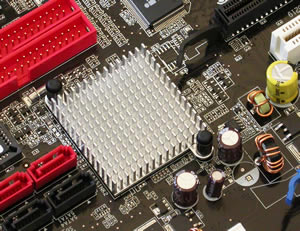
Below you can see the fanless cooling system from Asus, used with its latest products. There are 3 metal heatsinks, one for the MOSFETs (Metal Oxide Semiconductor Field Effect Transistor), the Northbridge and the MCP-04 Southbridge to maintain temperatures at low levels.

Intel MCH 945P

Intel ICH7R
Below you can see the 775 socket, for Intel's latest CPUs. The board also supports the new Dual CPUs from Intel, the D series.


The memory module slots are color coded black and yellow. You can always put two memory modules of the same memory size and timings on the same color slot, to utilise the Dual Channel's symmetry mode support, or even use two memory modules of different memory sizes to use asymmetry mode.
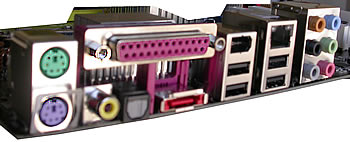
On the back panel, you will find the keyboard and mouse (PS2) ports, audio port (digital, analog and coaxial), the parallel port, VGA out port, 4 USB2.0 ports, one RJ-45 jack and one IEEE1394a port. There is also a slot for external Serial ATA. This port, according to Asus, connects to an external SATA box or a Serial ATA multiplier that supports up to 16 devices and enables smart setup and the hot-plug function.

There are two more connections for an extra USB and one for an extra firewire.
The P5LD2 Deluxe has many connection options. The ICH7R South Bridge from Intel is responsible for the four SATA II ports and one IDE Primary slot, the one coloured blue. The two red IDE slots are the responsibility of the ITE chipset while there are two more SATA ports, one placed near the CPU socket and the other available externally on the rear panel.
The IT8211F from ITE Tech supports 2 ATA133 channels with 4 devices.

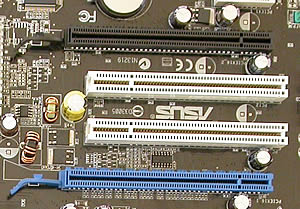
The Asus P5LD2 has two PCI-E X16 slots while there is also an SLI bridge included in the retail package. The first slot, the blue one, is 16X in both single and dual video modes while the black can also be set to 2X, 4X or Auto. With NVidia's 7.1.8.4 and 77.77 drivers we used, we weren't be able to enable SLI for this board. Instead of this, the dual PCI-E video slots can be used for powering up four screens, in quad display.
The ATX power connectors are one 24-pin and one 8-pin. They can also take 20-pin and 4-pin cables respectively.


The Marvell® Yukon® Gigabit Ethernet connectivity solutions are designed for LAN on motherboard (LOM), NIC and embedded applications. The Yukon products are well-suited for desktop, mobile and server network connections. Loaded with powerful manageability features, such as the Marvell Virtual Cable Tester® (VCT) technology and Wake-on-LAN support, the Yukon solution provides support for the broadest range of client and server platforms.
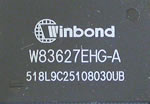
This small Winbond chip will give your system the ability to speak. It is a programmable speech synthesizer that will inform you if any error occurs in the BIOS self test scanning procedure. Users can edit and change these voices, and even add their own voice message for every error that might occur.
- The package

The retail package for the P5LD2 Deluxe includes a large list of accessories :
| Accessories | User's manual UltraDMA cable IDE cable FDD cable COM cable 2-port USB / Game module I/O shield SATA cable GT Soft Bridge 1 port 1394 module |


We liked, as always, the Asus manual. Very helpful...

As we previously stated, it would be rather interesting to see any differences between the 955X used on the P5WD2 Premium and 945P Intel chipset used on the P5LD2 motherboard. Look for this comparison in the following pages in the games and benchmark tests.
Review Pages
2. The mainboard - Packaging
3. Test System - Configuration
4. SLI Mode
5. 3DMark05
6. 3DMark03
7. Codecreatures
8. Aquamark/3DMark 2001
9. Half Life 2
10. Doom 3
11. PCMark04 & 05
12. Thief 3
13. Colin McRae 2005
14. Ground Control II
15. Performance Test v5.0
16. Overclocking
17. BIOS - Page 1
18. BIOS - Page 2
19. Software Bundled - Asus Update
20. Asus PCProbe2
21. Asus AIBooster
22. WiFi-TV set
23. Conclusion








