
Breaking News

GIGABYTE Announces the Availability of AORUS GeForce RTX 50 INFINITY Series Graphics Cards LG Electronics Launches LG xboom Blast Party Speaker Intel Gamer Days 2026 Kicking Off with AAA Gaming Bundle - Partnerships CORSAIR Expands Stream Deck Ecosystem with NIGHTSWORD v2 WIRELESS SD Sharkoon announces Rebel P20 Gen2 PSU

logo

  • Share Us
    • Facebook
    • Twitter
  • Home
  • Home
  • News
  • Reviews
  • Essays
  • About
    • Submit News

    • Contact Us
    • Privacy

    • Promotion
    • Advertise

    • RSS Feed

Search form

Asus P5Q Deluxe

Sep 26,2008 0

4. Energy Process Unit (EPU)


Review Pages

1. Introduction, features
2. Retail package, overview
3. Bios settings, test configuration
4. Energy Process Unit (EPU)
5. Benchmarks - Everest Ultimate Edition, SiSoftware Sandra
6. Benchmarks - PCMark Vantage, BAPCo's SYSmark 2007 Preview
7. Benchmarks - MAXON CINEBENCH, x264 HD Benchmark, TMPGEnc 4 Xpress
8. Benchmarks - SuperPI, wPrime
9. Benchmarks - 3DMark06, Crysis v1.2, Unreal Tournament 3 Demo
10. Overclocking
11. Final words


Asus has updated its EPU function to the EPU-6, which offers more power savings compared to the previous generation of the system. As we mentioned in the previous pages, the EPU can be enabled/disabled in the BIOS.

In order to have a better idea of how the EPU works, you will have to download the Asus EPU-6 software.

Note that EPU-6 doesn't work under manual overclocking.

After installing the software, a brief calibration procedure begins:

The Six Engine software can adjust the operation characteristics of six basic components of the system. You can choose to tweak the CPU, VGA, chipset, memory, HDD or CPU fan in order to have power saving gains.

All the available settings are simplified and in most cases, changing a parameter is easy and it is given in a user-friendly way. So don't expect to see actual numbers when you change your CPU's Vcore for example. Remember that this is not an overclocking tool, it just downgrades specific characteristics of your system in order to consume less power.

Pressing the CPU power, we can see the power our CPU currently consumes and the energy saving we have for a specific power setting.

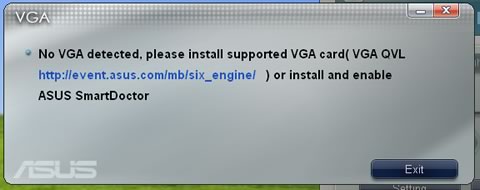
In order to also fine tune your VGA you have to use a supported VGA card
Looking at each mode, we can tune several settings. For example, we can increase the CPU frequency:

or decrease CPU frequency

.

Asus offers four different performance modes for each component. These modes offer pre-selected options, which can also be changed by the user.

If you leave everything to "Auto", the Six Engine will auto-tune the system for optimum energy saving according to your CPU load.


Review Pages

1. Introduction, features
2. Retail package, overview
3. Bios settings, test configuration
4. Energy Process Unit (EPU)
5. Benchmarks - Everest Ultimate Edition, SiSoftware Sandra
6. Benchmarks - PCMark Vantage, BAPCo's SYSmark 2007 Preview
7. Benchmarks - MAXON CINEBENCH, x264 HD Benchmark, TMPGEnc 4 Xpress
8. Benchmarks - SuperPI, wPrime
9. Benchmarks - 3DMark06, Crysis v1.2, Unreal Tournament 3 Demo
10. Overclocking
11. Final words


Pages

  • « first
  • ‹ previous
  • 1
  • 2
  • 3
  • 4
  • 5
  • 6
  • 7
  • 8
  • 9
  • …
  • next ›
  • last »

ASUS

Tags: ASUS
Previous Post
Seagate FreeAgent 500GB
Next Post
Patriot PC2-9200

Related Posts

  • ASUS Announces Prime AP304 PC Case

  • ASUS Announces ProArt Display OLED PA279CDV and PA329CDV

  • ASUS Announces T1 GeForce RTX 5070 and RTX 5060 Ti Graphics Cards

  • ASUS Announces ProArt GeForce RTX 5090 Graphics Card

  • ASUS Announces ProArt Display OLED PA27USD and PA32USD

  • ASUS Announces TUF Gaming Platinum Power Supply Series

  • ASUS Announces ProArt PA40SU USB4 SSD Enclosure

  • ASUS Showcases Comprehensive AI-Powered Creator Workflows at NAB Show 2026

Latest Reviews

KIOXIA Exceria Pro G2 NVME 2TB
PC components

KIOXIA Exceria Pro G2 NVME 2TB

Online Casino Games That Offer Something Different
Consumer Electronics

Online Casino Games That Offer Something Different

SOUNDPEATS Air6 HS
Consumer Electronics

SOUNDPEATS Air6 HS

Arctic MX-7
Cooling Systems

Arctic MX-7

Latency Is No Longer a Backend Detail
Enterprise & IT

Latency Is No Longer a Backend Detail

Popular News

CORSAIR announces Vanguard Pro 96 and Vanguard 96 Gaming Keyboards

CORSAIR announces Vanguard Pro 96 and Vanguard 96 Gaming Keyboards

MSI Launches FORGE GK600 TKL WIRELESS Special Edition Compact Mechanical Keyboard

MSI Launches FORGE GK600 TKL WIRELESS Special Edition Compact Mechanical Keyboard

TEAMGROUP Launches EXPERT P34F Find My External SSD

TEAMGROUP Launches EXPERT P34F Find My External SSD

Samsung announces Galaxy Tab S11 and Galaxy S25 FE series

Samsung announces Galaxy Tab S11 and Galaxy S25 FE series

Viltrox Showcases Upcoming Lens Lineup and New TTL Flash at IBC 2025

Viltrox Showcases Upcoming Lens Lineup and New TTL Flash at IBC 2025

Panasonic Introduces the First Ultra-Telephoto Zoom Lens in the LUMIX S Series

Panasonic Introduces the First Ultra-Telephoto Zoom Lens in the LUMIX S Series

MSI Launches DATAMAG 40Gbps Magnetic Portable SSD

MSI Launches DATAMAG 40Gbps Magnetic Portable SSD

Viltrox Joins the L-Mount Alliance, Expanding Creative Possibilities

Viltrox Joins the L-Mount Alliance, Expanding Creative Possibilities

Main menu

  • Home
  • News
  • Reviews
  • Essays
  • About
    • Submit News

    • Contact Us
    • Privacy

    • Promotion
    • Advertise

    • RSS Feed
  • About
  • Privacy
  • Contact Us
  • Promotional Opportunities @ CdrInfo.com
  • Advertise on out site
  • Submit your News to our site
  • RSS Feed
