Asus SaberTooth P67 B3 review
3. The uEFI BIOS
The Asus Sabertooth P67 supports the latest in BIOS technology: the Unified Extensible Firmware Interface (UEFI) interface. UEFI is a user-friendly interface that goes beyond traditional keyboard-only BIOS controls to enable mouse input. UEFI also features capabilities such as support for boot drives above 2.2TB and the potential for faster boot times.
uEFI is an interface. It can be implemented on top of a traditional BIOS or on top of non-BIOS implementations.
The UEFI BIOS can be used under the EZ Mode and Advanced Mode. You can change modes from the Exit menu or from the Exit/Advanced Mode button in the EZ Mode/Advanced Mode screen. By default, the EZ Mode screen appears when you enter the BIOS setup program and provides an overview of the basic system information, and allows you to select the display language, system performance mode and boot device priority.
The Advanced Mode provides more advanced options for experienced end-users to configure the BIOS settings.
The Ai Tweaker page is the interesting one in case you plan on overclocking your system. Here you can configure overclocking-related items such as clock speeds and voltages. Other items like DRAM configurations, Load Line Calibration, VRM Frequency and Phase Control are also found within the first part of Ai Tweaker.
Further down the page, you will find voltages such as CPU voltage, memory voltage, VCCIO voltage, PLL voltage and PCH voltage. CPU voltage has two modes, manual mode in which you set an exact vCore and offset mode in which you set a CPU offset voltage. VCCIO voltage helps to improve the overclocking capability of the IMC / DRAM. The other voltages can be left on auto.
The last submenu page of the Ai Tweaker is DRAM Timing Control. Here is where you set main and subtimings for your memory.
The first submenu of the Advanced menu is CPU Configuration. The items in this menu show the CPU-related information that the BIOS automatically detects as well as several adjustable items. CPU Ratio allows you to set the ratio between the CPU Core Clock and the BCLK Frequency. Intel Adaptive Thermal Monitor allows an overheated CPU to throttle its clock speed to cool down.
Active Processor Cores allows you to choose the number of CPU cores to activate. In most cases this will be kept to the All setting. Enhanced Intel SpeedStep Technology allows you to enable or disable the Enhanced Intel SpeedStep Technology (EIST). Disable this to stop your multiplier from dropping when the CPU is idle. The Turbo Mode setting appears only when you set the EIST item to Enabled and allows you to enable or disable the Intel Turbo Mode Technology.
The SATA Configuration page allows you to set up SATA devices. SATA Mode allows you to set the SATA configuration and has IDE, AHCI, and RAID modes. S.M.A.R.T. Status Check (Self-Monitoring, Analysis and Reporting Technology) is a monitoring system that allows the hard disk to report warning messages during the POST if any read/write errors occur.
The Monitor section contains the system temperature/power status, and adjustable fan settings.
The Tools menu contains EZ Flash 2, OC Profiles, and SPD Information for your memory. The Sabertooth BIOS OC Profiles page allows you to save various BIOS profiles which save a ton of time when overclocking.
The following video gives a quick overview of the uEFI bios options/features for the Asus Sabertooth P67 board. Asus has done a great job here and most of the features/options on the new BIOS interface are easy to understand and use:
- ASUS AI Suite II & Thermal Radar
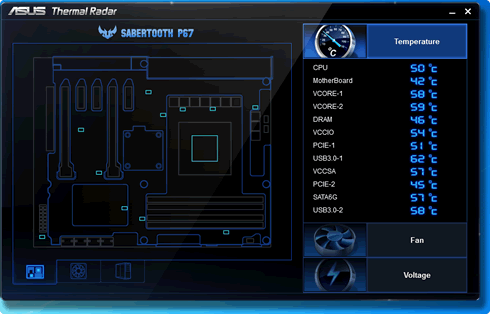
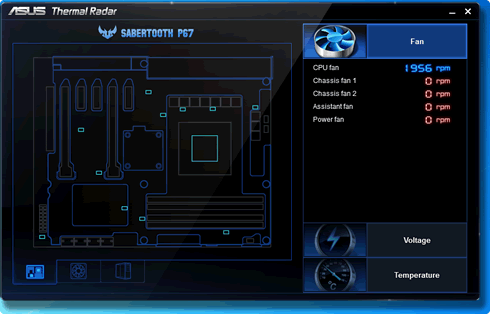
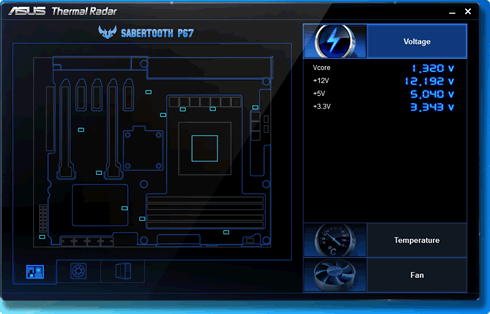
The Asus AI Suite II bundled with the board is an interesting utility that monitors the condition of the motherboard in real time. Using 12 sensors situated around the motherboard in strategic places, the utility monitors crucial component temperatures and it provides fan speed and voltage information:

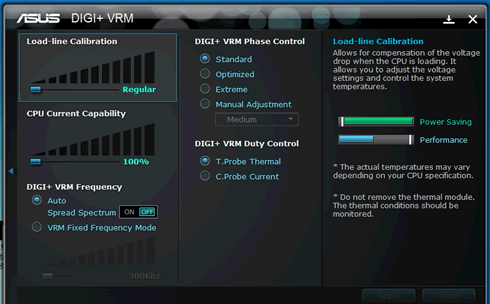
Another utility is the Asus DIGI+VRM, which gives you the management over the Phase Control above other elements. It allows you to play with the motherboard's settings and experiment with operation profiles based on energy efficiency or performance.
Of course the same options can be also set through the pages of the Asus uEFI bios .
The ASUS DIGI+ VRM design upgrades motherboard power delivery. The 8+2 digital architecture provides power efficiency, generating less heat to enhance longer component lifespan. With ASUS DIGI+ VRM, you can adjust power phase performance, enabling new PWM voltage and frequency modulation controls.
Generally, these settings are great to spend some time playing with them. However, advanced users and overclockers will prefer having greater control over their board by changing critical parameters such as voltages through the uEFI BIOS.