
Breaking News

G.SKILL Showcases DDR5-9200 1.1V 16GBx2 High-Speed CU-DIMM Memory Kit Sony Introduces BRAVIA 9 II and BRAVIA 7 II RGB TVs and the BRAVIA Theatre Trio Creative Announces Sound Blaster AE-X Acer Expands Gaming Portfolio With Predator Atlas 8 Handheld Powered by Intel COLORFUL Presents Limited Edition iGame GeForce RTX 5070 Ultra OC 12GB x 007 First Light Edition

logo

  • Share Us
    • Facebook
    • Twitter
  • Home
  • Home
  • News
  • Reviews
  • Essays
  • Forum
  • Legacy
  • About
    • Submit News

    • Contact Us
    • Privacy

    • Promotion
    • Advertise

    • RSS Feed
    • Site Map

Search form

Asus SaberTooth P67 B3 review

Sep 5,2011 0

4. Tests


Review Pages

1. Features
2. A closer look
3. The uEFI BIOS
4. Tests
5. Overclocking
6. Final words


Test setup:

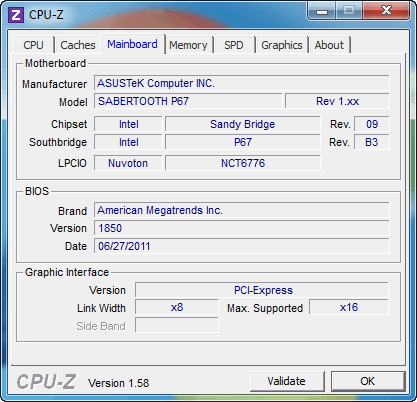
- Motherboard: Asus Sabertooth P67 with 1850 motherboard
- CPU: Intel i5-2500K retail
- CPU Cooler: Arctic Cooling Freezer 13 Extreme
- Memory: Crucial Ballistix DDR3 PC3-17000 (BL2KIT25664FN2139)
- VGA: Gigabyte GT-430
- HDD: WD 5001ALLS (500GB, 7200rpm Black Scorpio series)
- OS: Windows 7 x64 SP1 with all the latest updates installed
- VGA driver: Nvidia 275.33 x64 drivers

Our Asus Sabertooth motherboard had the 1850 BIOS installed. After installing the Intel i5-2500K processor under the Auto mode (BIOS), the Enhanced Intel SpeedStep Technology (EIST) kicked in, ready to offer CPU cores running from from 1.60GHz up to 3.51GHz, by controlling multiplier:

The memory was locked at DDR3-1333 and some manual configuration was needed in order to get the DDR3-2133 speed:

In order to do this, go to the uEFI's Advanced area and select the XMP mode to the "Overclock" page. The motherboard will read - provided that your memory supports it - the XMP settings and adjust memory's timing accordingly. In our case, the memory was set to 2133MHz and the CPU at 3.70GHz (automatically):
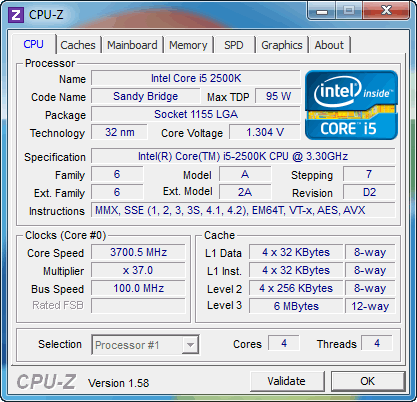
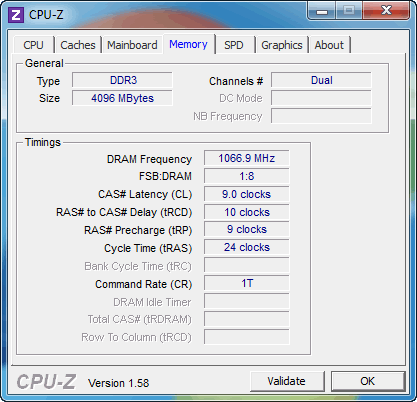
We ran a series of tests with the CPU core set to 1.6 ~3.5GHZ, 3.7GHz and finally after overclocking the CPU (see next page) at 4.8GHz. Here are the results:

 
PCMark 7
CineBench R11.5
Sandra Memory
Intel i5-2500k @ 1.6~3.5GHz with DDR3-1333
3128
5.40pts
17.70MB/sec
Intel i5-2500k @ 3.7GHz with DDR3-2133
3272
5.90pts
27.72MB/sec
Intel i5-2500K @ 4.8GHz with DDR3-2133
3621
7.59pts
28.00MB/sec

Without messing up with the Bios settings, we got 3272 points from PC Mark 7 at 3.7GHz, a significant improvement over the results we got with the CPU running at default speeds (3128 points). At the same time, we got an impressive memory boost from 16.80MB/sec to 27.72MB/sec.

Overclocking the processor at 4,8GHz further boosted the PC Mark 7 performance to 3621 points while the CineBench R11.5 result was also increased to 7.59pts over the previous 5.90pts. At the same time, the memory performance was not dramatically affected.


Review Pages

1. Features
2. A closer look
3. The uEFI BIOS
4. Tests
5. Overclocking
6. Final words


Pages

  • « first
  • ‹ previous
  • 1
  • 2
  • 3
  • 4
  • 5
  • 6
  • next ›
  • last »

ASUS

Tags: ASUS
Previous Post
Foxconn Rattler P67 review (Quantum Force)
Next Post
Numark DJ2Go Controller review

Related Posts

  • ASUS Announces T1 GeForce RTX 5070 and RTX 5060 Ti Graphics Cards

  • ASUS Announces ProArt GeForce RTX 5090 Graphics Card

  • ASUS Announces ProArt Display OLED PA27USD and PA32USD

  • ASUS Announces TUF Gaming Platinum Power Supply Series

  • ASUS Announces ProArt PA40SU USB4 SSD Enclosure

  • ASUS Showcases Comprehensive AI-Powered Creator Workflows at NAB Show 2026

  • ASUS Announces ProArt Router PRT-BE5000 and ProArt Switch PQG-U1080

  • ASUS Announces Intel Core Ultra 200S Plus Series Support on W880, Z890, Q870, B860 and H810 Motherboards

Latest Reviews

Swit NP-FZ100 Battery
Cameras

Swit NP-FZ100 Battery

The Technology Stack Behind Modern Digital Gaming Platforms
Consumer Electronics

The Technology Stack Behind Modern Digital Gaming Platforms

be quiet! Dark Rock Pro 6
Cooling Systems

be quiet! Dark Rock Pro 6

How Online Casinos Use Encryption, Verification, and Risk Controls to Build User Trust
Enterprise & IT

How Online Casinos Use Encryption, Verification, and Risk Controls to Build User Trust

Why Low-Latency Infrastructure Matters More Than Raw Specs
Enterprise & IT

Why Low-Latency Infrastructure Matters More Than Raw Specs

Popular News

TEAMGROUP Launches EXPERT P34F Find My External SSD

TEAMGROUP Launches EXPERT P34F Find My External SSD

CORSAIR announces Vanguard Pro 96 and Vanguard 96 Gaming Keyboards

CORSAIR announces Vanguard Pro 96 and Vanguard 96 Gaming Keyboards

MSI Launches FORGE GK600 TKL WIRELESS Special Edition Compact Mechanical Keyboard

MSI Launches FORGE GK600 TKL WIRELESS Special Edition Compact Mechanical Keyboard

Samsung announces Galaxy Tab S11 and Galaxy S25 FE series

Samsung announces Galaxy Tab S11 and Galaxy S25 FE series

Viltrox Showcases Upcoming Lens Lineup and New TTL Flash at IBC 2025

Viltrox Showcases Upcoming Lens Lineup and New TTL Flash at IBC 2025

Panasonic Introduces the First Ultra-Telephoto Zoom Lens in the LUMIX S Series

Panasonic Introduces the First Ultra-Telephoto Zoom Lens in the LUMIX S Series

MSI Launches DATAMAG 40Gbps Magnetic Portable SSD

MSI Launches DATAMAG 40Gbps Magnetic Portable SSD

Viltrox Joins the L-Mount Alliance, Expanding Creative Possibilities

Viltrox Joins the L-Mount Alliance, Expanding Creative Possibilities

Main menu

  • Home
  • News
  • Reviews
  • Essays
  • Forum
  • Legacy
  • About
    • Submit News

    • Contact Us
    • Privacy

    • Promotion
    • Advertise

    • RSS Feed
    • Site Map
  • About
  • Privacy
  • Contact Us
  • Promotional Opportunities @ CdrInfo.com
  • Advertise on out site
  • Submit your News to our site
  • RSS Feed
