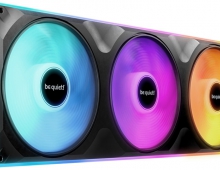
be quiet! Light Loop IO LCD
4. Tests
- CPU: AMD Ryzen 9 7950X
- Thermal Paste: Noctua NT-H2 thermal compound
- Open Case: StreaCom BC1 V2 Bench Table
- Motherboard: Asus ProArt X670E-CREATOR WIFI with 3902 BIOS
- Memory: 2x24GB Crucial DDR5-6000 CL48 (EXPO Profile)
- PSU: be quiet! Dark Pro 13 1300Watt
- Main Storage: Samsung 980Pro 1TB
- VGA: MSI GeForce RTX 4090 SUPRIM X 24G
- Operating system: Windows 11 x64 + latest motherboard/AMD chipset drivers installed
- Software: OCCT Enterprise Edition (2 sec interval monitor)
- Ambient room temperature ~ 24 Celsius (with AC climate control) - Environment Temperature measurements: Precision Gold N09AQ Envirometer Meter
We performed tests at three CPU TDP loads, set under Bios > AI Tweaker > Precision Boost Overdrive > AMD Eco Mode:
- cTDP 65Watt (real 90Watt)
- cTDP 105Watt (real 145watt)
- cTDP ~222Watt (via PBO at auto)
while we set the following voltages for all tests.
- CPU Core Voltage: Auto
- CPU SOC Voltage: 1.25V
- CPU VDDIO / MC Voltage: Auto
- Misc Voltage: 1.10V
At the OCCT software, we performed the Stability Test->CPU Test 15mins duration with various settings to get the maximum thermal production from the AMD 7950X.
Tests Disclaimer: Despite setting CPU voltages manually, the motherboard may supply the CPU with slightly different voltages, in some cases resulting in higher working temperatures. Our results are valid for the test system described above, and using other configurations may produce different results. Using other stress test software may also produce different test results.
Before each run, we clean the CPU surface with 95% isopropyl alcohol and paper roll and we apply each thermal paste with the same methodology (central dot, small X lines, and small dots) to cover the full surface of the CPU area.
Since most users will use the be quiet! IO Center software, we used the included quiet/performance default curves to get the performance that users will also get. Note that you could "theoretically" use the Asus software to control the included fans and pump; however, by default the system cannot recognize them, so you would need to manually build the fan/pump curves.
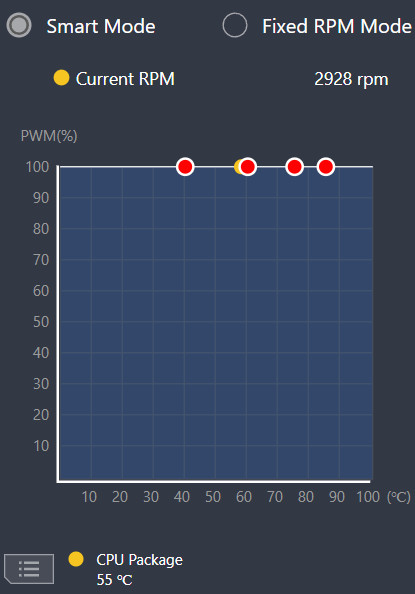
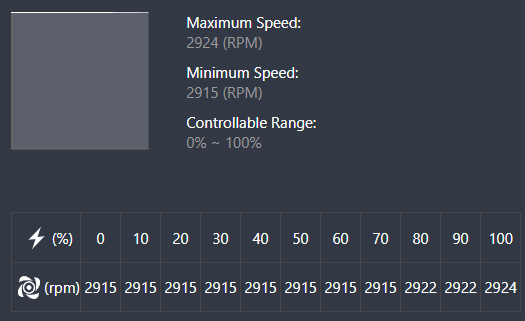
The Light Loop IO LCD can use sensor either from CPU or Liquid temperature
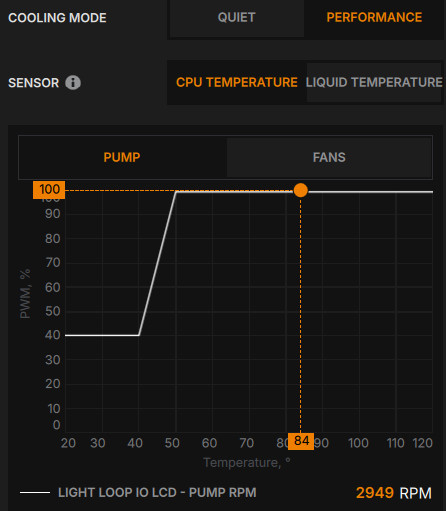
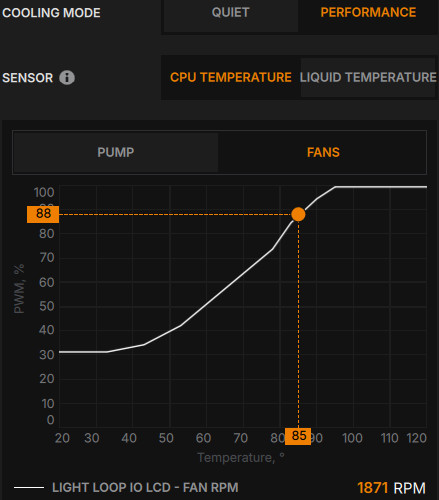
while the quiet mode has different fan/pump curves
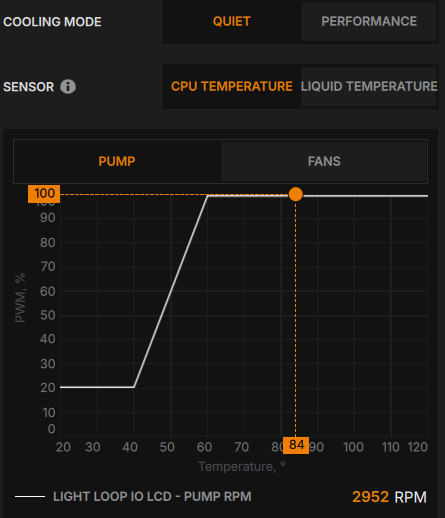
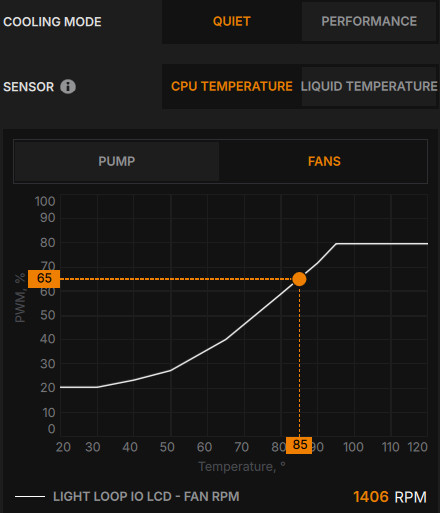
Looking at the default curves in IO Center, the two General-mode presets diverge mostly in fan behavior, not pump behavior. In Performance mode, the pump idles around 40% PWM and ramps to 100% by ~50°C CPU temp; fans idle around 30% and climb more gradually, reaching only 88% PWM (1871 RPM) even at 85°C. In Quiet mode, the pump idles lower (~20%) but still ramps to 100% PWM by ~60–65°C — nearly as aggressive as Performance mode once things heat up. The fans, though, are held back much harder: at the same 85°C reading, Quiet mode fans are running just 65% PWM (1406 RPM) versus Performance mode's 88%. In other words, be quiet! keeps the pump doing most of the thermal work in both modes and uses the fans as the main lever for the noise/performance trade-off — which lines up with the ~2°C gap between P and Q mode seen in the 222W thermal benchmarks above, and matches the general engineering logic that pump noise is less objectionable than fan noise at a given SPL.
Starting from the low 65watt AMD Eco TDP, we used the following OCCT settings
- Instruction Set: Auto
- Data Set: Large
- Mode: Normal
- Load Type: Variable
- Thread Settings: Auto
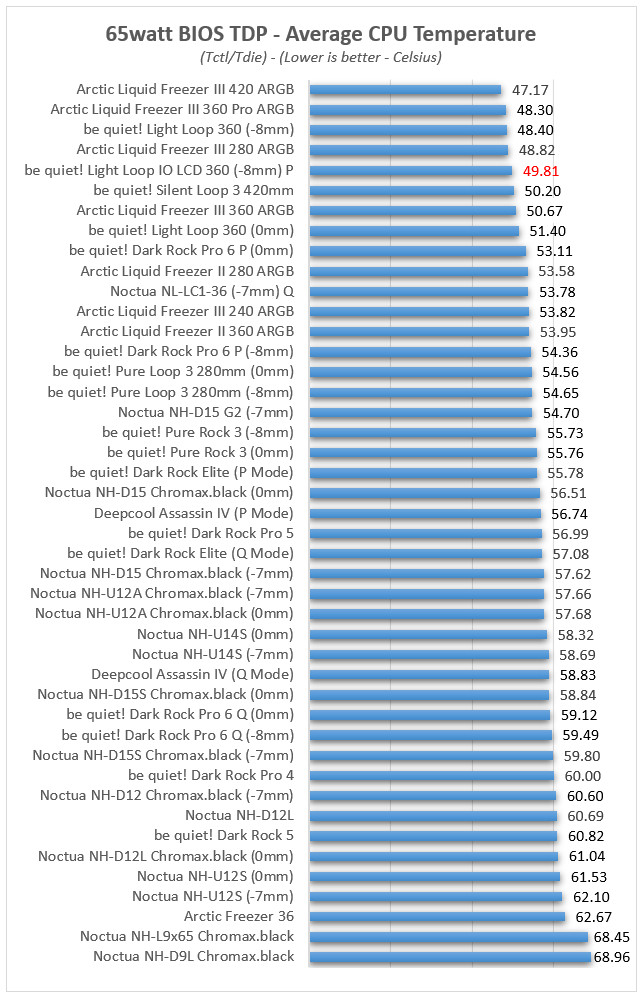
At light loads, the be quiet! Light Loop IO LCD 360 (P mode) scores 49.81°C.
At the 105watt AMD Eco TDP setting, we used the following OCCT settings
- Instruction Set: Auto
- Data Set: Large
- Mode: Normal
- Load Type: Variable
- Thread Settings: Auto
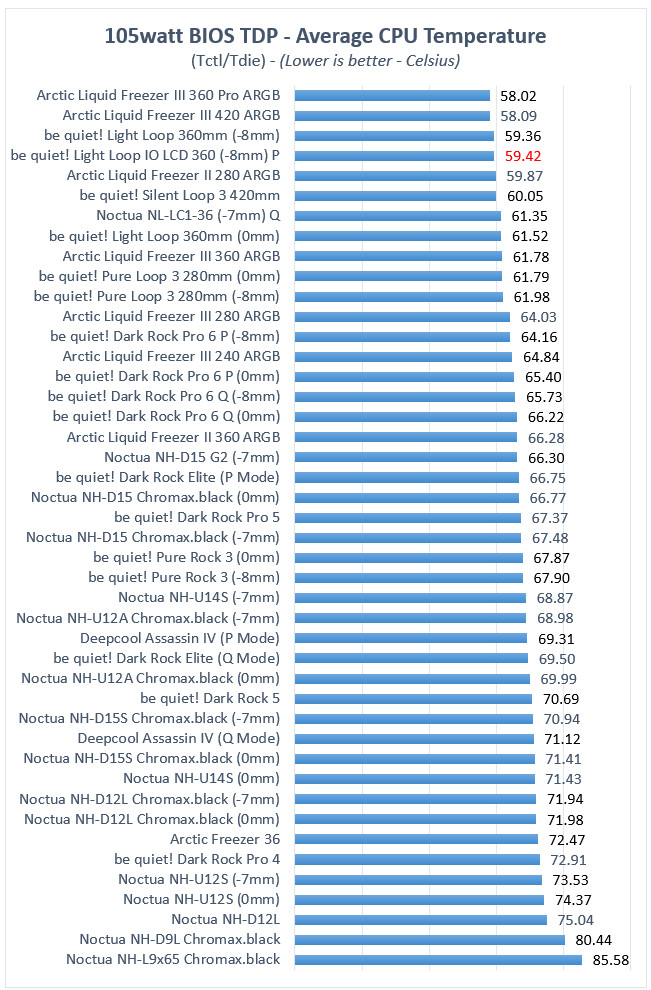
At the mid-load scenario, the be quiet! Light Loop IO LCD 360 also performed without issues, recording 59.42°C. Here it's essentially tied with the standard Light Loop 360mm (59.36°C) and sits just ahead of be quiet!'s own Silent Loop 3 420mm (60.05°C) despite the smaller radiator — a good result. It's still comfortably ahead of every air cooler in the chart.
At the 222watt AMD TDP setting, we used the following OCCT settings
- Instruction Set: SSE
- Data Set: Small
- Mode: Extreme
- Load Type: Steady
- Thread Settings: Auto
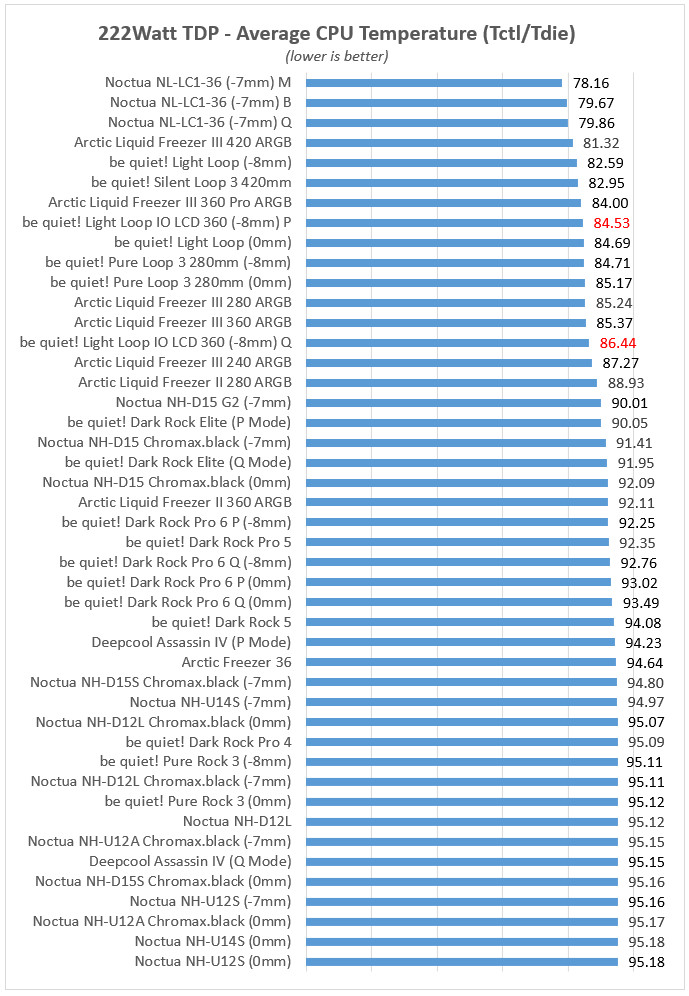
At extreme loads, the Light Loop IO LCD 360 scored 84.53°C in P mode and 86.44°C in Q mode. At this power level the gap to the very top performers (Noctua's NL-LC1-36 units at 78–80°C, Arctic Liquid Freezer III 420 at 81.3°C) opens up more noticeably, and it lands just behind the standard screen-less Light Loop 360 (84.69°C in 0mm config, though that's a different fan offset than the IO LCD's 84.53°C, so not a perfectly clean comparison) and be quiet!'s own Silent Loop 3 420mm (82.95°C, larger radiator). It's still solidly ahead of every air cooler and the majority of other AIOs in the chart, just not chart-topping at the extreme end.
Temperature-per-watt efficiency at 222W: P mode scores 0.3770 (lower is better) and Q mode 0.3852 — both slightly better than the standard screen-less Light Loop 360 at 0.3788, meaning the IO LCD variant isn't paying a meaningful thermal penalty for the added display and IO Controller hardware, at least in this dataset.
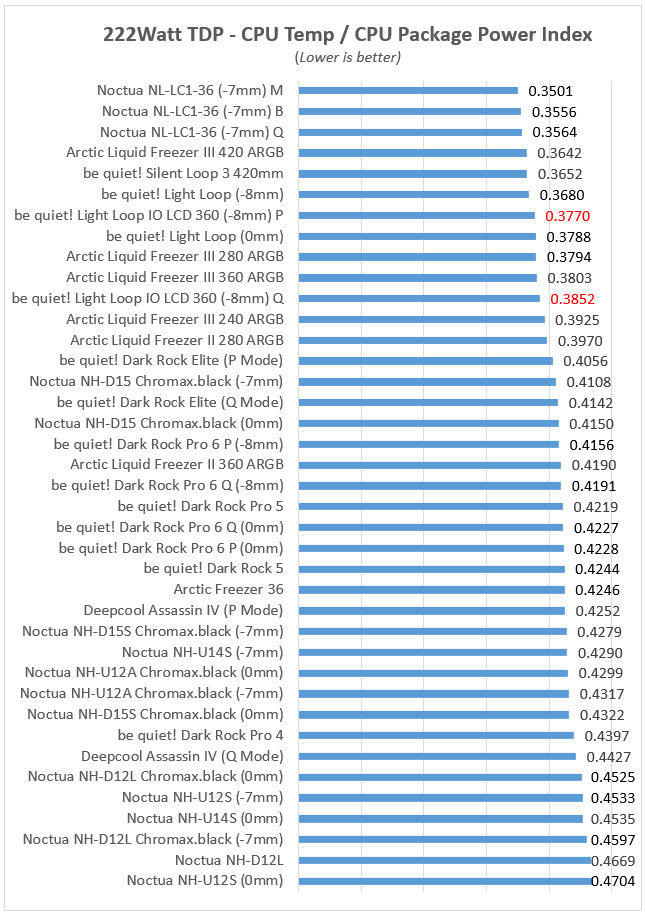
The display and IO Controller additions don't appear to have cost the Light Loop IO LCD meaningful cooling performance relative to be quiet!'s own screen-less Light Loop — the two track each other closely across all three power levels, with the IO LCD occasionally edging ahead. It's a solid, competitive 360mm AIO: not the best in class (that honor at high loads goes to the Arctic Liquid Freezer III and a couple of specialty Noctua units), but comfortably mid-to-upper tier and well clear of every air cooler tested. The gap between P and Q mode at 222W (nearly 2°C) tracks with what the default curves show (see the Cooling Setup section below) — Quiet mode holds the fans back noticeably harder than Performance mode while keeping the pump nearly as aggressive, so that ~2°C is really the cost of quieter fan operation specifically, not a pump limitation.
How it stacks up against similarly priced display AIOs
Two coolers sit closest to the Light Loop IO LCD in price and positioning: the NZXT Kraken Elite 360 (regularly $279.99, frequently on sale around $229.99) and the Corsair iCUE Link Titan 360 RX LCD (MSRP was $220, street price has settled around $195–220). Both, like the be quiet!, put a round IPS display on the pump head and lean on RGB and software customization as much as raw cooling.
A few things stand out from the spec sheets:
- Screen size is where be quiet! is genuinely behind. At 2.1", its display is the smallest of the three — NZXT's Kraken Elite runs a noticeably larger 2.72" panel at a sharper 640x640 resolution. Corsair matches be quiet!'s 2.1"/480x480 panel almost exactly, but claims higher peak brightness (600 vs. 500 nits).
- Warranty is a real gap. Both NZXT and Corsair back their display AIOs with 6-year warranties; be quiet!'s is 3 years. That's double the coverage for roughly the same or less money, and it's worth weighing against be quiet!'s reputation for build quality — a longer warranty is a tangible number, reputation is not.
- "Single cable" is a shared marketing claim, not a unique one. NZXT's breakout cable and Corsair's iCUE Link System Hub both make similar simplified-cabling pitches to be quiet!'s IO Controller — and, like the IO Controller, none of them actually reduce the total connections to one; they consolidate what would otherwise be several headers-worth of cabling into a single hub or breakout point that still needs its own power and data connections. A review of the Corsair unit specifically flagged that the "single hub" framing undersells how much cabling is still involved once you account for the System Hub's own power and header requirements — a caution worth extending to any AIO's "one cable" pitch, be quiet!'s included.
Bottom line on positioning: if display size and screen resolution are what you're shopping on, the Kraken Elite is the stronger pick at a similar price. If you want the smallest footprint for the display specifically and don't mind be quiet!'s shorter warranty, the Light Loop IO LCD and Titan 360 RX LCD are closely matched on paper, with be quiet! sitting somewhat higher in price for what looks like fairly similar hardware.
At almost exactly the same $240–250 price point, three coolers make three different bets on what matters most:
- Noctua NL-LC1-36 ($249.90–249.95) — no display, no RGB at all, and it's actually one of the best ever coolers we ever tested. It backs that up with a 6-year warranty and a reputation, among testers, for exceptional acoustic refinement and build quality. If pure cooling performance and long-term reliability are what you're paying $250 for, this is the direct competitor to beat. The trade-off is obvious: zero display, zero lighting, and Noctua's familiar brown/beige color scheme, which won't suit every build aesthetic.
- Lian Li HydroShift II LCD-C 360TL ($239.99) — matches be quiet!'s exact display spec (2.1", 480×480, 500 nits) and pushes further on aesthetics with side-mounted "tubeless" tubing for a cleaner look, plus a 6-year warranty. We haven't reviewed this model so we cannot comment upon its performance.
- Phanteks Glacier One 360M25-LCD ($149.99) — a genuine outlier worth mentioning even though it's priced a tier below: it pairs a much larger 6" IPS display (1480×720, vs. be quiet!'s 2.1"/480×480) with a $100 lower price. If display size is your main draw and you're willing to gamble on a newer, less-established product line without the benchmark track record of the others here, it's hard to ignore on spec alone.