
Breaking News

G.SKILL Showcases DDR5-9200 1.1V 16GBx2 High-Speed CU-DIMM Memory Kit Sony Introduces BRAVIA 9 II and BRAVIA 7 II RGB TVs and the BRAVIA Theatre Trio Creative Announces Sound Blaster AE-X Acer Expands Gaming Portfolio With Predator Atlas 8 Handheld Powered by Intel COLORFUL Presents Limited Edition iGame GeForce RTX 5070 Ultra OC 12GB x 007 First Light Edition

logo

  • Share Us
    • Facebook
    • Twitter
  • Home
  • Home
  • News
  • Reviews
  • Essays
  • Forum
  • Legacy
  • About
    • Submit News

    • Contact Us
    • Privacy

    • Promotion
    • Advertise

    • RSS Feed
    • Site Map

Search form

be quiet Silent Loop 3 420mm

Feb 12,2025 0

4. Tests


Review Pages

1. Introduction
2. Retail Package
3. Installation
4. Tests
5. Conclusion


For our tests we used an open test air test system, to avoid interference from case fans. Then we set the room temperature around 24 Celsius via A/C control. All tests are done with the same system, operating system, drivers, and software running in the background. CPU fans were controlled via software with the same curve fan and the following test system based upon AMD 7950X: 
  • CPU: AMD Ryzen 9 7950X
  • Thermal Paste: Noctua NT-H2 thermal compound
  • Open Case: StreaCom BC1 V2 Bench Table
  • Motherboard: Asus ProArt X670E-CREATOR WIFI with 2704 BIOS
  • Memory: 2x24GB Crucial DDR5-6000 CL48 (EXPO Profile)
  • PSU: be quiet! Dark Pro 13 1300Watt
  • Main Storage: Samsung 980Pro 1TB
  • VGA: MSI GeForce RTX 4090 SUPRIM X 24G
  • Operating system: Windows 11 x64 + latest motherboard/AMD chipset drivers installed
  • Software: OCCT Enterprise Edition (2 sec interval monitor)
  • Ambient room temperature ~ 24 Celsius (with AC climate control) - Environment Temperature measurements: Precision Gold N09AQ Envirometer Meter

We performed four tests depending on the CPU TDP load that can be set under Bios-> AI Tweaker-> Precision Boost Overdrive->AMD Eco Mode->

  • cTDP 65Watt (real 90Watt)
  • cTDP 105Watt (real 145watt)
  • cTDP ~ 222Watt (via PBO at auto)

while we set the following voltages for all tests.

  • CPU Core Voltage: Auto
  • CPU SOC Voltage: 1.25V
  • CPU VDDIO / MC Voltage: Auto
  • Misc Voltage: 1.10V

At the OCCT software, we performed the Stability Test->CPU Test 15mins duration with various settings to get the maximum thermal production from the AMD 7950X.

Tests Disclaimer: Despite placing CPU voltages manually, the motherboard may supply the CPU with slightly different voltages, resulting in some cases higher temperatures that also result in higher working temperatures. Our results are valid with the above test system and using other variations may result in different results. Using other stress test software may also introduce different test results.

Before each run, we clean the CPU surface with 95% isopropyl alcohol and paper roll and we apply each thermal paste with the same methodology (central dot, small X lines, and small dots) to cover the full surface of the CPU area.

The Asus motherboard presented its rotation curve with a %10 gap, as we can see the maximum RPM.
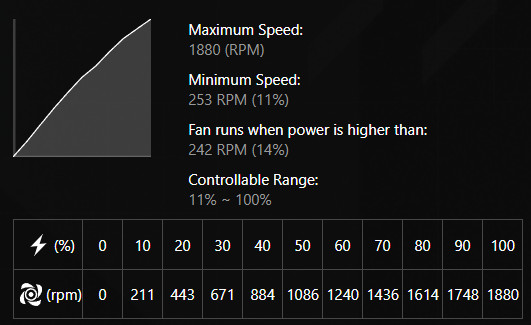
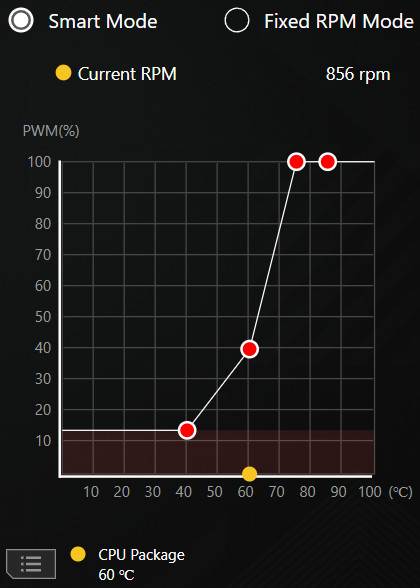
All of our tests are done with the default Asus PWM curve fan.
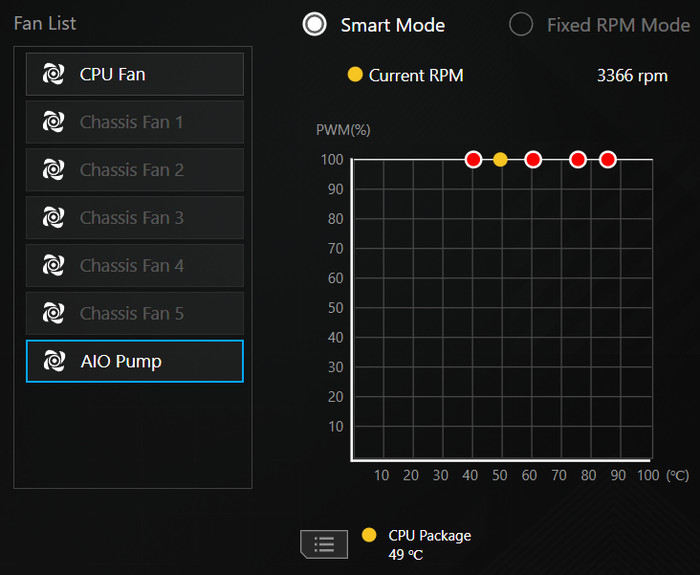
While the AIO Pump is set at Smart Mode with 100% PWM.
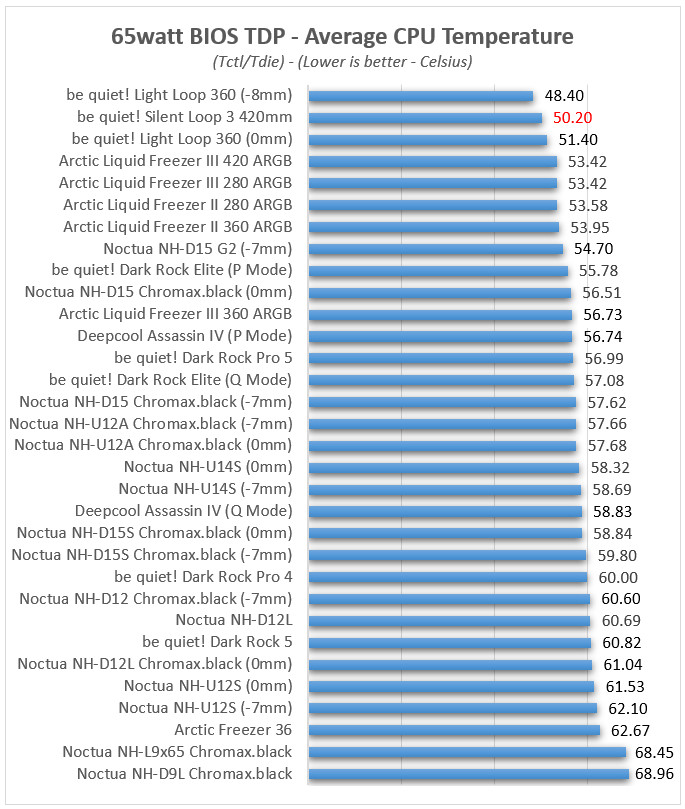
Below are the test results for the be quiet! Silent Loop 3 420mm product. Note the variation temperatures during different loads and variation tests.

Test Avg Temperatures Highest Temperatures
65Watt AMD ECO (CPU+RAM Default Test) 50.20 51.25
90 Watt AMD ECO (CPU+RAM Default Test) 60.05 67.00
170 Watt AMD ECO (CPU+RAM Default Test) 69.61 81.13
170 Watt AMD ECO (CPU Test. AVX2, Normal, Variable) 79.03 81.88
218 Watt (CPU Test, AVX2, Extreme, Steady) 75.16 76.50
222 Watt (CPU Test, SSE, Extreme, Steady) 82.95 84.63

Starting from the low 65watt AMD Eco TDP, we used the following OCCT settings

  • Instruction Set: Auto
  • Data Set: Large
  • Mode: Normal
  • Load Type: Variable
  • Thread Settings: Auto

The be quiet! Silent Loop 3 420mm seems to be very close to the Light Loop 360mm (-8mm offset), which has somewhat better performance, despite its "smaller" size.
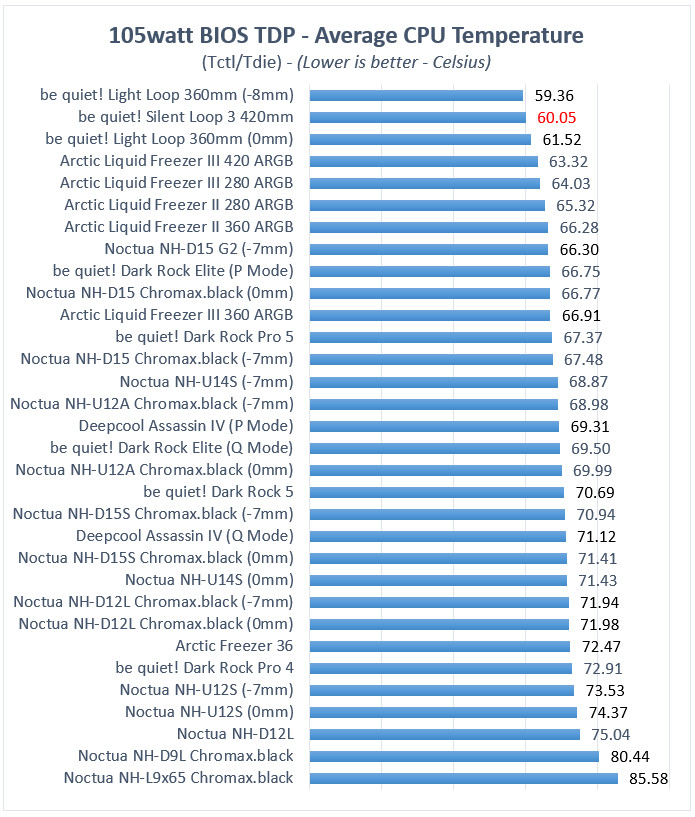
At the 105watt AMD Eco TDP setting, we used the following OCCT settings

  • Instruction Set: Auto
  • Data Set: Large
  • Mode: Normal
  • Load Type: Variable
  • Thread Settings: Auto

Increasing TDP seems to not affect the be quiet! Silent Loop 3 420mm, again very good results.
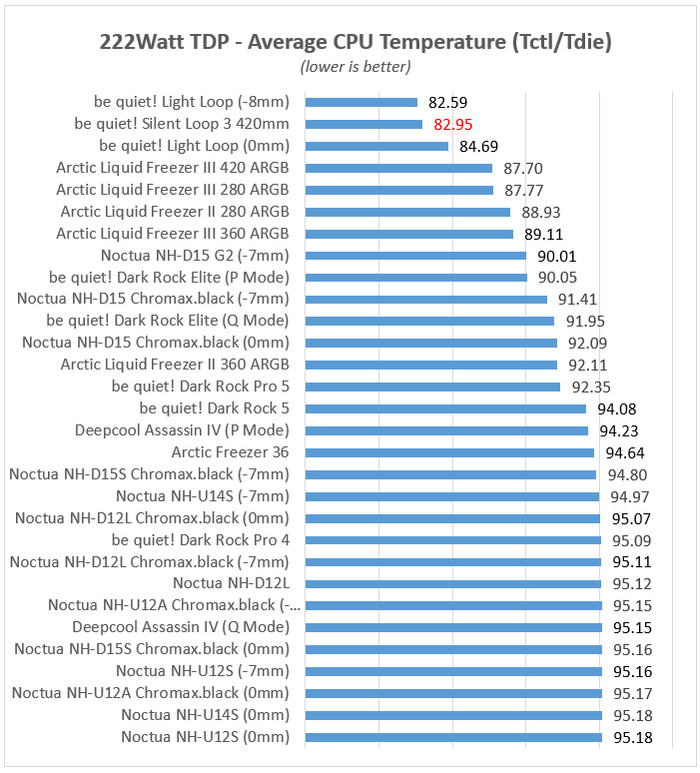
At the 222watt AMD TDP setting, we used the following OCCT settings

  • Instruction Set: SSE
  • Data Set: Small
  • Mode: Extreme
  • Load Type: Steady
  • Thread Settings: Auto

At the maximum possible TDP with the AMD 7950X for our tests, the be quiet! Silent Loop 3 has very good performance, much lower than the competition.
 

Review Pages

1. Introduction
2. Retail Package
3. Installation
4. Tests
5. Conclusion


Pages

  • « first
  • ‹ previous
  • 1
  • 2
  • 3
  • 4
  • 5
  • next ›
  • last »

be quiet!

Tags: be quiet!
Previous Post
SoundPeats PearlClip Pro
Next Post
Why Online Slots Are Becoming the Go-To Choice for Casino Enthusiasts

Related Posts

  • be quiet! Dark Rock Pro 6

  • be quiet! introduces Dark Rock Pro 6 and Dark Rock 6

  • be quiet! Pure Power 13M 1200W

  • be quiet! Dark Perk Mice

  • be quiet! Power Zone 2 1200W

  • be quiet! enters high-end gaming mouse market with Dark Perk Ergo and Dark Perk Sym

  • be quiet! announces new Power Zone 2 1200W and Pure Power 13 M 1200W

  • be quiet! at CES 2026

Latest Reviews

Swit NP-FZ100 Battery
Cameras

Swit NP-FZ100 Battery

The Technology Stack Behind Modern Digital Gaming Platforms
Consumer Electronics

The Technology Stack Behind Modern Digital Gaming Platforms

be quiet! Dark Rock Pro 6
Cooling Systems

be quiet! Dark Rock Pro 6

How Online Casinos Use Encryption, Verification, and Risk Controls to Build User Trust
Enterprise & IT

How Online Casinos Use Encryption, Verification, and Risk Controls to Build User Trust

Why Low-Latency Infrastructure Matters More Than Raw Specs
Enterprise & IT

Why Low-Latency Infrastructure Matters More Than Raw Specs

Popular News

TEAMGROUP Launches EXPERT P34F Find My External SSD

TEAMGROUP Launches EXPERT P34F Find My External SSD

CORSAIR announces Vanguard Pro 96 and Vanguard 96 Gaming Keyboards

CORSAIR announces Vanguard Pro 96 and Vanguard 96 Gaming Keyboards

MSI Launches FORGE GK600 TKL WIRELESS Special Edition Compact Mechanical Keyboard

MSI Launches FORGE GK600 TKL WIRELESS Special Edition Compact Mechanical Keyboard

Samsung announces Galaxy Tab S11 and Galaxy S25 FE series

Samsung announces Galaxy Tab S11 and Galaxy S25 FE series

Viltrox Showcases Upcoming Lens Lineup and New TTL Flash at IBC 2025

Viltrox Showcases Upcoming Lens Lineup and New TTL Flash at IBC 2025

Panasonic Introduces the First Ultra-Telephoto Zoom Lens in the LUMIX S Series

Panasonic Introduces the First Ultra-Telephoto Zoom Lens in the LUMIX S Series

MSI Launches DATAMAG 40Gbps Magnetic Portable SSD

MSI Launches DATAMAG 40Gbps Magnetic Portable SSD

Viltrox Joins the L-Mount Alliance, Expanding Creative Possibilities

Viltrox Joins the L-Mount Alliance, Expanding Creative Possibilities

Main menu

  • Home
  • News
  • Reviews
  • Essays
  • Forum
  • Legacy
  • About
    • Submit News

    • Contact Us
    • Privacy

    • Promotion
    • Advertise

    • RSS Feed
    • Site Map
  • About
  • Privacy
  • Contact Us
  • Promotional Opportunities @ CdrInfo.com
  • Advertise on out site
  • Submit your News to our site
  • RSS Feed