DualSense Edge wireless controller launches globally today
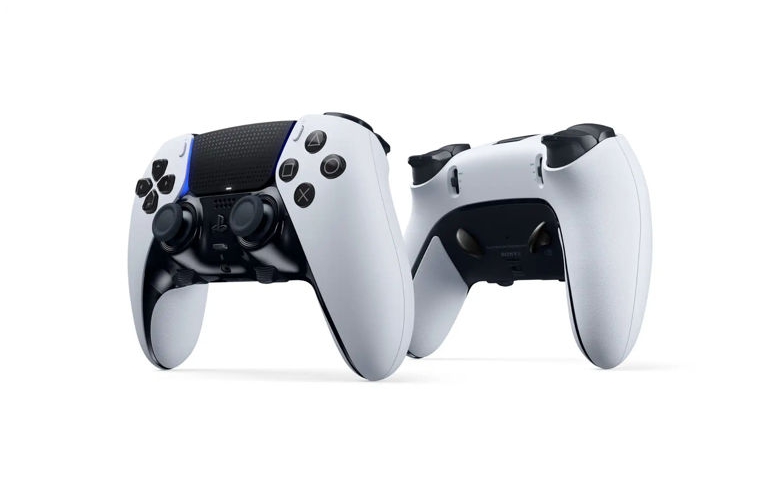
Τhe DualSense Edge wireless controller is now available globally starting today. We’re excited for the PlayStation community to experience the all-new, highly customizable controller designed for players to create a personalized gaming experience that adapts to their playstyle.
Built from the ground up for PS5, the DualSense Edge controller has many customization options available, including swappable stick caps and back buttons, L2/R2 stop sliders, button remapping, the ability to fine-tune stick sensitivity, stick dead zones, and trigger dead zones, and an on-controller user interface to seamlessly create and swap between custom profiles.
When designing the controller, our team at PlayStation gathered insights from professional gamers and esports players to ensure the DualSense Edge controller is competition ready, incorporating features like a 2.8M (9.1FT) USB braided cable and connector housing that locks the cable to the controller, and a carrying case to store the controller and its components. Players can even charge their controller via USB connection while it’s stored in the carrying case.
For competitive gamers or players who just prefer a personalized controller experience, the DualSense Edge controller is designed to be customized from top to bottom to adapt to each player’s preferences and unique playstyle. For insights to help players get started, let’s dive into the custom profiles I’ve set up on my own DualSense Edge controller to play my favorite games.
As an FPS fan, my setup for Call of Duty: Modern Warfare II focuses on precise aim, customized loadouts, and team communication:
- Changeable stick caps and stick sensitivity: I swap out my right stick cap with the High Dome stick cap and pair it with the Precise stick sensitivity preset curve for smoother, more precise aiming.
- L2/R2 stop sliders: I typically set the stop sliders on both the L2 and R2 buttons to the Short or Medium setting for quicker reaction to enemy encounters.
- Back buttons and button mapping: I’ve found it helpful for my own playstyle to map the back buttons to actions like jumping or swapping loadouts, so I can keep my thumbs on the sticks during tense moments.
- Fn buttons: When communicating with my team, I often use the Fn buttons to adjust the audio balance between the game and chat, so I can alternate between callouts and listening for the enemy team’s movements.
When playing action titles like God of War Ragnarök, I adjust my custom profile to ensure that I have key moves at my fingertips:
- Adjustable stick sensitivity: The Quick preset curve is my preferred stick sensitivity setting for the left and right sticks for fast camera adjustments, movement, and aiming. Occasionally, I swap to a Dynamic preset curve while in-game for sequences where I need to aim carefully and also turn quickly.
- Back buttons and button mapping: I swap to the Half Dome back buttons as they work well with how I typically grip the controller, allowing me to quickly dodge or recall my axe while simultaneously moving around the map and keeping an eye on enemies.
When loading into FIFA 23, my focus is on setting up for skill moves and quick maneuvers:
- Adjustable stick sensitivity: I set up my custom profile to use the Digital preset curve for the right stick, which makes it easier for me to use skill moves.
- L2/R2 stop sliders and trigger dead zones: I adjust the trigger dead zones in addition to changing the stop sliders to the Short setting – combining both of these adjustments makes it even quicker for me to activate the L2 and R2 buttons to sprint or shield.
- Back buttons and button mapping: I have my two back buttons assigned to shoot and pass, so I can also do a skill move while navigating the field.
We look forward to seeing how players make use of the controller’s extensive features to craft their own gaming experience. Find out more about the DualSense Edge wireless controller here on PlayStation.com.
Hear about how the DualSense Edge wireless controller was created – told by those who helped design and develop it.
Get it directly from PlayStation
In the US, UK, France, Germany, Netherlands, Belgium, and Luxembourg, the DualSense Edge wireless controller and replaceable stick module (sold separately) are available starting today only via direct.playstation.com. It will be offered at other participating retailers starting February 23, 2023.