
Breaking News

EnGenius Brings AI-Powered Analytics and Sophisticated Cloud Management to Existing ONVIF Cameras Introducing the 2026 Blade 16 ASRock Unveils Intel Arc Pro B70 Graphics Cards, Redefining Professional Workspaces Sony Unveils New BRAVIA Theatre Home Audio Lineup for Enhancing Home Cinema Experience GoPro to Unveil New Generation of Cameras at the April 2026 NAB Show

logo

  • Share Us
    • Facebook
    • Twitter
  • Home
  • Home
  • News
  • Reviews
  • Essays
  • Forum
  • Legacy
  • About
    • Submit News

    • Contact Us
    • Privacy

    • Promotion
    • Advertise

    • RSS Feed
    • Site Map

Search form

DVDXCopy

Dec 20,2002 0

2. Page 2


Review Pages

1. Page 1
2. Page 2
3. Page 3


DVDXCopy - Page 2

We have finished with the basic options and it's about time to start the procedure. Let's press the "Copy Now" button. The software will copy the contents of the original DVD disc to the HDD, will modify the necessary files and afterwards it will burn the disk(s) to a DVD±R/RW media. 321 Studios suggest using DVD-RW/+RW in order to test the software first, but now days DVD-R media are also affordable.

The "Output Disk is ready" window verifies that a blank disc is loaded to the DVD±R/RW and the software is ready to proceed directly to the writing part; else we will be prompted to insert a blank disc. That applies in the case we have a reader and a writer. The drive's supported ripping speed and the CPU resources of your PC mainly affect the reading time. With a LiteOn LTD-163 it took 15mins to rip the disc to HDD, with a rather slow PC, for the current standard (AMD Duron 700 MHz). Note that if you decide not to burn the disk the data from HDD will be erased, so you have to repeat the same process for future usage.

After having the first disc contents is on the HDD, the software will start burning. Currently the software uses Nero Burning engine. With a 2X DVD-R media and with Pioneer DVR-104, the duration of the task will be approximately 25mins.

After a successful burning of the first disc, the software proceeds to the second disk

For making a backup of the Matrix movie, with LiteOn LTD-163 (source) and Pioneer DVR-104 (writer), we needed 1:14:34mins.

A successful message will appear with a false, however, Kb/s calculation:

Let's see now if our disc works correctly. We used PowerDVD XP to test the disc. The first screen prompts us that this is a backup disc:

When we tried to access the second part, a screen prompted us to insert Disc2:

The software does not allow copying the produced DVD backup. However it's now pretty easy to backup it with normal CD-R software, since this time the contents are below 4.38GB

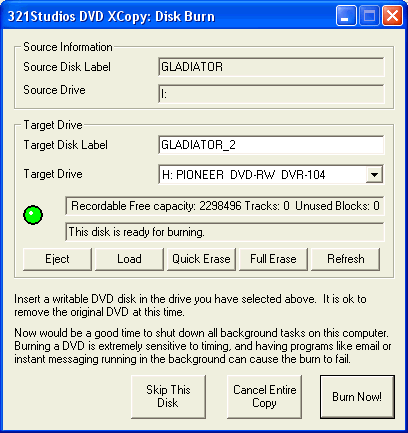
If you don't select automatic writing, you can select the burner and the disk label. However we noticed that the renaming the Disk Label feature doesn't seem to work properly.
 

Review Pages

1. Page 1
2. Page 2
3. Page 3


Pages

  • « first
  • ‹ previous
  • 1
  • 2
  • 3
  • next ›
  • last »

Tags:
Previous Post
Testing C2 information
Next Post
TEAC CD-W548E CD-RW

Related Posts

Latest Reviews

In the Age of AI Phishing, the Best User Experience Might Be the One That Feels Safest
Enterprise & IT

In the Age of AI Phishing, the Best User Experience Might Be the One That Feels Safest

SoundPeats C30
Consumer Electronics

SoundPeats C30

Why Streaming Live Casino Games Demands Smarter Tech
Enterprise & IT

Why Streaming Live Casino Games Demands Smarter Tech

Kioxia Exceria Plus G3 512GB microSD
Cameras

Kioxia Exceria Plus G3 512GB microSD

SoundPeats Cove Pro
Consumer Electronics

SoundPeats Cove Pro

Popular News

COLORFUL Presents CVN X870 ARK FROZEN Motherboard for AMD Ryzen 9000 CPUs

COLORFUL Presents CVN X870 ARK FROZEN Motherboard for AMD Ryzen 9000 CPUs

TEAMGROUP Launches EXPERT P34F Find My External SSD

TEAMGROUP Launches EXPERT P34F Find My External SSD

Samsung announces Galaxy Tab S11 and Galaxy S25 FE series

Samsung announces Galaxy Tab S11 and Galaxy S25 FE series

Viltrox Showcases Upcoming Lens Lineup and New TTL Flash at IBC 2025

Viltrox Showcases Upcoming Lens Lineup and New TTL Flash at IBC 2025

CORSAIR announces Vanguard Pro 96 and Vanguard 96 Gaming Keyboards

CORSAIR announces Vanguard Pro 96 and Vanguard 96 Gaming Keyboards

Panasonic Introduces the First Ultra-Telephoto Zoom Lens in the LUMIX S Series

Panasonic Introduces the First Ultra-Telephoto Zoom Lens in the LUMIX S Series

MSI Launches DATAMAG 40Gbps Magnetic Portable SSD

MSI Launches DATAMAG 40Gbps Magnetic Portable SSD

MSI Launches FORGE GK600 TKL WIRELESS Special Edition Compact Mechanical Keyboard

MSI Launches FORGE GK600 TKL WIRELESS Special Edition Compact Mechanical Keyboard

Main menu

  • Home
  • News
  • Reviews
  • Essays
  • Forum
  • Legacy
  • About
    • Submit News

    • Contact Us
    • Privacy

    • Promotion
    • Advertise

    • RSS Feed
    • Site Map
  • About
  • Privacy
  • Contact Us
  • Promotional Opportunities @ CdrInfo.com
  • Advertise on out site
  • Submit your News to our site
  • RSS Feed



