
Breaking News

Razer Unveils All-New Wolverine V4 Line ASUS Republic of Gamers Ships ROG Rapture GT-BN98 Router GMK Unveils TriggerKey, a New Mechanical Key System for Greater Precision and Comfort Akasa Unveils Euler MX2, Fanless Mini-ITX Case for Unattended Commercial and Industrial Computing Air Power G10 PC Case Now Available at Newegg with Three Tilting Front Fans

logo

  • Share Us
    • Facebook
    • Twitter
  • Home
  • Home
  • News
  • Reviews
  • Essays
  • About
    • Submit News

    • Contact Us
    • Privacy

    • Promotion
    • Advertise

    • RSS Feed

Search form

ECS KN3SLI2 Motherboard

Dec 30,2006 0

11. Overclocking


Review Pages

1. Introduction
2. The Package
3. Bios
4. Installation
5. Everest Ultimate/SiSoft Sandra
6. PCMARK - 3DMARK
7. Science Mark - PovRay - Nero Digital
8. CINEBENCH -SuperPI
9. F.E.A.R - Prey
10. Splinter Cell Chaos Theory - Half Life
11. Overclocking
12. Conclusion


The ECS KN3SLI is based on the Nvidia 590SLI, an AMD platform offering very good overclocking. ECS has also mentioned in an official press release the superb overclocking capabilities, so we were eager to see how this motherboard would perform, especially compared with the other two in this review.

First of all, ECS doesn't provide a utility to use for overclocking the board. Nothing to worry about however, we will use Nvidia's nTune:
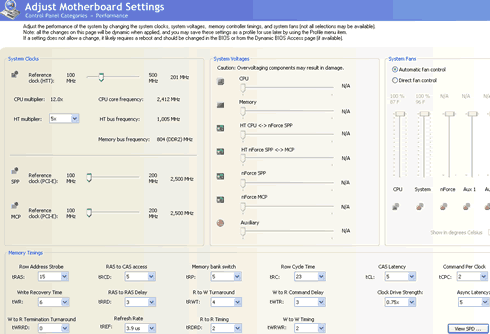
But just as with the Asus M2N32WS Pro, nTune also doesn't fully support the ECS KN3SLI2. You cannot set the CPU/DRAM voltages. We then tried to find the maximum FSB for our CPU (AMD Athlon X2 4600+). To our disappointment, the system hung when nTune tried to increase the FSB and test the overclocking stability. Therefore, you have to rely on the BIOS manual settings and find exactly how far you can overclock your CPU.

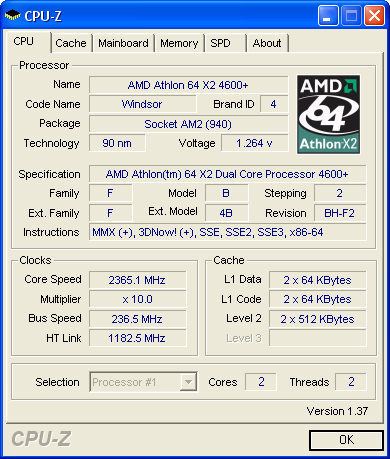
After carefully looking at the BIOS settings, we noticed that the overclocking settings were much lower than what we had seen with the Asus and Foxconn motherboards. For example, there is no option to lock the PCI-E at any specific clock frequency (usually 100MHz). We proceeded with our tests and by lowering the CPU multiplier, we were able to boot at 236FSB. However, the system was very unstable (default CPU voltage).
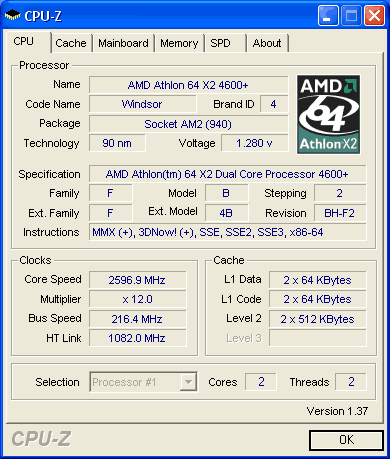
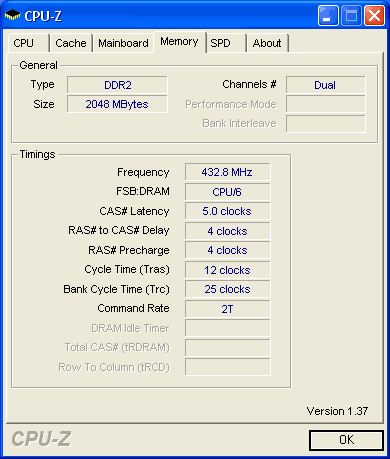
By lowering the FSB we reached 216, which can be considered a rather low number for an 590SLI motherboard:
 

Review Pages

1. Introduction
2. The Package
3. Bios
4. Installation
5. Everest Ultimate/SiSoft Sandra
6. PCMARK - 3DMARK
7. Science Mark - PovRay - Nero Digital
8. CINEBENCH -SuperPI
9. F.E.A.R - Prey
10. Splinter Cell Chaos Theory - Half Life
11. Overclocking
12. Conclusion


Pages

  • « first
  • ‹ previous
  • …
  • 4
  • 5
  • 6
  • 7
  • 8
  • 9
  • 10
  • 11
  • 12
  • next ›
  • last »

Tags:
Previous Post
NeoDigits X5000
Next Post
Samsung Blackjack

Related Posts

Latest Reviews

Fanxiang MP83 M.2 NVMe SSD Enclosure
Enterprise & IT

Fanxiang MP83 M.2 NVMe SSD Enclosure

Ugreen CM642 USB4.0 Enclosure
PC components

Ugreen CM642 USB4.0 Enclosure

be quiet! Dark Power 14 IO
PC components

be quiet! Dark Power 14 IO

SanDisk High Endurance 512GB microSDXC
Cameras

SanDisk High Endurance 512GB microSDXC

Samsung PRO Ultimate 512GB microSDXC
Cameras

Samsung PRO Ultimate 512GB microSDXC

Popular News

MSI’s Latest AMD X870E MAX & EVO Series Motherboards

MSI’s Latest AMD X870E MAX & EVO Series Motherboards

COLORFUL Launches iGame B850M ULTRA Series Micro-ATX Motherboards

COLORFUL Launches iGame B850M ULTRA Series Micro-ATX Motherboards

COLORFUL Presents Limited Edition Chitu MAG-60 Magnetic Keyboard Inspired by the Year of the Horse

COLORFUL Presents Limited Edition Chitu MAG-60 Magnetic Keyboard Inspired by the Year of the Horse

COLORFUL Launches iGame B850I MINI OC V14 Motherboard

COLORFUL Launches iGame B850I MINI OC V14 Motherboard

COLORFUL Presents iGame Z890 ULTRA-S W and iGame Z890M ULTRA Z Motherboards

COLORFUL Presents iGame Z890 ULTRA-S W and iGame Z890M ULTRA Z Motherboards

COLORFUL Launches the iGame X870E VULCAN W OC Motherboard

COLORFUL Launches the iGame X870E VULCAN W OC Motherboard

COLORFUL Expands B850 Motherboard Lineup with New CVN, Battle-Ax, and MEOW Models

COLORFUL Expands B850 Motherboard Lineup with New CVN, Battle-Ax, and MEOW Models

ASRock Adds Support for One Sub-Channel DRAM Module on Intel DDR5 Motherboards

ASRock Adds Support for One Sub-Channel DRAM Module on Intel DDR5 Motherboards

Main menu

  • Home
  • News
  • Reviews
  • Essays
  • About
    • Submit News

    • Contact Us
    • Privacy

    • Promotion
    • Advertise

    • RSS Feed
  • About
  • Privacy
  • Contact Us
  • Promotional Opportunities @ CdrInfo.com
  • Advertise on out site
  • Submit your News to our site
  • RSS Feed
