Breaking News

COLORFUL Launches iGame Guard G114 140W GaN Multi-Port Charger INNO3D TOWER WORKSTATION AWS-511Z-R1 Thermal Grizzly and Noctua introduce WireView Pro II Noctua Edition GPU monitoring device Nikon releases the Z5IIC full-frame mirrorless camera Announcing the New ASUS Googlebook 14

logo

  • Share Us
    • Facebook
    • Twitter
  • Home
  • Home
  • News
  • Reviews
  • Essays
  • About
    • Submit News

    • Contact Us
    • Privacy

    • Promotion
    • Advertise

    • RSS Feed

Search form

Foxconn N570SM2AA Motherboard

Dec 11,2006 0

2. The Package


Review Pages

1. Introduction
2. The Package
3. Bios
4. Installation
5. Everest Ultimate Edition 2006
6. PCMARK05 and 3DMARK05
7. Science Mark and Nero Digital
8. CineBench and SuperPi
9. F.E.A.R. and Prey
10. Splinter Cell Chaos Theory and Half Life
11. Overclocking
12. Conclusion


Foxconn's retail package is very simple and at the ideal price for entry level users:

Below is a list of what's included:

  • A printed manual
  • 1x CD-ROM with drivers
  • 2x UltraDMA IDE cables
  • 1x FDD cable
  • 1x I/O shield
  • 1x SLI bridge
  • 2x SATA cables
  • 2x SATA power cables

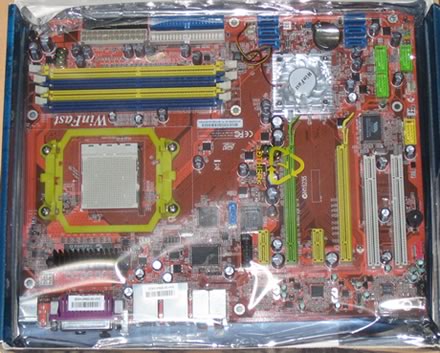
The board is well laid out and uncluttered, and most parts can be identified easily

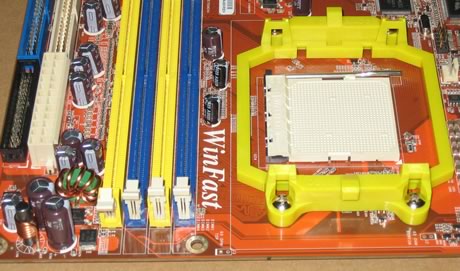
On the right, we find the CPU socket, while under the plastic fan is the Nvidia 570SLI chipset. The CPU area is not surrounded with other components, so it can easily accommodate a larger than the default CPU cooler. What is rather unusual though, is the color coding for the memory banks. The colors usually indicate in which pair of memory banks you install the memory modules for dual channel memory. In this case, you would expect 1+3 (yellow) or 2+4 (blue), right? Wrong! You must either install the memory modules in banks 1+2 or 3+4 for dual channel memory operation. We confirmed this from our tests. So is this a "design" fault? It isn't a serious problem, but it is something to be wary of.
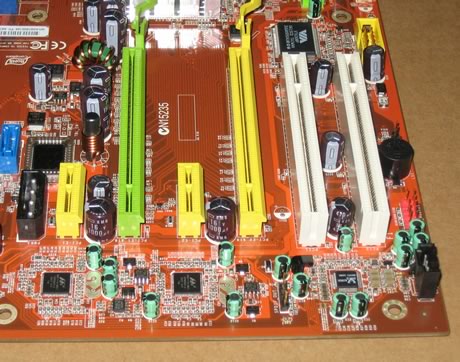
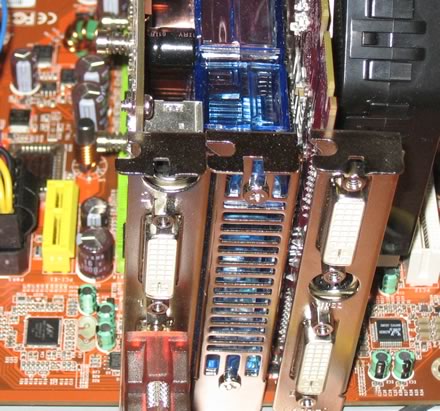
The Nvidia 570SLI supports 2xPCI-E cards in SLI operation. If the SLI cards are big, for example with additional air cooling, while the space between the two cards is minimal, there is no problem installing them:
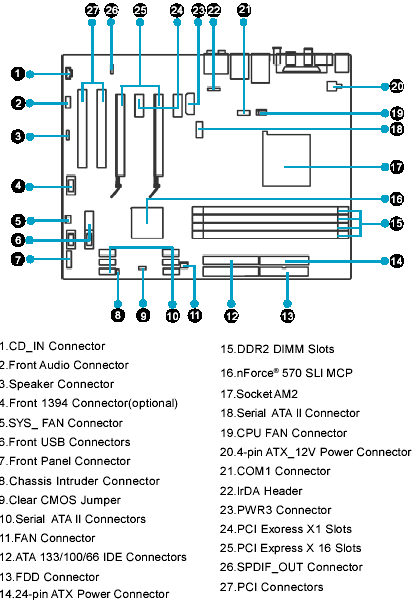
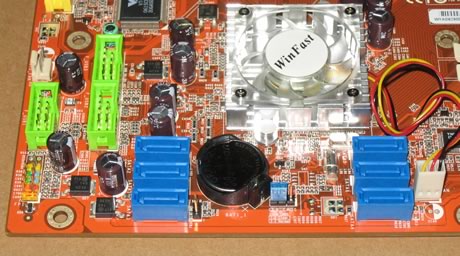
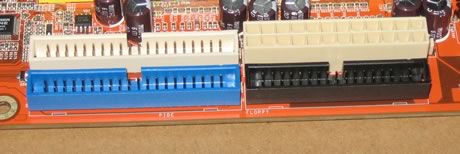
On the bottom left, we find the connections for storage devices, namely the SATA and IDE channels. Foxconn offers 6x SATAII channels and 2xIDE ATA133 connections for installing your storage devices. Floppy drives are also supported:
There are also extra slots on the motherboard for extra USB2.0, Front Panel Audio, COM2 and Firewire. However, Foxconn hasn't included these in the retail package, probably to keep the retail price low.
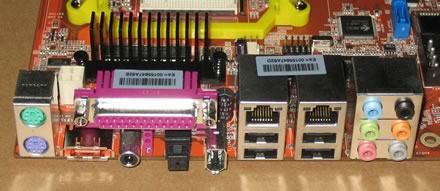
The back I/O panel has the usual array of standard connections:

  • 1x PS/2 keyboard
  • 1 x PS/2 mouse
  • 1 x 1394a
  • 1 x S/PDIF Coax out
  • 4 x USB 2.0
  • 2 x RJ45 (2x 1GBit LAN)
  • 7.1 channel Audio jacks (6 jacks)
  • 1 x Parallel
  • 1 x eSerial ATA (reserve)
  • 1 x S/PDIF Fibre out


Review Pages

1. Introduction
2. The Package
3. Bios
4. Installation
5. Everest Ultimate Edition 2006
6. PCMARK05 and 3DMARK05
7. Science Mark and Nero Digital
8. CineBench and SuperPi
9. F.E.A.R. and Prey
10. Splinter Cell Chaos Theory and Half Life
11. Overclocking
12. Conclusion


Pages

  • « first
  • ‹ previous
  • 1
  • 2
  • 3
  • 4
  • 5
  • 6
  • 7
  • 8
  • 9
  • …
  • next ›
  • last »

Hon Hai/Foxconn Technology Group

AMD

MotherBoards

Tags: Hon Hai/Foxconn Technology Group AMD MotherBoards
Previous Post
OCZ PC2-7200EPP
Next Post
Asus EAX1950XTX

Related Posts

  • G.SKILL Launches Flare X5X Series with AMD EXPO Ultra Low Latency

  • AMD Advances the Hybrid Future of Quantum Computing

  • AMD Expands AMD Ryzen PRO 9000 Series Processor Lineup

  • AMD Launches Ryzen 9 9950X3D2 Dual Edition Processor

  • MINISFORUM Showcases Agent Computing Solutions

  • Samsung and AMD Expand Strategic Collaboration on Next-Generation AI Memory Solutions

  • AMD Ryzen AI PRO 400 Series CPUs Deliver Advanced AI for Desktops

  • AMD at CES 2026

Latest Reviews

Fanxiang MP83 M.2 NVMe SSD Enclosure
Enterprise & IT

Fanxiang MP83 M.2 NVMe SSD Enclosure

Ugreen CM642 USB4.0 Enclosure
PC components

Ugreen CM642 USB4.0 Enclosure

be quiet! Dark Power 14 IO
PC components

be quiet! Dark Power 14 IO

SanDisk High Endurance 512GB microSDXC
Cameras

SanDisk High Endurance 512GB microSDXC

Samsung PRO Ultimate 512GB microSDXC
Cameras

Samsung PRO Ultimate 512GB microSDXC

Popular News

MSI’s Latest AMD X870E MAX & EVO Series Motherboards

MSI’s Latest AMD X870E MAX & EVO Series Motherboards

COLORFUL Launches iGame B850M ULTRA Series Micro-ATX Motherboards

COLORFUL Launches iGame B850M ULTRA Series Micro-ATX Motherboards

COLORFUL Presents Limited Edition Chitu MAG-60 Magnetic Keyboard Inspired by the Year of the Horse

COLORFUL Presents Limited Edition Chitu MAG-60 Magnetic Keyboard Inspired by the Year of the Horse

COLORFUL Presents iGame Z890 ULTRA-S W and iGame Z890M ULTRA Z Motherboards

COLORFUL Presents iGame Z890 ULTRA-S W and iGame Z890M ULTRA Z Motherboards

COLORFUL Launches iGame B850I MINI OC V14 Motherboard

COLORFUL Launches iGame B850I MINI OC V14 Motherboard

COLORFUL Expands B850 Motherboard Lineup with New CVN, Battle-Ax, and MEOW Models

COLORFUL Expands B850 Motherboard Lineup with New CVN, Battle-Ax, and MEOW Models

ASRock Adds Support for One Sub-Channel DRAM Module on Intel DDR5 Motherboards

ASRock Adds Support for One Sub-Channel DRAM Module on Intel DDR5 Motherboards

Exceed the Infinite with New ASRock X870E Taichi White Motherboard

Exceed the Infinite with New ASRock X870E Taichi White Motherboard

Main menu

  • Home
  • News
  • Reviews
  • Essays
  • About
    • Submit News

    • Contact Us
    • Privacy

    • Promotion
    • Advertise

    • RSS Feed
  • About
  • Privacy
  • Contact Us
  • Promotional Opportunities @ CdrInfo.com
  • Advertise on out site
  • Submit your News to our site
  • RSS Feed