Breaking News

GAMEMAX Unveils NEX C53 Panoramic Chassis be quiet! announces new Power Zone 2 1200W and Pure Power 13 M 1200W Thypoch announces 21mm f/3.5 M Mount Lens ASUS showcases new AI technologies and celebrates 20 years of ROG gaming at CES Prograde Digital Announces Pro Card Caddy

logo

  • Share Us
    • Facebook
    • Twitter
  • Home
  • Home
  • News
  • Reviews
  • Essays
  • Forum
  • Legacy
  • About
    • Submit News

    • Contact Us
    • Privacy

    • Promotion
    • Advertise

    • RSS Feed
    • Site Map

Search form

Foxconn nT-i1200 nanoPC review

Jun 19,2012 0

2. Package, overview


Review Pages

1. Features
2. Package, overview
3. Installing the OS
4. Basic benchmarks
5. Final words


The compact Foxconn Nano-PC nT-i1200 comes in a small package and retails online for about $160 (newegg) - a reasonable price for barebone mini pcs.

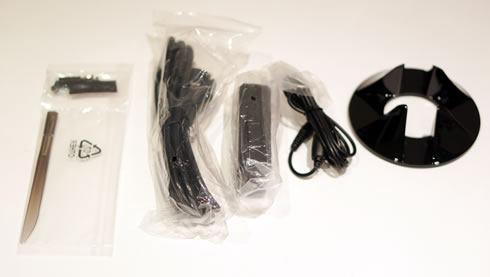
Package contents:

  1. The nano-PC system
  2. 1x power adapter
  3. 1x power cord
  4. 4x magnet rubber foot
  5. 1x VESA mount
  6. 1x Seatbase
  7. 1x Opening tool
  8. 1x mini pcie half card support
  9. 4x screw cover
  10. 4x screw for VESA mounting
  11. 4x screw for HDD support bracket
  12. 1x screw for half mini-PCI card
  13. 1x screw for half miniPCI half card support bracket
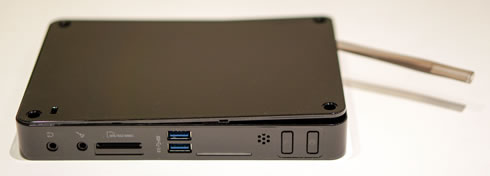
As you see in the picture below, the nT-i1200 is very compact in size, measuring at just 19x13.5x24cm (W x D x H). This is almost the size of a 7" tablet. Its plastic case looks and feels durable so no serious complains here.

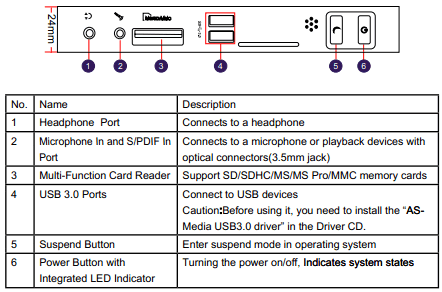
At the front side of the device there is a headphone jack, a mic input, an SD/SDHC/MS/MS Pro/MMC 5 in 1 Card Reader, two (2) USB 3.0 ports and the power/reset buttons:

The nettop is not completely fanless as there is a small fan inside to cool down the CPU.

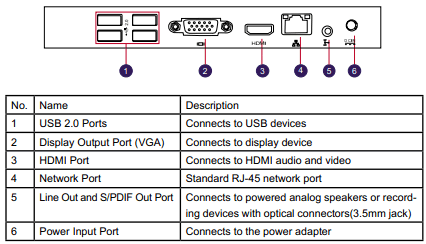
At the rear side there are four USB2.0 ports, a VGA port, an HDMI graphics port, a 1Gbit network port, a line-out jack and the power input. 

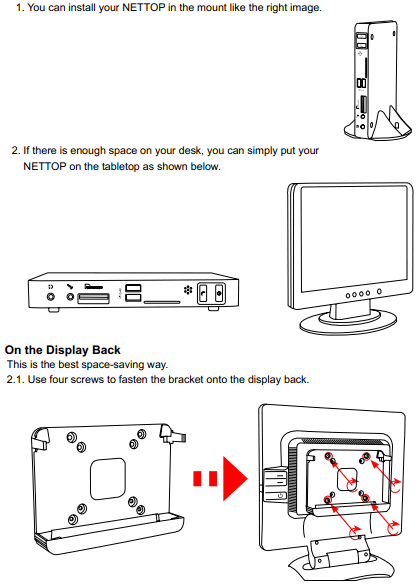
The package includes a VESA mount in case you need to mount the system at the back of your PC monitor.
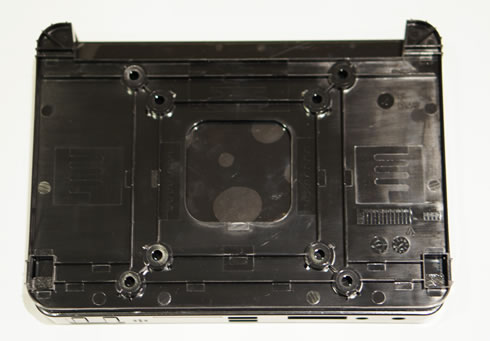
Before powering on the system, we opened the case in order to install an SSD. Of course, you can also install any 2.5-inch HDD. We used the plastic opening tool that came in the package. Just start from the hole at the top side of the case and gently open the back cover:
As you see in the picture below, the only components you can add here are the SO-DIMM memory (up to 4GB DDR3 800/1066) and the 2.5" storage device. Our system also came with an Intel Wifi 1000 mini half-sized PCI card pre-installed.
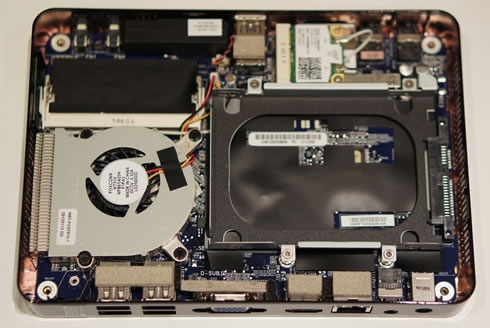
For our tests we installed a Crucial CT2865160 4GB SO-DIMM memory module running at DDR3-8500 (800MHz) and an 2.5" OCZ Synapse Cache Solid State Drive.


Review Pages

1. Features
2. Package, overview
3. Installing the OS
4. Basic benchmarks
5. Final words


Pages

  • « first
  • ‹ previous
  • 1
  • 2
  • 3
  • 4
  • 5
  • next ›
  • last »

Hon Hai/Foxconn Technology Group

Tags: Hon Hai/Foxconn Technology Group
Previous Post
Pioneer BDR-2207 (BDR-207M) BDXL burner review
Next Post
OCZ 1000W Fatal1ty Series Power Supply Review

Related Posts

  • Foxconn’s Q1 Profit Influenced by Slow Smartphone Sales

  • Foxconn to Assemble Procedural Masks in Wisconsin for Pandemic Relief

  • Foxconn Says 5G IPhone Fall Launch is Feasible

  • Foxconn to Resume Production in China by End of The Month

  • Foxconn Slowly Resumes Production, Says Coronavirus Will Have am Impact to Revenue

  • Apple Stores Beijing to Reopen on February 14, Coronavirus Could Impact iPhone Production

  • China Blocks Operations of Foxconn Plants due to Coronavirus: report

  • Coronavirus Measures to Hold Back Foxconn's Production

Latest Reviews

The Difference Between American and European Stakes and Why It Changes How People Bet
Enterprise & IT

The Difference Between American and European Stakes and Why It Changes How People Bet

Endorfy Thock V2 Wireless Keyboard
PC components

Endorfy Thock V2 Wireless Keyboard

Noctua NH-D15 G2 Chromax.Black
Cooling Systems

Noctua NH-D15 G2 Chromax.Black

EnGenius ECW520 AP
Enterprise & IT

EnGenius ECW520 AP

Noctua NP-DM3 desk mat
Gaming

Noctua NP-DM3 desk mat

Popular News

COLORFUL Introduces CVN B850I GAMING FROZEN Motherboard

COLORFUL Introduces CVN B850I GAMING FROZEN Motherboard

COLORFUL Presents CVN X870 ARK FROZEN Motherboard for AMD Ryzen 9000 CPUs

COLORFUL Presents CVN X870 ARK FROZEN Motherboard for AMD Ryzen 9000 CPUs

COLORFUL Presents the B860 Series Motherboards

COLORFUL Presents the B860 Series Motherboards

TEAMGROUP Launches EXPERT P34F Find My External SSD

TEAMGROUP Launches EXPERT P34F Find My External SSD

ASRock AM5 Motherboards Now Fully Support AMD Ryzen 9 9950X3D & 9900X3D Processors

ASRock AM5 Motherboards Now Fully Support AMD Ryzen 9 9950X3D & 9900X3D Processors

Samsung announces Galaxy Tab S11 and Galaxy S25 FE series

Samsung announces Galaxy Tab S11 and Galaxy S25 FE series

Viltrox Showcases Upcoming Lens Lineup and New TTL Flash at IBC 2025

Viltrox Showcases Upcoming Lens Lineup and New TTL Flash at IBC 2025

CORSAIR announces Vanguard Pro 96 and Vanguard 96 Gaming Keyboards

CORSAIR announces Vanguard Pro 96 and Vanguard 96 Gaming Keyboards

Main menu

  • Home
  • News
  • Reviews
  • Essays
  • Forum
  • Legacy
  • About
    • Submit News

    • Contact Us
    • Privacy

    • Promotion
    • Advertise

    • RSS Feed
    • Site Map
  • About
  • Privacy
  • Contact Us
  • Promotional Opportunities @ CdrInfo.com
  • Advertise on out site
  • Submit your News to our site
  • RSS Feed