Breaking News

be quiet! enters high-end gaming mouse market with Dark Perk Ergo and Dark Perk Sym ASUS ROG announces ROG Strix GS-BE7200 Dual-Band WiFi 7 Gaming Router Transcend Launches RDE3 microSD Express Card Reader for Next-Generation High-Speed Performance Akasa Unleashes Six New Low-Profile CPU Coolers Up to 165W TDP Cooling in Compact Form Factors SWIT announces Powercell Battery Series for Sony, Canon, Nikon, and Fujifilm Cameras

logo

  • Share Us
    • Facebook
    • Twitter
  • Home
  • Home
  • News
  • Reviews
  • Essays
  • Forum
  • Legacy
  • About
    • Submit News

    • Contact Us
    • Privacy

    • Promotion
    • Advertise

    • RSS Feed
    • Site Map

Search form

Gigabyte GA-MA790FX-DQ6

Nov 5,2007 0

3. BIOS settings


Review Pages

1. Introduction, specifications
2. Inside the box
3. BIOS settings
4. Test configuration
5. Everest Ultimate Edition 2007
6. SiSoftware Sandra
7. PCMark 2005, 3DMark 2006
8. ScienceMark 2.0, Pov-ray, x264 Benchmark
9. CineBench
10. SuperPI
11. SySmark 2007, WorldBench 6
12. Lost Planet: Extreme Condition
13. Overclocking
14. Conclusion
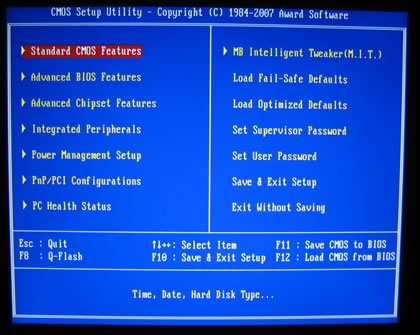
 

The BIOS is Award based and the main screen is what most users have used to:

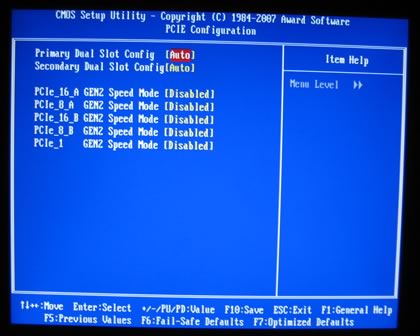
By pressing F11 you can save bios settings to a "memory file", there are 8 available slots. This is useful since you can access different memory/FSB/CPU schemes. Setting several important settings, for example, disable C1E and speedstep. Another things you should keep in mind is that by pressing CTRL+F1 unveils the "Advanced" features of the motherboard, something that we feel should be there from the beginning. There are three settings with various effects in performance/stability of the motherboard
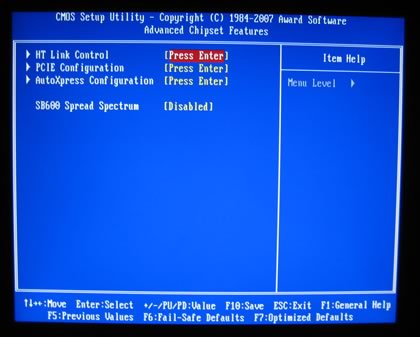
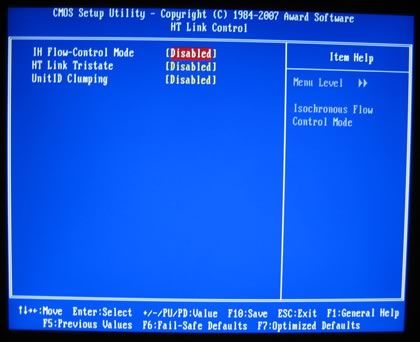
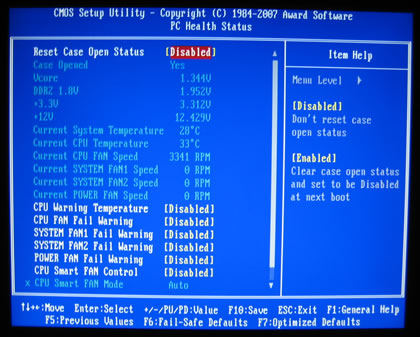
while there are several things to notice under PC Health Status tab
Ok, now to the most interesting part, the MB Intelligent Tweaker or (M.I.T). Here you control all the major functions of the board, like FSB, voltages and timings
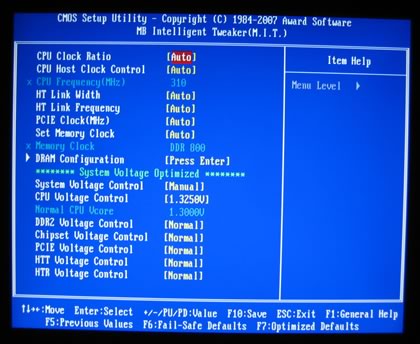
In one screen you can set whatever you like. Let's notice the most important. First of all the HT Link can go up to 1GHz

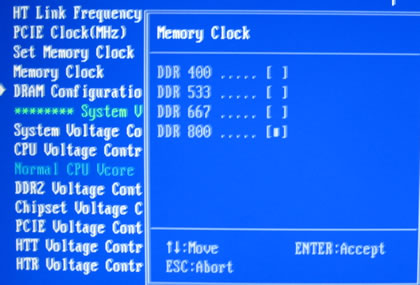
Memory Clocks can now be seen as it supposed to be, each different setting represents a different DRAM:FSB ratio. We didn't saw the 1066MHz option, we assume this will only be available with the Phenom AM2+ processors
DRAM timings are organized in another tab and they can be set to either manual or auto.
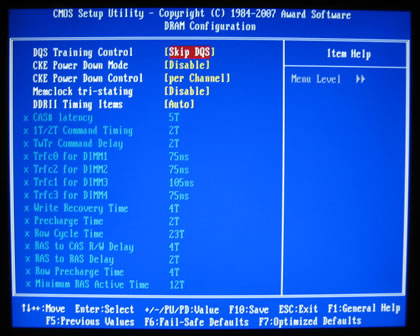
Several memory options are available and unfortunately, voltages have no absolute values but instead they are in the form of +0.xx. That's not good since you don't know the exact voltage that motherboard has selected for your CPU/subsystems. If you are using Gigabyte's Windows Easy Tune 5 software, you can view or set voltages from there, but again it would be ideal to have absolute values under the Bios. The voltages margins are not that high, we should expected more from this board:

  • FSB up to 500MHz (FSB 2000)
  • Frequency bus PCI-E to 200MHz.
  • Voltage CPU up to 1.9V
  • Voltage DDR2 up to +0.5 V (2.3V), thus somewhat short.
  • SB voltage to +0.4 V.
  • Voltage PCI-E to +0.45 V.
  • Voltage HTT link up +0.40 V.

- Installation

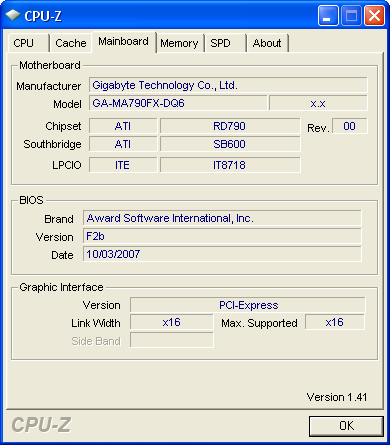
Using Everest Ultimate Edition 2007 we can get more information about the board:

Both North Bridge and South Bridge chipsets unveiled:

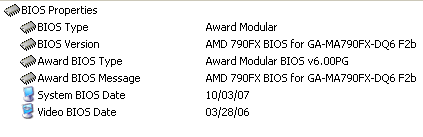
For all tests we used the latest available BIOS (F2B).
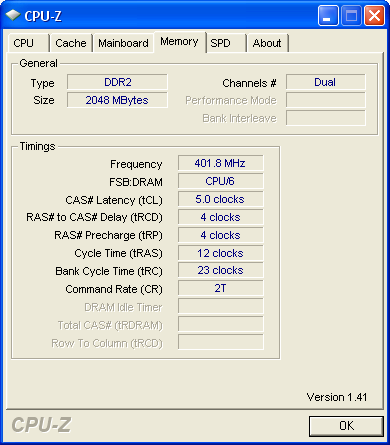
Let's see now  how our CPU was identified using CPU-Z:


Review Pages

1. Introduction, specifications
2. Inside the box
3. BIOS settings
4. Test configuration
5. Everest Ultimate Edition 2007
6. SiSoftware Sandra
7. PCMark 2005, 3DMark 2006
8. ScienceMark 2.0, Pov-ray, x264 Benchmark
9. CineBench
10. SuperPI
11. SySmark 2007, WorldBench 6
12. Lost Planet: Extreme Condition
13. Overclocking
14. Conclusion

 

Pages

  • « first
  • ‹ previous
  • 1
  • 2
  • 3
  • 4
  • 5
  • 6
  • 7
  • 8
  • 9
  • …
  • next ›
  • last »

Gigabyte

Tags: Gigabyte
Previous Post
Pioneer BDC-S02BK
Next Post
Spire PowerFuse

Related Posts

  • GIGABYTE Announces World's First DDR5-7200 at Full 256GB with CQDIMM at CES 2026

  • GIGABYTE Launches AORUS GeForce RTX 5090 INFINITY Graphics Card

  • GIGABYTE Introduces EAGLE 360 Series AIO Liquid Coolers

  • GIGABYTE Announces Availability of GAMING A16 PRO and GAMING A18 Laptops

  • GIGABYTE Announces Availability of 27” QHD 280Hz WOLED Gaming Monitor MO27Q28G with 4-Sided Borderless Design

  • GIGABYTE Launches AORUS RTX 5060 Ti AI BOX eGPU

  • GIGABYTE AI-Powered X870E AORUS X3D Motherboards Redefining Performance and Innovation

  • GIGABYTE Announces Availability of 27” QD-OLED Gaming Monitor AORUS FO27Q5P

Latest Reviews

The Difference Between American and European Stakes and Why It Changes How People Bet
Enterprise & IT

The Difference Between American and European Stakes and Why It Changes How People Bet

Endorfy Thock V2 Wireless Keyboard
PC components

Endorfy Thock V2 Wireless Keyboard

Noctua NH-D15 G2 Chromax.Black
Cooling Systems

Noctua NH-D15 G2 Chromax.Black

EnGenius ECW520 AP
Enterprise & IT

EnGenius ECW520 AP

Noctua NP-DM3 desk mat
Gaming

Noctua NP-DM3 desk mat

Popular News

COLORFUL Introduces CVN B850I GAMING FROZEN Motherboard

COLORFUL Introduces CVN B850I GAMING FROZEN Motherboard

COLORFUL Presents CVN X870 ARK FROZEN Motherboard for AMD Ryzen 9000 CPUs

COLORFUL Presents CVN X870 ARK FROZEN Motherboard for AMD Ryzen 9000 CPUs

TEAMGROUP Launches EXPERT P34F Find My External SSD

TEAMGROUP Launches EXPERT P34F Find My External SSD

ASRock AM5 Motherboards Now Fully Support AMD Ryzen 9 9950X3D & 9900X3D Processors

ASRock AM5 Motherboards Now Fully Support AMD Ryzen 9 9950X3D & 9900X3D Processors

Samsung announces Galaxy Tab S11 and Galaxy S25 FE series

Samsung announces Galaxy Tab S11 and Galaxy S25 FE series

Viltrox Showcases Upcoming Lens Lineup and New TTL Flash at IBC 2025

Viltrox Showcases Upcoming Lens Lineup and New TTL Flash at IBC 2025

CORSAIR announces Vanguard Pro 96 and Vanguard 96 Gaming Keyboards

CORSAIR announces Vanguard Pro 96 and Vanguard 96 Gaming Keyboards

Panasonic Introduces the First Ultra-Telephoto Zoom Lens in the LUMIX S Series

Panasonic Introduces the First Ultra-Telephoto Zoom Lens in the LUMIX S Series

Main menu

  • Home
  • News
  • Reviews
  • Essays
  • Forum
  • Legacy
  • About
    • Submit News

    • Contact Us
    • Privacy

    • Promotion
    • Advertise

    • RSS Feed
    • Site Map
  • About
  • Privacy
  • Contact Us
  • Promotional Opportunities @ CdrInfo.com
  • Advertise on out site
  • Submit your News to our site
  • RSS Feed