Breaking News

KIOXIA Unveils EXCERIA PRO G2 SD Memory Card Series Leica announces Noctilux-M 35 f/1.2 ASPH CORSAIR’s GALLEON 100 SD now Shipping Worldwide DJI Launches the RS 5, an All-New Lightweight Commercial Gimbal Sony Evolves Large Display Lineup with the Launch of the BRAVIA Professional Displays BZ-P Series

logo

  • Share Us
    • Facebook
    • Twitter
  • Home
  • Home
  • News
  • Reviews
  • Essays
  • Forum
  • Legacy
  • About
    • Submit News

    • Contact Us
    • Privacy

    • Promotion
    • Advertise

    • RSS Feed
    • Site Map

Search form

Globalsat GH-601

May 5,2006 0

4. Installation


Review Pages

1. Introduction
2. Package
3. Menus
4. Installation
5. Performance
6. Conclusion


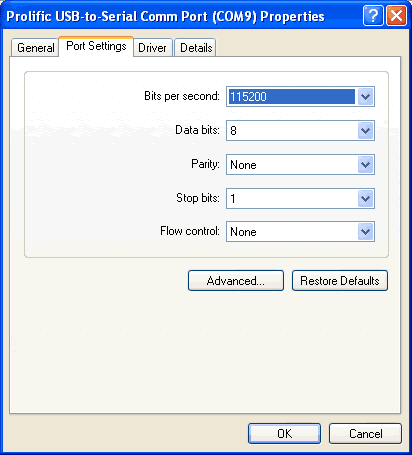
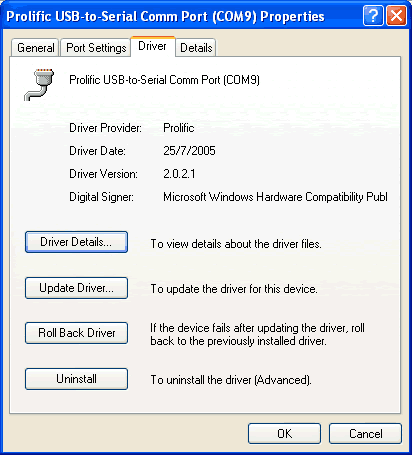
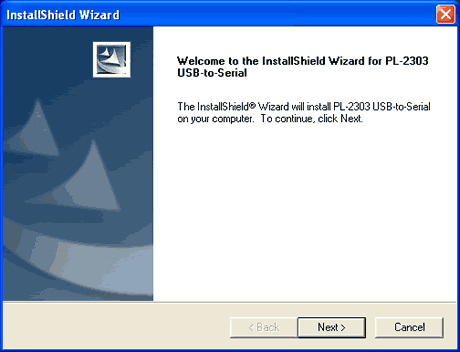
In order to use the device with a PC, first you have to install the software driver, which is included in the accompanying CD. There is a newer version available, which we tested and found it worked without any problems.

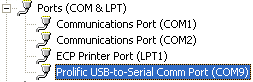
After rebooting the PC after installation of the driver, your device is recognized and is assigned a COM port. You can then download your records, or simply use it as a GPS mouse (remember to enable this function in your GH-601, otherwise you won't see any data with your GPS software).
Globalsat includes a software that can be used to upgrade the GH-601 or download/upload track records to Google Earth.


Review Pages

1. Introduction
2. Package
3. Menus
4. Installation
5. Performance
6. Conclusion


Pages

  • « first
  • ‹ previous
  • 1
  • 2
  • 3
  • 4
  • 5
  • 6
  • next ›
  • last »

GlobalSat

Tags: GlobalSat
Previous Post
Krusell x50V
Next Post
Spire RocKeteer VI - SP-600W

Related Posts

  • Globalsat BT-368

  • Globalsat TR-101

  • Globalsat BT-328 Review

  • Globalsat BT-359b

  • Globalsat BT-359: The Next Generation Bluetooth GPS Receiver

  • Ricoh and GlobalSat Embed GPS Data into Digital Images

  • Turn Your iPod Into a Wireless Music Center

  • GlobalSat BTA-806, BTA-830 and BTH-820

Latest Reviews

be quiet! Power Zone 2 1200W
PC components

be quiet! Power Zone 2 1200W

The Difference Between American and European Stakes and Why It Changes How People Bet
Enterprise & IT

The Difference Between American and European Stakes and Why It Changes How People Bet

Endorfy Thock V2 Wireless Keyboard
PC components

Endorfy Thock V2 Wireless Keyboard

Noctua NH-D15 G2 Chromax.Black
Cooling Systems

Noctua NH-D15 G2 Chromax.Black

EnGenius ECW520 AP
Enterprise & IT

EnGenius ECW520 AP

Popular News

COLORFUL Introduces CVN B850I GAMING FROZEN Motherboard

COLORFUL Introduces CVN B850I GAMING FROZEN Motherboard

COLORFUL Presents CVN X870 ARK FROZEN Motherboard for AMD Ryzen 9000 CPUs

COLORFUL Presents CVN X870 ARK FROZEN Motherboard for AMD Ryzen 9000 CPUs

TEAMGROUP Launches EXPERT P34F Find My External SSD

TEAMGROUP Launches EXPERT P34F Find My External SSD

ASRock AM5 Motherboards Now Fully Support AMD Ryzen 9 9950X3D & 9900X3D Processors

ASRock AM5 Motherboards Now Fully Support AMD Ryzen 9 9950X3D & 9900X3D Processors

Samsung announces Galaxy Tab S11 and Galaxy S25 FE series

Samsung announces Galaxy Tab S11 and Galaxy S25 FE series

Viltrox Showcases Upcoming Lens Lineup and New TTL Flash at IBC 2025

Viltrox Showcases Upcoming Lens Lineup and New TTL Flash at IBC 2025

CORSAIR announces Vanguard Pro 96 and Vanguard 96 Gaming Keyboards

CORSAIR announces Vanguard Pro 96 and Vanguard 96 Gaming Keyboards

Panasonic Introduces the First Ultra-Telephoto Zoom Lens in the LUMIX S Series

Panasonic Introduces the First Ultra-Telephoto Zoom Lens in the LUMIX S Series

Main menu

  • Home
  • News
  • Reviews
  • Essays
  • Forum
  • Legacy
  • About
    • Submit News

    • Contact Us
    • Privacy

    • Promotion
    • Advertise

    • RSS Feed
    • Site Map
  • About
  • Privacy
  • Contact Us
  • Promotional Opportunities @ CdrInfo.com
  • Advertise on out site
  • Submit your News to our site
  • RSS Feed