
Breaking News

Razer Unveils All-New Wolverine V4 Line ASUS Republic of Gamers Ships ROG Rapture GT-BN98 Router GMK Unveils TriggerKey, a New Mechanical Key System for Greater Precision and Comfort Akasa Unveils Euler MX2, Fanless Mini-ITX Case for Unattended Commercial and Industrial Computing Air Power G10 PC Case Now Available at Newegg with Three Tilting Front Fans

logo

  • Share Us
    • Facebook
    • Twitter
  • Home
  • Home
  • News
  • Reviews
  • Essays
  • About
    • Submit News

    • Contact Us
    • Privacy

    • Promotion
    • Advertise

    • RSS Feed

Search form

Inno3D ION

Dec 22,2009 0

3. Getting started


Review Pages

1. Features, retail package
2. The mainboard
3. Getting started
4. BIOS settings
5. Tests - CPU, Memory, WiFi
6. Tests - Graphics
7. Tests - Video playback
8. Conclusion


To start using the Inno3D ION iChiLL motherboard you only need to install the memory modules. Due to the motherboard's size and design, it would be convenient to install the motherboard into a low-profile mini-ATX case, which does not offer any space for a power supply. Have a look here to see what we mean. Unfortunately, the only case we had in our labs was the Thermaltake Element Q , which is big enough to fit even two ION motherboards inside :)
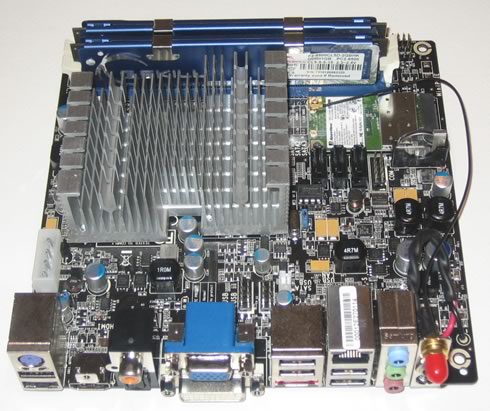
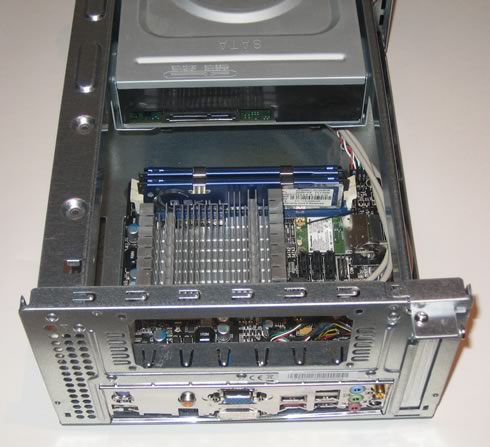
Installing the motherboard is pretty simple. As you can see in the picture below, there is lot of free space left since the cases' PSU does not need to be installed at all:
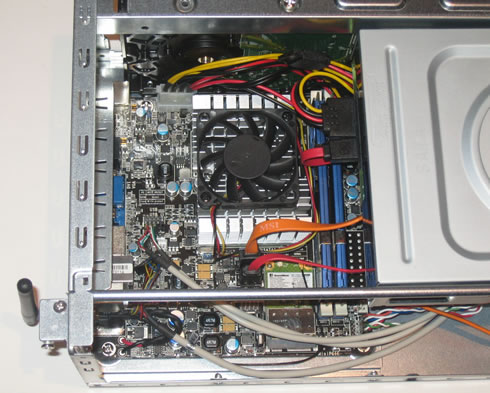
In a few minutes you will be able to connect all the front panel/USB headers, the SATA connectors for the HDD and optical drives and of course the included CPU fan, which is almost silent:

Here is a top view of the motherboard with all the cables connected and everything installed. Our box is ready to roll..
 

Visit Ebuyer.com to Buy The Inno3D ION iChiLL Motherboard


Review Pages

1. Features, retail package
2. The mainboard
3. Getting started
4. BIOS settings
5. Tests - CPU, Memory, WiFi
6. Tests - Graphics
7. Tests - Video playback
8. Conclusion


Pages

  • « first
  • ‹ previous
  • 1
  • 2
  • 3
  • 4
  • 5
  • 6
  • 7
  • 8
  • next ›
  • last »

Inno3D

Tags: Inno3D
Previous Post
Hercules DJ Control MP3 e2
Next Post
Thermaltake Wing RS301 PC case

Related Posts

  • INNO3D TOWER WORKSTATION AWS-511Z-R1

  • INNO3D AT COMPUTEX 2026

  • INNO3D DELIVERS HIGH PERFORMANCE FOR LESS WITH THE NEW GEFORCE RTX 5050

  • INNO3D GEFORCE RTX 50 SERIES IS HERE!

  • INNO3D AT COMPUTEX TAIPEI 2024 SUMMARY

  • Nvidia partners releasing RTX4080 and RTX4090 cars

  • INNO3D GEFORCE GTX 1630 TWIN X2 OC + COMPACT

  • Nvidia releases RTX3090TI

Latest Reviews

Fanxiang MP83 M.2 NVMe SSD Enclosure
Enterprise & IT

Fanxiang MP83 M.2 NVMe SSD Enclosure

Ugreen CM642 USB4.0 Enclosure
PC components

Ugreen CM642 USB4.0 Enclosure

be quiet! Dark Power 14 IO
PC components

be quiet! Dark Power 14 IO

SanDisk High Endurance 512GB microSDXC
Cameras

SanDisk High Endurance 512GB microSDXC

Samsung PRO Ultimate 512GB microSDXC
Cameras

Samsung PRO Ultimate 512GB microSDXC

Popular News

MSI’s Latest AMD X870E MAX & EVO Series Motherboards

MSI’s Latest AMD X870E MAX & EVO Series Motherboards

COLORFUL Launches iGame B850M ULTRA Series Micro-ATX Motherboards

COLORFUL Launches iGame B850M ULTRA Series Micro-ATX Motherboards

COLORFUL Presents Limited Edition Chitu MAG-60 Magnetic Keyboard Inspired by the Year of the Horse

COLORFUL Presents Limited Edition Chitu MAG-60 Magnetic Keyboard Inspired by the Year of the Horse

COLORFUL Launches iGame B850I MINI OC V14 Motherboard

COLORFUL Launches iGame B850I MINI OC V14 Motherboard

COLORFUL Presents iGame Z890 ULTRA-S W and iGame Z890M ULTRA Z Motherboards

COLORFUL Presents iGame Z890 ULTRA-S W and iGame Z890M ULTRA Z Motherboards

COLORFUL Launches the iGame X870E VULCAN W OC Motherboard

COLORFUL Launches the iGame X870E VULCAN W OC Motherboard

COLORFUL Expands B850 Motherboard Lineup with New CVN, Battle-Ax, and MEOW Models

COLORFUL Expands B850 Motherboard Lineup with New CVN, Battle-Ax, and MEOW Models

ASRock Adds Support for One Sub-Channel DRAM Module on Intel DDR5 Motherboards

ASRock Adds Support for One Sub-Channel DRAM Module on Intel DDR5 Motherboards

Main menu

  • Home
  • News
  • Reviews
  • Essays
  • About
    • Submit News

    • Contact Us
    • Privacy

    • Promotion
    • Advertise

    • RSS Feed
  • About
  • Privacy
  • Contact Us
  • Promotional Opportunities @ CdrInfo.com
  • Advertise on out site
  • Submit your News to our site
  • RSS Feed