Intel Core i7-920
8. Overclocking
Review Pages
2. Package, installation
3. Benchmarks - Everest Ultimate Edition, SiSoftware Sandra
4. Benchmarks - PCMark Vantage, SYSmark 2007 Preview
5. Benchmarks - MAXON CINEBENCH, x264 HD Benchmark, TMPGEnc 4 Xpress
6. Benchmarks - SuperPI, wPrime
7. Benchmarks - 3DMark06, Crysis v1.2
8. Overclocking
9. Conclusion
Overclocking the new Intel i7 series is somehow different than you may have experienced until now since the Term "FSB" has now been replaced by four multipliers on the motherboard, which are used to change the system's speed:
-
CPU Speed: When multiplied by the system base clock speed (default 133.33 MHz) gives the CPU frequency. Four multipliers are used to define different speeds based on the number of active CPU cores.
-
Memory Speed: When multiplied by the system base clock speed gives the memory frequency. For example a memory multiplier of 10 times the base clock of 133.33 MHz results in a memory frequency of 1333 MHz.
-
Quick Path Interconnect (QPI) Speed: Selectable transfer rate of data transferred between the CPU and the IOH.
-
Uncore Speed: This multiplier applies to the non-CPU related items in the processor. The limit on this multiplier is set by the memory multiplier.
Since the Intel Core i7-920 is multiplier-locked, you can only increase the base clock (CPU Speed). For our tests we used the Intel stock cooler, which proved to be very efficient, at least for the short time overclocking (~30mins) period we used to test the system's stability. Using bigger and aftermarket coolers could further improve overclocking and increase your processor's life.
The default Vcore for the Intel Core i7-920 is 1.10V. You need to manually increase the Vcore - the sweet point for getting up to 3.60GHz (!) is the 1.25V. Since the memory is synced to the Bus speed, a good idea is to increase the DDR3 voltage as well, with the 1.65V to be the maximum value. Our first attempt was successful and very stable, even with the Intel's stock cooler installed. We also enabled the Turbo function, hence the Bus speed was reported at 181.3MHz, although we had set it at 180MHz through the BIOS.
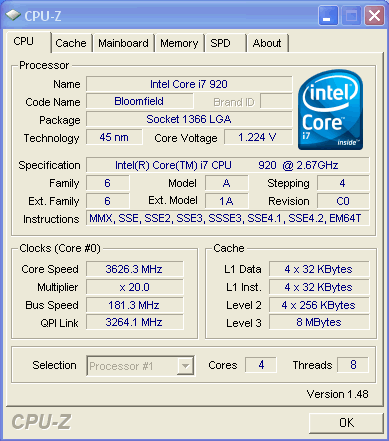
Although the 1.25Voltage is considered as high, the reported temperatures were adequate. The CoreTemp software reported a temperature of ~75 degrees Celsius, while the RealTemp gave ~70 degrees at full load. Meanwhile, the memory was running at CL9 so we may be able to further tune this and get better results.
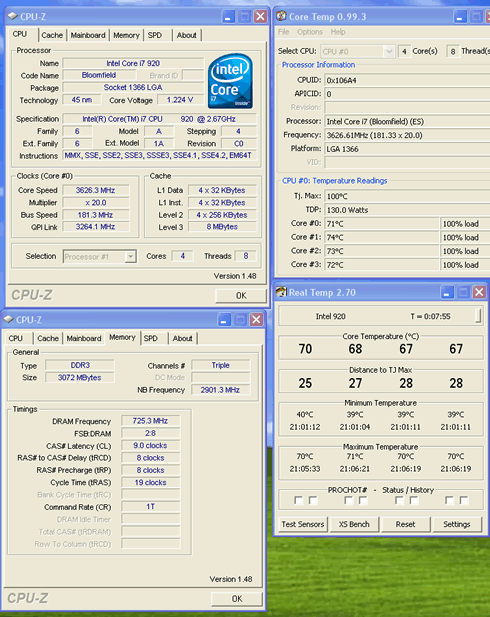
The temperature at idle mode, was ~ 40 degrees Celsius and this time, we had the memory running at CL7@ 1450MHz, while the Intel Core i7-920 was running at 3.60GHz.

If you want to get even higher, you should further increase the Vcore. The sweet point of the 3.80GHz should be stable enough with 1.35V. The Crucial memory had to be moved to CL8 since we had already reached the 1530MHz with 1.65V. At that time, the CPU temperature was very high (90 degrees C) with the Intel stock cooler installed. So it would be recommended to use a better cooler at these speeds.
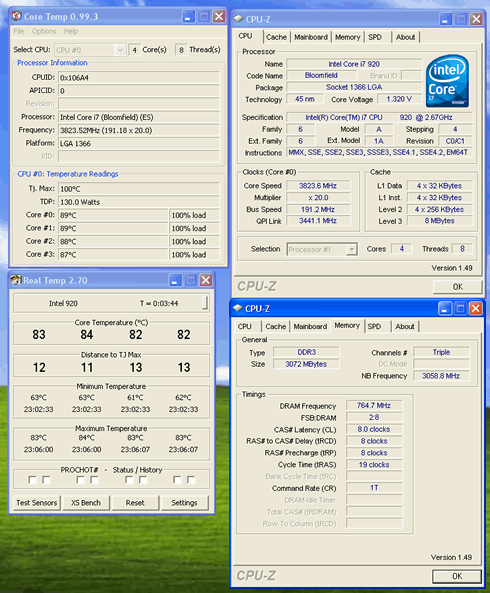
By using a water-cooling solution and a higher Vcore, it is possible to reach the 4.0GHz.
It would be interesting to see here where an Intel Core i7-920 stands against an overclocked Q9300 at their "maximum" speeds:
Benchmark |
Intel Q9300@3.52GHz |
Intel Core i7-920@3.60GHz |
% Difference (in favor of i7-920) |
x264 HD Benchmark |
43.51 |
61.46 |
+29.20% |
SuperPI |
4.08969 |
2.99376 |
+36.61% |
CineBench R10 |
15307 |
21324 |
+28.22% |
TMPGEnc 4 Xpress |
246.03 |
355.20 |
+30.73% |
wPrime |
13.656 |
7.781 |
+43.02% |
PCMark Vantage |
4910 |
4994 |
+1.68% |
3DMark 06 |
3527 |
3540 |
+0.37% |
The overclocked Intel Core i7-920 CPU gives an impressive performance, especially in the Video encoding applications. The performance difference is up to 28~36%, while at the wPrime reaches up to 43%! However, when looking at office applications over PCMark Vantage, the i7-920 is has a very small lead over the Intel Q300 CPU.
Review Pages
2. Package, installation
3. Benchmarks - Everest Ultimate Edition, SiSoftware Sandra
4. Benchmarks - PCMark Vantage, SYSmark 2007 Preview
5. Benchmarks - MAXON CINEBENCH, x264 HD Benchmark, TMPGEnc 4 Xpress
6. Benchmarks - SuperPI, wPrime
7. Benchmarks - 3DMark06, Crysis v1.2
8. Overclocking
9. Conclusion