Breaking News

Western Digital Accelerates Storage Innovation for AI Era Leica LUX Case for the iPhone 17 Pro/Pro Max ASUS Announces ROG Strix Aiolos Viltrox Launches AF 16mm F1.8 L for Full Frame Casio to Release G-SHOCK with Minimalist Metal Design and Even Better Fit

logo

  • Share Us
    • Facebook
    • Twitter
  • Home
  • Home
  • News
  • Reviews
  • Essays
  • Forum
  • Legacy
  • About
    • Submit News

    • Contact Us
    • Privacy

    • Promotion
    • Advertise

    • RSS Feed
    • Site Map

Search form

Linux Raid Guide

Feb 14,2007 0

3. Kernel and modules


Review Pages

1. Introduction
2. Partitioning
3. Kernel and modules
4. Making the array
5. Performance


Untitled Document

You need to check whether your kernel includes RAID support. First try to load the raid modules, if necessary:

Then verify the existence of raid support. Try:

If /proc/mdstat is not available, or if line 32 does not show the [raid1] personality, you will need to enable the following options in your kernel (screen taken from 2.6.18.1) and recompile :
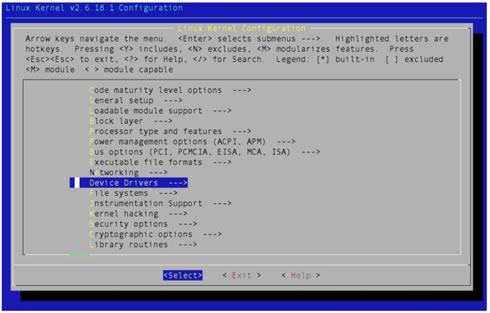
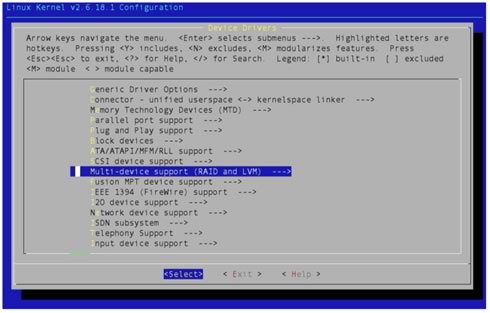
After kernel recompile and reboot, the /proc/mdstat file should be available and showing that you have 2 RAID “personalities” available: [raid0] and [raid1].  You could choose to install RAID support as modules, but since you're going to be using it all the time, it makes no difference if you include it in the kernel, as I did above. Note that the device mapper support is a different thing, but it's useful to have around, so you could just go ahead and install it for future use (encrypted volumes are an obvious application).

 

Review Pages

1. Introduction
2. Partitioning
3. Kernel and modules
4. Making the array
5. Performance


Pages

  • « first
  • ‹ previous
  • 1
  • 2
  • 3
  • 4
  • 5
  • next ›
  • last »

Linux

Tags: Linux
Previous Post
Motorola Q (Sprint Moto Q)
Next Post
Asus P5W64WS Pro

Related Posts

  • NVIDIA Accelerates Open Data Center Innovation

  • System76's Lemur Pro Linux Laptop Now Available

  • System76 Is Designing Its Own Keyboard

  • Microsoft Brings Microsoft Defender ATP to Linux, iOS and Android

  • Tuxedo Computers and Manjaro Team Up on New Linux Laptops

  • Huawei Unveils The openEuler CentOS-based Linux Distribution

  • Lazarus Group Targets Linux With New Malware

  • Microsoft Teams Available on Linux

Latest Reviews

Akaso Brave 8 Lite
Cameras

Akaso Brave 8 Lite

Soundpeats Air 5
Consumer Electronics

Soundpeats Air 5

XbotGo Chamaleon
Consumer Electronics

XbotGo Chamaleon

be quiet! Dark Perk Mice
Gaming

be quiet! Dark Perk Mice

Acemagic W1
PC components

Acemagic W1

Popular News

COLORFUL Introduces CVN B850I GAMING FROZEN Motherboard

COLORFUL Introduces CVN B850I GAMING FROZEN Motherboard

COLORFUL Presents CVN X870 ARK FROZEN Motherboard for AMD Ryzen 9000 CPUs

COLORFUL Presents CVN X870 ARK FROZEN Motherboard for AMD Ryzen 9000 CPUs

TEAMGROUP Launches EXPERT P34F Find My External SSD

TEAMGROUP Launches EXPERT P34F Find My External SSD

ASRock AM5 Motherboards Now Fully Support AMD Ryzen 9 9950X3D & 9900X3D Processors

ASRock AM5 Motherboards Now Fully Support AMD Ryzen 9 9950X3D & 9900X3D Processors

Samsung announces Galaxy Tab S11 and Galaxy S25 FE series

Samsung announces Galaxy Tab S11 and Galaxy S25 FE series

Viltrox Showcases Upcoming Lens Lineup and New TTL Flash at IBC 2025

Viltrox Showcases Upcoming Lens Lineup and New TTL Flash at IBC 2025

CORSAIR announces Vanguard Pro 96 and Vanguard 96 Gaming Keyboards

CORSAIR announces Vanguard Pro 96 and Vanguard 96 Gaming Keyboards

Panasonic Introduces the First Ultra-Telephoto Zoom Lens in the LUMIX S Series

Panasonic Introduces the First Ultra-Telephoto Zoom Lens in the LUMIX S Series

Main menu

  • Home
  • News
  • Reviews
  • Essays
  • Forum
  • Legacy
  • About
    • Submit News

    • Contact Us
    • Privacy

    • Promotion
    • Advertise

    • RSS Feed
    • Site Map
  • About
  • Privacy
  • Contact Us
  • Promotional Opportunities @ CdrInfo.com
  • Advertise on out site
  • Submit your News to our site
  • RSS Feed