Asustor AS5404T 4-Bay NAS System
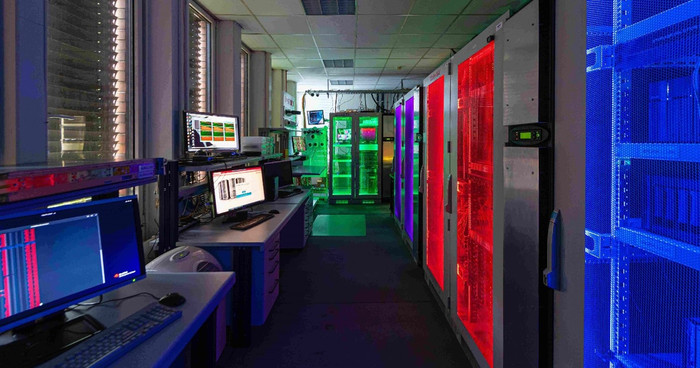
Toshiba’s HDD Innovation Lab in Düsseldorf, Germany, is dedicated to evaluating complex storage architectures. The lab supports customers and partners by offering expert testing, comprehensive benchmarking, and detailed reporting, ensuring they identify the optimal HDD setups for demanding applications. Answering the complex configuration question, such as determining the best RAID setup for the widely used 4-bay network-attached storage (NAS) systems, was one recent project.
Choosing the right RAID
Small businesses and enterprises across various industries use NAS systems to store data on the network and provide easy access to files. These systems contain multiple HDDs, often arranged into a redundant array of independent disks (RAID) configuration. Depending on the selected configuration, RAID technology can enhance data redundancy with features such as parity or mirroring, offering increased resiliency and potentially improved performance.
Configurations for 1- or 2-bay NAS systems are relatively straightforward: a single drive in a 1-bay system without drive redundancy, or two drives in a 2-bay system with data mirroring (RAID1). However, the popular 4-bay NAS systems present several configuration options. The choice of configuration, or what is considered the best RAID configuration for a 4-bay NAS system, is heavily influenced by the individual use case. To address this, Toshiba’s HDD Innovation Lab conducted a rigorous evaluation.
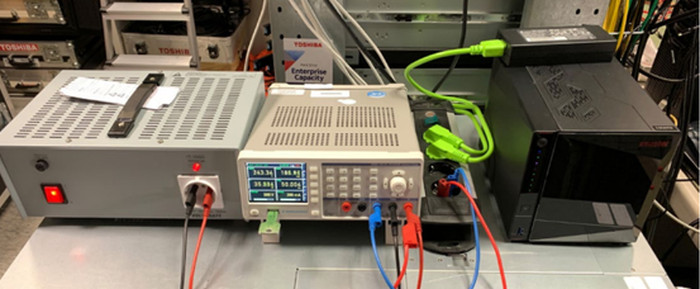
Figure 1: Evaluation setup of Asustor’s AS5404T at Toshiba’s HDD Innovation Lab
Toshiba’s partner Asustor provided a sample of its AS5404T NAS system – a 4-bay model with 2.5GbE network connectivity. It supports up to 4x M.2 SSDs for caching. However, since the aim of the evaluation project was to benchmark the base performance of the HDD array in continuous data flow applications, the cache option was disregarded. However, it should be noted that SSD caching improves random performance during short bursts of incoming data or repeated reads from the same location. But, ultimately, sustained performance depends on HDD speed and the chosen RAID configuration.
Two 256GB M.2 NVMe SSDs were installed to create Pool1 with RAID1. This Pool1 was used for the operating system, while the later-installed HDD Pool2 was reserved for user data. This setup ensures that operating system disk interactions do not interfere with the storage workload.
For the test, the lab equipped the 4-bay NAS system (AS5404T) with four Toshiba N300 8TB HDDs. The lab evaluated the three most common 4-drive configurations: RAID5, RAID6, and RAID10.
For each RAID configuration, the lab set up one HDD storage pool in the NAS, waited for full initialisation and created a thick-provisioned iSCSI block storage target using 80% of the usable pool size. One iSCSI target was connected via the 2.5GbE network interface to an application server, and a Windows logical drive was created and filled with 2TB of test data. In a second round of benchmarking, two iSCSI targets were created on the HDD pool and connected to the application server via separate 2.5GbE connections, using the full network bandwidth of the AS5404T, which features two 2.5GbE ports.
Three types of workload were benchmarked: sequential writing and reading in 1MB blocks and mixed random read/write tasks.
RAID configurations tested
Depending on the specific NAS system requirements, three techniques can be implemented in various RAID configurations. As the name suggests, ‘mirroring’ involves copying data to multiple disks, ensuring redundancy. ‘Striping’, on the other hand, is a technique that divides data across multiple disks to improve performance. ‘Parity’ is a calculated form of error-checking that provides data redundancy. In the event of a single drive failure, the NAS system reconstructs lost or corrupted data.
RAID5
Data is striped across three disks with the fourth disk carrying parity information, allowing data reconstruction if one drive fails. This configuration offers a storage efficiency of 75%, providing 24TB of usable space with the four 8TB drives. While read speeds are fast, write speeds may be reduced because parity must be calculated and written. During a rebuild, all parity must be recalculated, which is a resource-intensive process.
RAID6
RAID6, traditionally used for RAID sets of 6 drive or more, stores two parity stripes, allowing the NAS system to tolerate two drive failures. This is useful when a second drive fails during the rebuild of a previously failed drive. When used with only four drives, the storage efficiency drops to 50%, resulting in a total usable storage capacity of 16TB. The added tolerance for random drive failures may justify this choice, even for systems with only four drives.
RAID10
A RAID10 configuration achieves redundancy by mirroring data across pairs of disks and then striping those mirrors. This avoids resource-consuming parity calculations, but the trade-off is reduced storage efficiency, resulting in a usable capacity of 16TB. RAID10 also tolerates two drive failures, but only if they are not from the same mirrored pair.
Identifying the best configuration
The lab’s benchmarking revealed that the ‘best’ configuration depends on the user’s primary objective: capacity, protection, or performance.
In tests using a single 2.5GbE connection, sequential performance across RAID5 and RAID10 was limited by the network bandwidth (~290MB/s). RAID6 showed slightly lower sequential write performance due to the dual parity calculations. In mixed random workloads, RAID10 performed best, followed by RAID5 and RAID6.
4-Bay NAS |
Disk |
Config |
Capacity |
Performance |
||
SeqWrite |
SeqRead |
Mixed |
||||
MB/s |
MB/s |
MB/s |
||||
AS5404T |
N300 8GB (HDWG780) |
RAID5 |
24TB |
287 |
288 |
54 |
RAID6 |
16TB |
236 |
281 |
35 |
||
RAID10 |
16TB |
289 |
288 |
68 |
||
Table 1: Results for one HDD pool with a single 2.5GbE connection
The recommendations are:
For maximum capacity, use RAID5, which offers 75% storage efficiency with reasonable protection and speed.
For maximum data protection, use RAID6; however, this comes at the cost of speed and capacity due to its tolerance of two concurrent drive failures.
For maximum performance in mixed workloads, use RAID10, although this requires a compromise on capacity and protection.
The evaluation further explored the performance limits of the 4-bay NAS system using both 2.5GbE connections, overcoming the network bandwidth limitations.
4-Bay NAS |
Disk |
Config |
Capacity |
Performance |
||
SeqWrite |
SeqRead |
Mixed |
||||
MB/s |
MB/s |
MB/s |
||||
AS5404T |
N300 8GB (HDWG780) |
RAID5 |
24TB |
365 |
428 |
49 |
RAID6 |
16TB |
290 |
323 |
44 |
||
RAID10 |
16TB |
358 |
351 |
68 |
||
Table 2: Results for one HDD pool with a dual 2.5GbE connection
The results for RAID5, RAID6 and RAID10 followed the same objective trends – RAID5 for capacity, RAID6 for protection, and RAID10 for mixed workloads. However, the lab identified an advanced configuration that provided optimal sequential performance.
Unlocking peak performance
HDDs perform best in sequential operations; having two iSCSI blocks on one HDD pool causes frequent seeking when accessing the two blocks concurrently. Using two separate RAID1 pools avoids this. This setup, supported by the AS5404T, avoids frequent seeking. The lab created one iSCSI block per pool and connected them via separate 2.5GbE interfaces.
4-Bay NAS |
Disk |
Config |
Capacity |
Performance |
||
SeqWrite |
SeqRead |
Mixed |
||||
MB/s |
MB/s |
MB/s |
||||
AS5404T |
N300 8GB (HDWG780) |
2xRAID1 |
16TB |
522 |
572 |
108 |
Table 3: Results for two HDD pools with a dual 2.5GbE connection
Using the 2xRAID1 configuration with dual 2.5GbE connections, the NAS system achieved sequential write speeds of 522MB/s and sequential read speeds of 572MB/s. This performance exceeds RAID10 and reaches the theoretical bandwidth of 2.5GbE. If the network and application support multiple logical storage entities, this configuration offers the optimal performance while maintaining similar protection and capacity efficiency as RAID10.
Power and cooling
In sleep mode, with no storage access or NAS GUI access, the power consumption is basically that of the NAS processing unit, which is 20W. During full data operation, the power consumption ranges from 50W to 60W. Both values are excellent, supporting energy efficiency and sustainability.
The AS5404T’s cooling system keeps the internal temperatures of the HDDs below 50°C, even under load. Although the long-term reliability of the HDDs may degrade above 45°C, the longer idle or sleep periods with lower temperatures help mitigate this. However, for continuous full-load operation, the ambient (external room) temperature should not exceed 23°C to ensure the HDDs remain cool enough for maximum reliability and minimal failure probability.
Conclusion
The Asustor AS5404T 4-bay NAS system, equipped with four Toshiba N300 HDDs, offers high capacity, strong performance, and effective protection against disk media failures.
With one 2.5GbE port, RAID5/6/10 configurations saturate the network (~250MB/s). With both ports, performance reaches between 350MB/s and 400MB/s. Using two RAID1 pools achieves over 500MB/s, which is the theoretical limit of dual 2.5GbE.
The unit's power consumption is relatively low (20W in sleep mode, ~50W in active mode) and cooling is effective, maintaining HDD temperatures within the recommended limits for long-term reliability.
Toshiba’s HDD Innovation Lab stands ready to support business partners interested in performing their own tests or evaluating configurations.
By Rainer W. Kaese, Senior Manager Business Development, Storage Products Division, Toshiba Electronics Europe GmbH