Breaking News

COLORFUL Launches iGame Guard G114 140W GaN Multi-Port Charger INNO3D TOWER WORKSTATION AWS-511Z-R1 Thermal Grizzly and Noctua introduce WireView Pro II Noctua Edition GPU monitoring device Nikon releases the Z5IIC full-frame mirrorless camera Announcing the New ASUS Googlebook 14

logo

  • Share Us
    • Facebook
    • Twitter
  • Home
  • Home
  • News
  • Reviews
  • Essays
  • About
    • Submit News

    • Contact Us
    • Privacy

    • Promotion
    • Advertise

    • RSS Feed

Search form

LiteOn LVW-5045 HDD&DVD Recorder

Feb 9,2005 0

19. Making the LV-5045 Region Free


Review Pages

1. Introduction
2. Packaging & Interior Look
3. Control Menu
4. The Language Menu
5. The Playback menu
6. The Record Menu
7. The Audio Menu
8. The TV Tuner Menu
9. Reading tests
10. Compressed Audio (data CD/DVD)
11. The Easy Guider Menu
12. Easy Guider - Recording Menu
13. Easy Guider - Timer Record Menu
14. Easy Guider - Copy Menu
15. Photo management
16. Writing Quality Tests - Page 1
17. Writing Quality Tests - Page 2
18. Recommended Media List
19. Making the LV-5045 Region Free
20. Conclusion


LiteOn LVW-5045 HDD&DVD Recorder

Making the LV-5045 Region Free

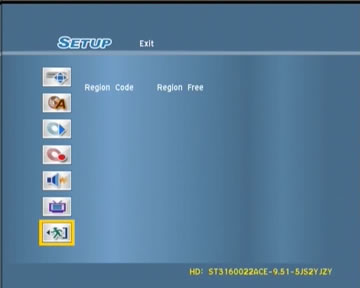
As mentioned previously, the LVW-5045 that we got to test was a region 2 unit. That means, that the DVD-Video discs that it could play were region 2 encoded discs or unencoded ones. So what happens if someone has, let's say, a few region 1 discs that they would like to play with the LVW-5045? Fortunately there is a workaround where the LVW-5045 can be made region free, so that it will play all DVD-Video discs, regardless their region encoding.

The procedure is rather simple and it is persistent. This means, that the setting remains active even if the unit is powered off and can be changed as often as desired. We would like to state here that this feature is unofficial and not supported by LiteOn. While it exists in the current firmware, there is no guarantee that this function will be available in future firmware upgrades.

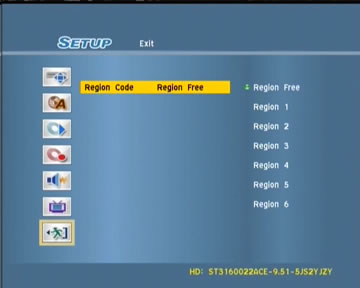
The machine can be made region free by accessing the setup menu, moving the highlight box over exit, typing 2960 after which an extra menu pops up with all of the regions as well as region free on the list.

 

Review Pages

1. Introduction
2. Packaging & Interior Look
3. Control Menu
4. The Language Menu
5. The Playback menu
6. The Record Menu
7. The Audio Menu
8. The TV Tuner Menu
9. Reading tests
10. Compressed Audio (data CD/DVD)
11. The Easy Guider Menu
12. Easy Guider - Recording Menu
13. Easy Guider - Timer Record Menu
14. Easy Guider - Copy Menu
15. Photo management
16. Writing Quality Tests - Page 1
17. Writing Quality Tests - Page 2
18. Recommended Media List
19. Making the LV-5045 Region Free
20. Conclusion

 

Pages

  • « first
  • ‹ previous
  • …
  • 12
  • 13
  • 14
  • 15
  • 16
  • 17
  • 18
  • 19
  • 20
  • next ›
  • last »

LiteOn

Tags: LiteOn
Previous Post
Should ideas be patented
Next Post
The Internet ERA Pirates

Related Posts

  • LITE-ON Technology Delays Transfer of Its Solid State Drives Business to Kioxia

  • SSSTC is Sampling the CA6 PCIe Gen 4 SSDs

  • LITE-ON Technology Approves the Transfer of its Solid State Drives Business to Toshiba Memory

  • Toshiba to Buy Lite-On Technology’s Storage Business Unit

  • LITE-ON to Release Project Denali Compliant SSDs

  • LITE-ON Unveils New SSD for Enterprise Workloads

  • Lite-On to Unveil New NVRAM Hybrid Solid-State Drive at OCP 2018

  • LITE-ON Transfers its Camera Module Business to LuxVisions

Latest Reviews

Fanxiang MP83 M.2 NVMe SSD Enclosure
Enterprise & IT

Fanxiang MP83 M.2 NVMe SSD Enclosure

Ugreen CM642 USB4.0 Enclosure
PC components

Ugreen CM642 USB4.0 Enclosure

be quiet! Dark Power 14 IO
PC components

be quiet! Dark Power 14 IO

SanDisk High Endurance 512GB microSDXC
Cameras

SanDisk High Endurance 512GB microSDXC

Samsung PRO Ultimate 512GB microSDXC
Cameras

Samsung PRO Ultimate 512GB microSDXC

Popular News

MSI’s Latest AMD X870E MAX & EVO Series Motherboards

MSI’s Latest AMD X870E MAX & EVO Series Motherboards

COLORFUL Launches iGame B850M ULTRA Series Micro-ATX Motherboards

COLORFUL Launches iGame B850M ULTRA Series Micro-ATX Motherboards

COLORFUL Presents Limited Edition Chitu MAG-60 Magnetic Keyboard Inspired by the Year of the Horse

COLORFUL Presents Limited Edition Chitu MAG-60 Magnetic Keyboard Inspired by the Year of the Horse

COLORFUL Presents iGame Z890 ULTRA-S W and iGame Z890M ULTRA Z Motherboards

COLORFUL Presents iGame Z890 ULTRA-S W and iGame Z890M ULTRA Z Motherboards

COLORFUL Launches iGame B850I MINI OC V14 Motherboard

COLORFUL Launches iGame B850I MINI OC V14 Motherboard

COLORFUL Expands B850 Motherboard Lineup with New CVN, Battle-Ax, and MEOW Models

COLORFUL Expands B850 Motherboard Lineup with New CVN, Battle-Ax, and MEOW Models

ASRock Adds Support for One Sub-Channel DRAM Module on Intel DDR5 Motherboards

ASRock Adds Support for One Sub-Channel DRAM Module on Intel DDR5 Motherboards

Exceed the Infinite with New ASRock X870E Taichi White Motherboard

Exceed the Infinite with New ASRock X870E Taichi White Motherboard

Main menu

  • Home
  • News
  • Reviews
  • Essays
  • About
    • Submit News

    • Contact Us
    • Privacy

    • Promotion
    • Advertise

    • RSS Feed
  • About
  • Privacy
  • Contact Us
  • Promotional Opportunities @ CdrInfo.com
  • Advertise on out site
  • Submit your News to our site
  • RSS Feed