Breaking News

TerraMaster Launches Storage Upgrade Season with Up to 30% Off During Prime Big Deal Days COLORFUL Launches iGame Guard G114 140W GaN Multi-Port Charger INNO3D TOWER WORKSTATION AWS-511Z-R1 Thermal Grizzly and Noctua introduce WireView Pro II Noctua Edition GPU monitoring device Nikon releases the Z5IIC full-frame mirrorless camera

logo

  • Share Us
    • Facebook
    • Twitter
  • Home
  • Home
  • News
  • Reviews
  • Essays
  • About
    • Submit News

    • Contact Us
    • Privacy

    • Promotion
    • Advertise

    • RSS Feed

Search form

MAYA44 USB External Sound Card

Apr 15,2007 0

4. Drivers/Installation - Page 2


Review Pages

1. Introduction
2. The package
3. Drivers/Installation - Page 1
4. Drivers/Installation - Page 2
5. Performance/Conclusion


For our tests, we used VirtualDJ version v4.2R1. The software has detected the Maya44 USB card and after selecting it, all properties are set automatically.
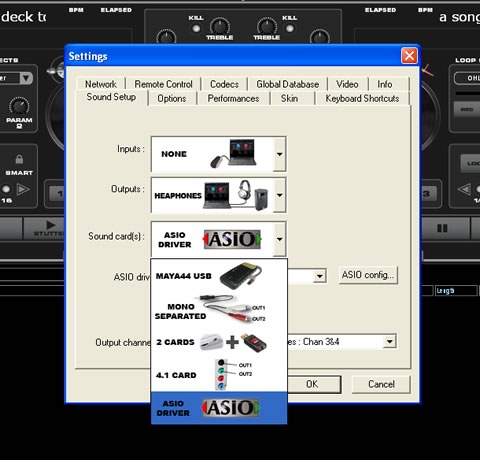
However, for better handling, you can select ASIO driver mode and after pressing the "ASIO config..." button, you access the card's ASIO panel. There are two major tabs, where you can select the sample rate 44/48KHz and resolution (16bit always):

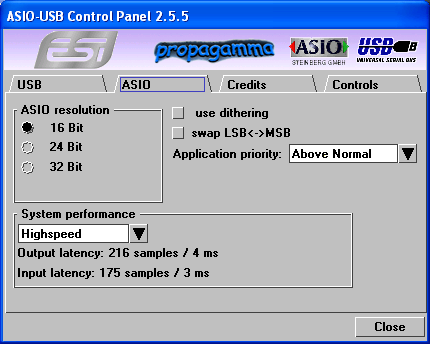
In the ASIO tab, again you can select the ASIO resolution and system performance. With a fast computer, and after selecting "Highspeed" mode, the output latency reaches 4ms. Of course, we could like to have zero latency but 4ms is still very low:
In case your PC is not very fast, you can select other modes:
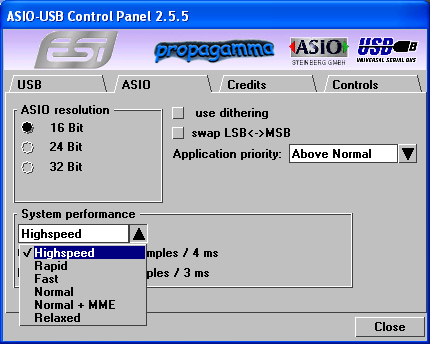
With the "relaxed" (worst) option selected, output latency reaches 123ms, not useful to any kind of user:

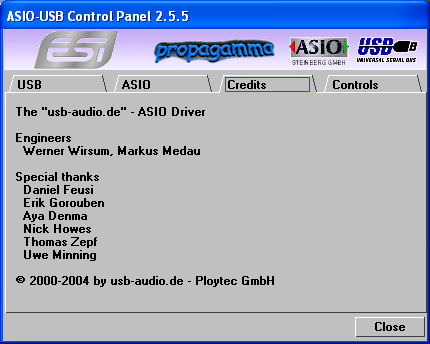
The Credits tab.
Lastly, the Control tab, controls the output/input levels.

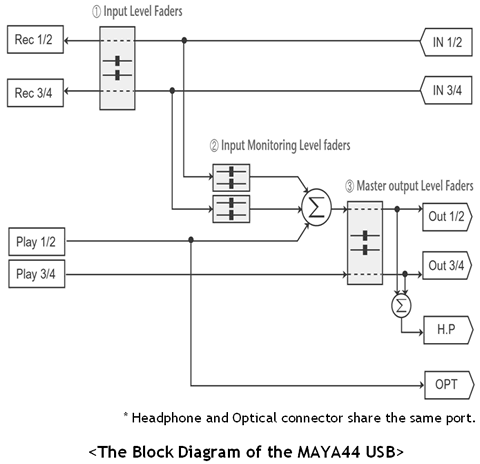
1. Monitor Level Control Section
This section can be used to control the input level. You can monitor the signals through the input channel 1,2 and input channel 3,4 individually and/or simultaneously. It will not affect the actual input level from the source. Even if these faders are muted, you can still record the signals from the source, but you are not able to listen to (= monitor) the input source through the analog output.

2. Input Level Control Section
This section controls the real input level through the input ports. You can control all 4 inputs using the one set of stereo faders.

3. Output Level Control Section
These are the master output level faders. You can control all the outputs using the single set of the stereo master faders, except the digital optical output. You can control the monitoring level of the input source through the input ports and/or the playing out level of the wave file through the analog output ports.

The headphone output signal is the mixed signal from analog out 1, 2 and analog out 3, 4. Also note that the analog headphone output and the digital optical output share the same connector, i.e. they cannot be used simultaneously. The Gang mode links the left and right faders of each channel together for easier stereo operation. Deselect Gang if you need to control the left and right levels independently.


Review Pages

1. Introduction
2. The package
3. Drivers/Installation - Page 1
4. Drivers/Installation - Page 2
5. Performance/Conclusion
 

Pages

  • « first
  • ‹ previous
  • 1
  • 2
  • 3
  • 4
  • 5
  • next ›
  • last »

ESI

External Sound Card

USB

Tags: ESI External Sound Card USB
Previous Post
Blackberry 8800
Next Post
Biostar T-Force P965

Related Posts

  • Pre-IFA 2019: Sound Blaster X3 and Super X-Fi

  • USB-IF Completes Media Agnostic Wireless USB Specification

  • Next Generation USB Connector Underway

  • SuperSpeed USB 10 Gbps Ready for Development

  • USB-IF Certified Intel 7 Series Chipset and Intel C216 Chipset Family

  • Roboform2Go

  • Behringer BCD3000

  • Supertalent DH 2GB USB

Latest Reviews

Fanxiang MP83 M.2 NVMe SSD Enclosure
Enterprise & IT

Fanxiang MP83 M.2 NVMe SSD Enclosure

Ugreen CM642 USB4.0 Enclosure
PC components

Ugreen CM642 USB4.0 Enclosure

be quiet! Dark Power 14 IO
PC components

be quiet! Dark Power 14 IO

SanDisk High Endurance 512GB microSDXC
Cameras

SanDisk High Endurance 512GB microSDXC

Samsung PRO Ultimate 512GB microSDXC
Cameras

Samsung PRO Ultimate 512GB microSDXC

Popular News

MSI’s Latest AMD X870E MAX & EVO Series Motherboards

MSI’s Latest AMD X870E MAX & EVO Series Motherboards

COLORFUL Launches iGame B850M ULTRA Series Micro-ATX Motherboards

COLORFUL Launches iGame B850M ULTRA Series Micro-ATX Motherboards

COLORFUL Presents Limited Edition Chitu MAG-60 Magnetic Keyboard Inspired by the Year of the Horse

COLORFUL Presents Limited Edition Chitu MAG-60 Magnetic Keyboard Inspired by the Year of the Horse

COLORFUL Presents iGame Z890 ULTRA-S W and iGame Z890M ULTRA Z Motherboards

COLORFUL Presents iGame Z890 ULTRA-S W and iGame Z890M ULTRA Z Motherboards

COLORFUL Launches iGame B850I MINI OC V14 Motherboard

COLORFUL Launches iGame B850I MINI OC V14 Motherboard

COLORFUL Expands B850 Motherboard Lineup with New CVN, Battle-Ax, and MEOW Models

COLORFUL Expands B850 Motherboard Lineup with New CVN, Battle-Ax, and MEOW Models

ASRock Adds Support for One Sub-Channel DRAM Module on Intel DDR5 Motherboards

ASRock Adds Support for One Sub-Channel DRAM Module on Intel DDR5 Motherboards

Exceed the Infinite with New ASRock X870E Taichi White Motherboard

Exceed the Infinite with New ASRock X870E Taichi White Motherboard

Main menu

  • Home
  • News
  • Reviews
  • Essays
  • About
    • Submit News

    • Contact Us
    • Privacy

    • Promotion
    • Advertise

    • RSS Feed
  • About
  • Privacy
  • Contact Us
  • Promotional Opportunities @ CdrInfo.com
  • Advertise on out site
  • Submit your News to our site
  • RSS Feed