Microsoft Previews New Bing
Today at SES New York Microsoft shared with attendees the company's plans to begin testing some new Bing features.
Microsoft focus remains the same, - the company aims at making Bing the best place to help users make better decisions. The new Bing search engine, schedulled for launch this spring, will continue to helped users get to better decisions by providing a more visual and a more organized experience.
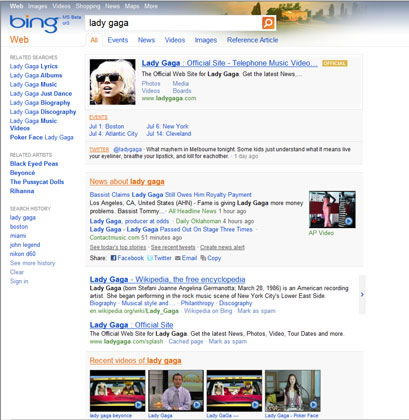
Microsoft's research showed that 42% of sessions require refinements, searching sessions are getting longer, and many of those refinements happen when trying to complete common tasks. At launch, Microsoft introduced Quick Tabs in the Explore Pane (left rail) to give users 1-click tools to help refine queries and help them go from question to decision. For example, when planning a trip, Quick Tabs anticipate the intent of the task a customer wants to accomplish and provide shortcuts for key planning activities such as weather, events, and maps. These quick tabs adapt based upon the user intent, and match the things a user would expect when looking for a travel destination.
Jeff Henshaw, GPM of Microsoft's user experience team put it well, "We have a vision for Bing to serve as a vital assistant to your online decision-making. In these latest designs, you?ll see a lighter, cleaner presentation of results that highlight key actions that will efficiently guide you toward your goal. Every day, Bing gets more intelligent about tasks that are important to people like you and me, so we continue to streamline and polish the Bing experience in ways that let you tap into that intelligence." So over the next few months, Microsoft is going to test some new design concepts moving Quick Tabs functionality to the top of the page for 1-click access to Bing's most robust, visual, and organized pages.
This week, Microsoft will also test new experiences for real-time results. For example, when users search for a publication such as the New York Times, Bing not only gives them access to specific sections of the destination website, but also provides the most popular shared links from that publication.
Another area in search that has been growing far more quickly as web search is the ability to get better local information by visualizing information on maps. Microsoft has been doing a bunch of work here to bring interesting experiences to users on top of the mapping canvas with a relatively new feature called Map Apps. Map Apps enables Bing to bring relevant data from Microsoft's partners to the search platform. Today Microsoft previewed a cool new map application, which brings real time data from foursquare into our Silverlight maps experience to give users a real time sense of what?s going on as they plan activities in their own neighborhoods or while on the road.
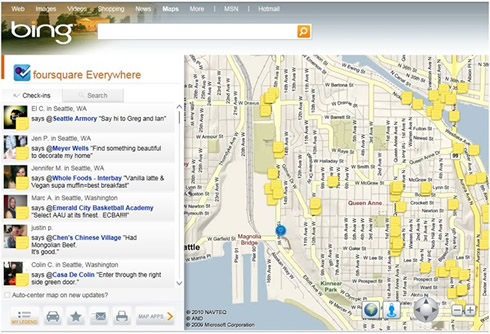
The foursquare map app is a combination of the spatial canvas that Bing Maps provides, combined with foursquare?s user reputation service ability to see who has unlocked specific badges, where and who has been crowned mayor of certain locations making it easier to explore any city in the world as if you were a local. "Let?s say you?re travelling to New York City for the week, but you don?t know what?s hot in Greenwich Village. Selecting the foursquare Map App in Bing Maps, and zooming into to Greenwich Village will get you tips that show you what locals are saying about the hot spots in that area. It's like an interactive day planner, designed to help find the best things to do in that area. And if you have questions, you can always contact users through foursquare to get the inside scoop," Microsoft explained.
Microsoft's research showed that 42% of sessions require refinements, searching sessions are getting longer, and many of those refinements happen when trying to complete common tasks. At launch, Microsoft introduced Quick Tabs in the Explore Pane (left rail) to give users 1-click tools to help refine queries and help them go from question to decision. For example, when planning a trip, Quick Tabs anticipate the intent of the task a customer wants to accomplish and provide shortcuts for key planning activities such as weather, events, and maps. These quick tabs adapt based upon the user intent, and match the things a user would expect when looking for a travel destination.
Jeff Henshaw, GPM of Microsoft's user experience team put it well, "We have a vision for Bing to serve as a vital assistant to your online decision-making. In these latest designs, you?ll see a lighter, cleaner presentation of results that highlight key actions that will efficiently guide you toward your goal. Every day, Bing gets more intelligent about tasks that are important to people like you and me, so we continue to streamline and polish the Bing experience in ways that let you tap into that intelligence." So over the next few months, Microsoft is going to test some new design concepts moving Quick Tabs functionality to the top of the page for 1-click access to Bing's most robust, visual, and organized pages.
This week, Microsoft will also test new experiences for real-time results. For example, when users search for a publication such as the New York Times, Bing not only gives them access to specific sections of the destination website, but also provides the most popular shared links from that publication.
Another area in search that has been growing far more quickly as web search is the ability to get better local information by visualizing information on maps. Microsoft has been doing a bunch of work here to bring interesting experiences to users on top of the mapping canvas with a relatively new feature called Map Apps. Map Apps enables Bing to bring relevant data from Microsoft's partners to the search platform. Today Microsoft previewed a cool new map application, which brings real time data from foursquare into our Silverlight maps experience to give users a real time sense of what?s going on as they plan activities in their own neighborhoods or while on the road.
The foursquare map app is a combination of the spatial canvas that Bing Maps provides, combined with foursquare?s user reputation service ability to see who has unlocked specific badges, where and who has been crowned mayor of certain locations making it easier to explore any city in the world as if you were a local. "Let?s say you?re travelling to New York City for the week, but you don?t know what?s hot in Greenwich Village. Selecting the foursquare Map App in Bing Maps, and zooming into to Greenwich Village will get you tips that show you what locals are saying about the hot spots in that area. It's like an interactive day planner, designed to help find the best things to do in that area. And if you have questions, you can always contact users through foursquare to get the inside scoop," Microsoft explained.