Breaking News

ENDORFY Palm Rest V2 series delivers comfort with a magnetic pull MSI’s Latest AMD X870E MAX & EVO Series Motherboards KIOXIA unleashes EXCERIA PRO G2 SSD series KINGMAX Launches DDR5 Horizon II Overclocking Memory Module, Tailored for High-Load Scenarios DeepCool Unveils SPARTACUS 360 AIO Liquid Cooler for High-End Performance and Customization

logo

  • Share Us
    • Facebook
    • Twitter
  • Home
  • Home
  • News
  • Reviews
  • Essays
  • Forum
  • Legacy
  • About
    • Submit News

    • Contact Us
    • Privacy

    • Promotion
    • Advertise

    • RSS Feed
    • Site Map

Search form

Nero DVD-Video Guide

Nov 11,2003 0

6. Step5


Review Pages

1. Introduction
2. Step1
3. Step2
4. Step3
5. Step4
6. Step5


“Nero Burning Rom DVD-Video”

Burn

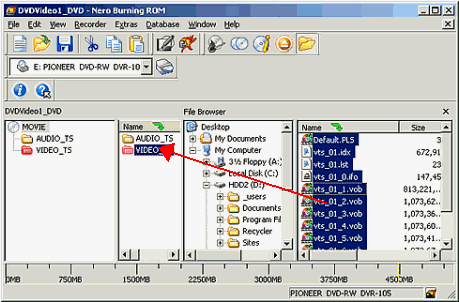
We find and we choose in the File Browser the folder with the files we want to write. In the right menu we see the contents of the selected folder. We choose them all ( put the censor in the contents menu and press ctrl+A) and with the drug and drop way we put them in the VIDEO_TS in the second from the left menu, as in photo bellow.
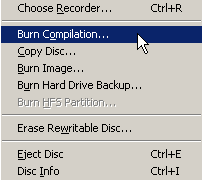
After you finish drug and drop choose the Recorder Option from the main bar and right after the "Burn Compilation..." option( or just press the icon).

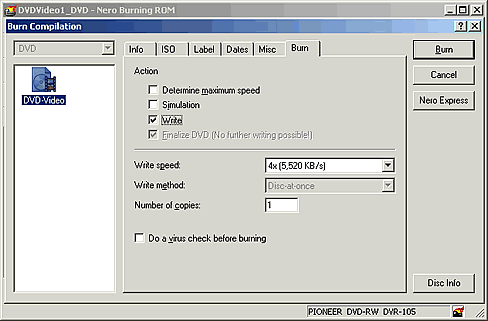
Below is the screen you will see. Choose the "Write" option for writing your project or "Simulation" for test. Also set the speed you want, from the "Write speed" drop-down menu. If we forget to name our compilation this is our last chance to do it, just as we described in page 1. Ending press the Burn botton to start the burning procedure(or Simulate button if you have choose Simulation).
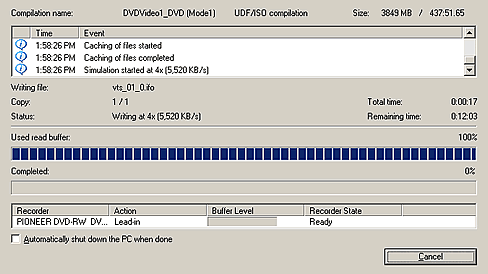
Now you'll have to wait. The recording time depends on the writing speed that your drive and media supports.
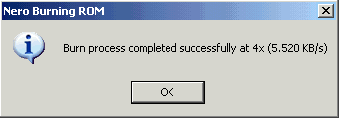
As soon as the procedure is complete you will you will receive the following message.
 

Review Pages

1. Introduction
2. Step1
3. Step2
4. Step3
5. Step4
6. Step5


Pages

  • « first
  • ‹ previous
  • 1
  • 2
  • 3
  • 4
  • 5
  • 6

Tags:
Previous Post
Philips DVR824P
Next Post
How to backup a DVD movie

Related Posts

Latest Reviews

Noctua NP-DM3 desk mat
Gaming

Noctua NP-DM3 desk mat

Crucial P510 2TB NMVE
PC components

Crucial P510 2TB NMVE

The Quiet Technology Behind the Spin
Enterprise & IT

The Quiet Technology Behind the Spin

Crucial DDR5 Pro 6400 CL32
PC components

Crucial DDR5 Pro 6400 CL32

SOUNDPEATS Clip1
Consumer Electronics

SOUNDPEATS Clip1

Popular News

COLORFUL Introduces CVN B850I GAMING FROZEN Motherboard

COLORFUL Introduces CVN B850I GAMING FROZEN Motherboard

COLORFUL Presents CVN X870 ARK FROZEN Motherboard for AMD Ryzen 9000 CPUs

COLORFUL Presents CVN X870 ARK FROZEN Motherboard for AMD Ryzen 9000 CPUs

COLORFUL Presents the B860 Series Motherboards

COLORFUL Presents the B860 Series Motherboards

Intel-AMD new motherboards announced

Intel-AMD new motherboards announced

TEAMGROUP Launches EXPERT P34F Find My External SSD

TEAMGROUP Launches EXPERT P34F Find My External SSD

ASRock AM5 Motherboards Now Fully Support AMD Ryzen 9 9950X3D & 9900X3D Processors

ASRock AM5 Motherboards Now Fully Support AMD Ryzen 9 9950X3D & 9900X3D Processors

Samsung announces Galaxy Tab S11 and Galaxy S25 FE series

Samsung announces Galaxy Tab S11 and Galaxy S25 FE series

Viltrox Showcases Upcoming Lens Lineup and New TTL Flash at IBC 2025

Viltrox Showcases Upcoming Lens Lineup and New TTL Flash at IBC 2025

Main menu

  • Home
  • News
  • Reviews
  • Essays
  • Forum
  • Legacy
  • About
    • Submit News

    • Contact Us
    • Privacy

    • Promotion
    • Advertise

    • RSS Feed
    • Site Map
  • About
  • Privacy
  • Contact Us
  • Promotional Opportunities @ CdrInfo.com
  • Advertise on out site
  • Submit your News to our site
  • RSS Feed