
Breaking News

TerraMaster Launches Storage Upgrade Season with Up to 30% Off During Prime Big Deal Days COLORFUL Launches iGame Guard G114 140W GaN Multi-Port Charger INNO3D TOWER WORKSTATION AWS-511Z-R1 Thermal Grizzly and Noctua introduce WireView Pro II Noctua Edition GPU monitoring device Nikon releases the Z5IIC full-frame mirrorless camera

logo

  • Share Us
    • Facebook
    • Twitter
  • Home
  • Home
  • News
  • Reviews
  • Essays
  • About
    • Submit News

    • Contact Us
    • Privacy

    • Promotion
    • Advertise

    • RSS Feed

Search form

NeuNeo HVD108 DVD Player

Oct 21,2004 0

5. Menus - page 1


Review Pages

1. Introduction
2. Main Chipset
3. HDTV
4. Connections
5. Menus - page 1
6. Menus - Page 2
7. Menus - page 3
8. Menus - Page 4
9. Reading Tests
10. Error Correction
11. Conclusion


NeuNeo HVD108 DVD Player - Page 5

Menus - page 1

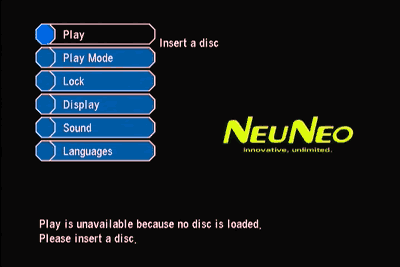
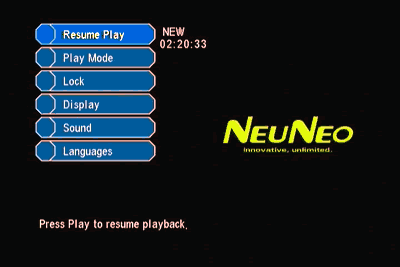
After connecting the NeuNeo player, we turned it on. The follow screen is what we saw first. The first screenshot is without a disc inserted while the second had a DVD movie.
You also have the option of locking the player, by inputing a four digit password.

The "Display" menu option has two subcategories:

The first one, "TV System", lets you define the image quality and resolution as well as the video output that you'll be using.

In the second, "TV Image", you can set the aspect ratio depending on your TV.

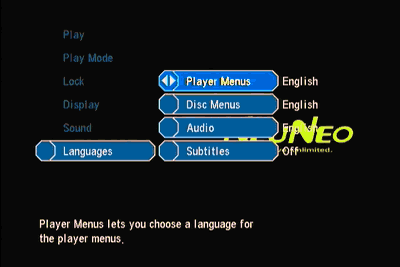
The last option in the main menu, "Languages", lets you define the language for the player's menus, disc menus, audio language and subtitles to be used by default.
 

Review Pages

1. Introduction
2. Main Chipset
3. HDTV
4. Connections
5. Menus - page 1
6. Menus - Page 2
7. Menus - page 3
8. Menus - Page 4
9. Reading Tests
10. Error Correction
11. Conclusion


Pages

  • « first
  • ‹ previous
  • 1
  • 2
  • 3
  • 4
  • 5
  • 6
  • 7
  • 8
  • 9
  • …
  • next ›
  • last »

NeuNeo

Tags: NeuNeo
Previous Post
PowerColor X300
Next Post
Hercules DJ Console

Related Posts

  • NeuNeo DV308 MPEG4 DVD Player

  • NeuNeos High Definition DVD player hits the market

Latest Reviews

Fanxiang MP83 M.2 NVMe SSD Enclosure
Enterprise & IT

Fanxiang MP83 M.2 NVMe SSD Enclosure

Ugreen CM642 USB4.0 Enclosure
PC components

Ugreen CM642 USB4.0 Enclosure

be quiet! Dark Power 14 IO
PC components

be quiet! Dark Power 14 IO

SanDisk High Endurance 512GB microSDXC
Cameras

SanDisk High Endurance 512GB microSDXC

Samsung PRO Ultimate 512GB microSDXC
Cameras

Samsung PRO Ultimate 512GB microSDXC

Popular News

MSI’s Latest AMD X870E MAX & EVO Series Motherboards

MSI’s Latest AMD X870E MAX & EVO Series Motherboards

COLORFUL Launches iGame B850M ULTRA Series Micro-ATX Motherboards

COLORFUL Launches iGame B850M ULTRA Series Micro-ATX Motherboards

COLORFUL Presents Limited Edition Chitu MAG-60 Magnetic Keyboard Inspired by the Year of the Horse

COLORFUL Presents Limited Edition Chitu MAG-60 Magnetic Keyboard Inspired by the Year of the Horse

COLORFUL Presents iGame Z890 ULTRA-S W and iGame Z890M ULTRA Z Motherboards

COLORFUL Presents iGame Z890 ULTRA-S W and iGame Z890M ULTRA Z Motherboards

COLORFUL Launches iGame B850I MINI OC V14 Motherboard

COLORFUL Launches iGame B850I MINI OC V14 Motherboard

COLORFUL Expands B850 Motherboard Lineup with New CVN, Battle-Ax, and MEOW Models

COLORFUL Expands B850 Motherboard Lineup with New CVN, Battle-Ax, and MEOW Models

ASRock Adds Support for One Sub-Channel DRAM Module on Intel DDR5 Motherboards

ASRock Adds Support for One Sub-Channel DRAM Module on Intel DDR5 Motherboards

Exceed the Infinite with New ASRock X870E Taichi White Motherboard

Exceed the Infinite with New ASRock X870E Taichi White Motherboard

Main menu

  • Home
  • News
  • Reviews
  • Essays
  • About
    • Submit News

    • Contact Us
    • Privacy

    • Promotion
    • Advertise

    • RSS Feed
  • About
  • Privacy
  • Contact Us
  • Promotional Opportunities @ CdrInfo.com
  • Advertise on out site
  • Submit your News to our site
  • RSS Feed
