
Breaking News

CORSAIR Expands Its Gaming Ecosystem at Computex 2026 with Advanced Hall Effect Technology, Stream Deck-Integrated Performance, and All-Day Audio CORSAIR Unveils the Latest Innovation in Cases, Cooling, Power Supplies and More for DIY PC Builders at COMPUTEX 2026 be quiet! unveils new power, cooling, and peripheral lineup Micron Powers AI Everywhere at COMPUTEX 2026 Delkin Devices Launches New microSD Express Cards Optimized for Nintendo Switch 2 Gaming

logo

  • Share Us
    • Facebook
    • Twitter
  • Home
  • Home
  • News
  • Reviews
  • Essays
  • Forum
  • Legacy
  • About
    • Submit News

    • Contact Us
    • Privacy

    • Promotion
    • Advertise

    • RSS Feed
    • Site Map

Search form

PatriotMemory Box Office Player

Dec 3,2009 0

2. Opening the package


Review Pages

1. About the PatriotMemory Box Office HD Media Player
2. Opening the package
3. Powering up the player
4. Setup Menu
5. ISO Support
6. Subtitles
7. Network
8. Final thoughts


The PatriotMemory Box office can be purchased online for $99 after Amazon's rebate. The price is quite competitive to other products, such as the WD Live TV!.
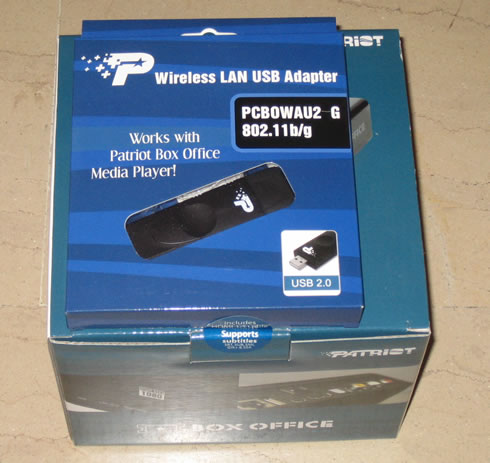
For our tests, Patriot Memory supplied us with a WLAN adapter that is actually a USB2.0 Wifi adapter based on the Realtek chipset with drivers for PC systems. Since it is not bundled with the main device, you need pay some additional $15 to get it. However, it would be recommended to buy it in order to avoid any possible incompatibility issues with other USB wifi adapters you may already have or plan to buy.

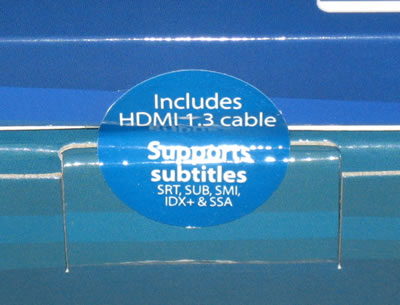
A sticker informs us that an HDMI 1.3 cable is included and that the device supports subtitles - both very useful:
Let's open the box. As you can see below you will find the Box Office Media Player, a remote control with batteries included, a composite AV cable, an HDMI v1.3 cable, an AC adapter, a quick install guide and a manual/transcode media center software CD. Both the software and manual can be also downloaded from the PatriotMemory's website in case your CD is broken. The package is complete for a $99 product.

The device looks good and the metallic outer shell makes it look quite solid.

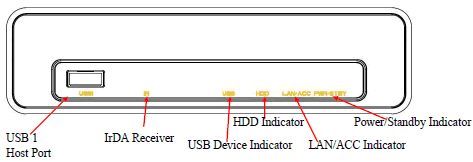
A USB port (input) and several LEDs are placed on the front panel, as you can see in the pictures below:

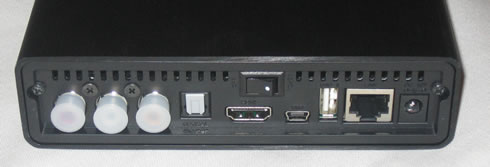
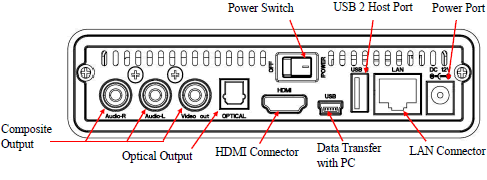
USB2.0 ports, ethernet, optical and composite outputs and of course the HDMI port are found at the rear side of the device. All these ports should be enough to allow you to connect the player with your flat panel TV and enjoy your videos:
 

Review Pages

1. About the PatriotMemory Box Office HD Media Player
2. Opening the package
3. Powering up the player
4. Setup Menu
5. ISO Support
6. Subtitles
7. Network
8. Final thoughts


Pages

  • « first
  • ‹ previous
  • 1
  • 2
  • 3
  • 4
  • 5
  • 6
  • 7
  • 8
  • next ›
  • last »

Patriot Memory

Tags: Patriot Memory
Previous Post
LiteOn iHOS104 4x BD-ROM
Next Post
Gainward GT240

Related Posts

  • Patriot Announces VIPER VENOM RGB and non-RGB DDR5 Kits

  • Patriot Announces Signature DDR5 Memory Series

  • PATRIOT VIPER GAMING STEEL RGB Memory Lineup

  • VIPER GAMING by PATRIOT Launches the PXD m.2 PCIe Type-C External SSD

  • Patriot Announces the VPR100 RGB M.2 NVMe SSD

  • Patriot Launches The P200 Series SATA SSDs

  • Viper Gaming Releases The VPN100 NVMe PCIe M.2 SSD

  • Patriot Launches the Viper Steel DDR4 16GB 4400MHz Memory

Latest Reviews

Swit NP-FZ100 Battery
Cameras

Swit NP-FZ100 Battery

The Technology Stack Behind Modern Digital Gaming Platforms
Consumer Electronics

The Technology Stack Behind Modern Digital Gaming Platforms

be quiet! Dark Rock Pro 6
Cooling Systems

be quiet! Dark Rock Pro 6

How Online Casinos Use Encryption, Verification, and Risk Controls to Build User Trust
Enterprise & IT

How Online Casinos Use Encryption, Verification, and Risk Controls to Build User Trust

Why Low-Latency Infrastructure Matters More Than Raw Specs
Enterprise & IT

Why Low-Latency Infrastructure Matters More Than Raw Specs

Popular News

TEAMGROUP Launches EXPERT P34F Find My External SSD

TEAMGROUP Launches EXPERT P34F Find My External SSD

CORSAIR announces Vanguard Pro 96 and Vanguard 96 Gaming Keyboards

CORSAIR announces Vanguard Pro 96 and Vanguard 96 Gaming Keyboards

MSI Launches FORGE GK600 TKL WIRELESS Special Edition Compact Mechanical Keyboard

MSI Launches FORGE GK600 TKL WIRELESS Special Edition Compact Mechanical Keyboard

Samsung announces Galaxy Tab S11 and Galaxy S25 FE series

Samsung announces Galaxy Tab S11 and Galaxy S25 FE series

Viltrox Showcases Upcoming Lens Lineup and New TTL Flash at IBC 2025

Viltrox Showcases Upcoming Lens Lineup and New TTL Flash at IBC 2025

Panasonic Introduces the First Ultra-Telephoto Zoom Lens in the LUMIX S Series

Panasonic Introduces the First Ultra-Telephoto Zoom Lens in the LUMIX S Series

MSI Launches DATAMAG 40Gbps Magnetic Portable SSD

MSI Launches DATAMAG 40Gbps Magnetic Portable SSD

Viltrox Joins the L-Mount Alliance, Expanding Creative Possibilities

Viltrox Joins the L-Mount Alliance, Expanding Creative Possibilities

Main menu

  • Home
  • News
  • Reviews
  • Essays
  • Forum
  • Legacy
  • About
    • Submit News

    • Contact Us
    • Privacy

    • Promotion
    • Advertise

    • RSS Feed
    • Site Map
  • About
  • Privacy
  • Contact Us
  • Promotional Opportunities @ CdrInfo.com
  • Advertise on out site
  • Submit your News to our site
  • RSS Feed