
Breaking News

Razer Unveils All-New Wolverine V4 Line ASUS Republic of Gamers Ships ROG Rapture GT-BN98 Router GMK Unveils TriggerKey, a New Mechanical Key System for Greater Precision and Comfort Akasa Unveils Euler MX2, Fanless Mini-ITX Case for Unattended Commercial and Industrial Computing Air Power G10 PC Case Now Available at Newegg with Three Tilting Front Fans

logo

  • Share Us
    • Facebook
    • Twitter
  • Home
  • Home
  • News
  • Reviews
  • Essays
  • About
    • Submit News

    • Contact Us
    • Privacy

    • Promotion
    • Advertise

    • RSS Feed

Search form

PatriotMemory Box Office Player

Dec 3,2009 0

6. Subtitles


Review Pages

1. About the PatriotMemory Box Office HD Media Player
2. Opening the package
3. Powering up the player
4. Setup Menu
5. ISO Support
6. Subtitles
7. Network
8. Final thoughts


The Box Office player supports various subtitle formats as well as many languages. The default English language is very well supported as you can see below:

Pressing at the "Subtitle" menu will get you to the subtitle properties window. There you can choose among the available subtitles of the movie, change the text encoding, color, size, offset and of course disable them:
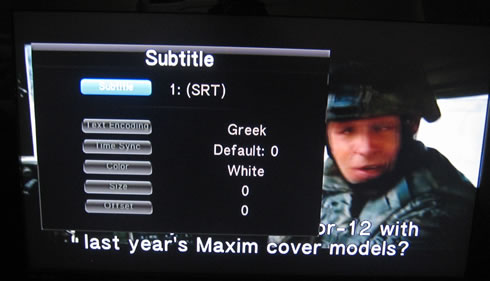
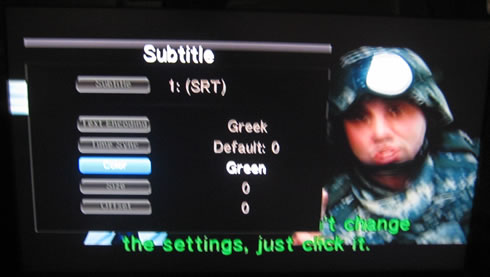
But how does the player deal with other complicated languages like ..Greek? Well, the Greek subtitles appeared on the screen although the letters had an annoying extra space between them making reading really hard:

In addition, letters using a punctuation mark won't appear at all, no matter if you have chosen the UTF-8 or any other character encoding. In any case, this is something that PatriotMemory should fix.

The good news is that DVD subtitles appear just fine:

No problems with Greek subtitles of a Blu-ray based ISO:

..although you cannot change any of the properties:


Review Pages

1. About the PatriotMemory Box Office HD Media Player
2. Opening the package
3. Powering up the player
4. Setup Menu
5. ISO Support
6. Subtitles
7. Network
8. Final thoughts


Pages

  • « first
  • ‹ previous
  • 1
  • 2
  • 3
  • 4
  • 5
  • 6
  • 7
  • 8
  • next ›
  • last »

Patriot Memory

Tags: Patriot Memory
Previous Post
LiteOn iHOS104 4x BD-ROM
Next Post
Gainward GT240

Related Posts

  • Patriot Announces VIPER VENOM RGB and non-RGB DDR5 Kits

  • Patriot Announces Signature DDR5 Memory Series

  • PATRIOT VIPER GAMING STEEL RGB Memory Lineup

  • VIPER GAMING by PATRIOT Launches the PXD m.2 PCIe Type-C External SSD

  • Patriot Announces the VPR100 RGB M.2 NVMe SSD

  • Patriot Launches The P200 Series SATA SSDs

  • Viper Gaming Releases The VPN100 NVMe PCIe M.2 SSD

  • Patriot Launches the Viper Steel DDR4 16GB 4400MHz Memory

Latest Reviews

Fanxiang MP83 M.2 NVMe SSD Enclosure
Enterprise & IT

Fanxiang MP83 M.2 NVMe SSD Enclosure

Ugreen CM642 USB4.0 Enclosure
PC components

Ugreen CM642 USB4.0 Enclosure

be quiet! Dark Power 14 IO
PC components

be quiet! Dark Power 14 IO

SanDisk High Endurance 512GB microSDXC
Cameras

SanDisk High Endurance 512GB microSDXC

Samsung PRO Ultimate 512GB microSDXC
Cameras

Samsung PRO Ultimate 512GB microSDXC

Popular News

MSI’s Latest AMD X870E MAX & EVO Series Motherboards

MSI’s Latest AMD X870E MAX & EVO Series Motherboards

COLORFUL Launches iGame B850M ULTRA Series Micro-ATX Motherboards

COLORFUL Launches iGame B850M ULTRA Series Micro-ATX Motherboards

COLORFUL Presents Limited Edition Chitu MAG-60 Magnetic Keyboard Inspired by the Year of the Horse

COLORFUL Presents Limited Edition Chitu MAG-60 Magnetic Keyboard Inspired by the Year of the Horse

COLORFUL Launches iGame B850I MINI OC V14 Motherboard

COLORFUL Launches iGame B850I MINI OC V14 Motherboard

COLORFUL Presents iGame Z890 ULTRA-S W and iGame Z890M ULTRA Z Motherboards

COLORFUL Presents iGame Z890 ULTRA-S W and iGame Z890M ULTRA Z Motherboards

COLORFUL Launches the iGame X870E VULCAN W OC Motherboard

COLORFUL Launches the iGame X870E VULCAN W OC Motherboard

COLORFUL Expands B850 Motherboard Lineup with New CVN, Battle-Ax, and MEOW Models

COLORFUL Expands B850 Motherboard Lineup with New CVN, Battle-Ax, and MEOW Models

ASRock Adds Support for One Sub-Channel DRAM Module on Intel DDR5 Motherboards

ASRock Adds Support for One Sub-Channel DRAM Module on Intel DDR5 Motherboards

Main menu

  • Home
  • News
  • Reviews
  • Essays
  • About
    • Submit News

    • Contact Us
    • Privacy

    • Promotion
    • Advertise

    • RSS Feed
  • About
  • Privacy
  • Contact Us
  • Promotional Opportunities @ CdrInfo.com
  • Advertise on out site
  • Submit your News to our site
  • RSS Feed