Promise FastTrack TX2000
4. RAID Levels - Page 1
Review Pages
Promise FastTrack TX2000 - Page 4
RAID Levels - Page 1
In short we will analyze the different RAID levels which Promise FastTrack TX2000 supports. A "disk array" is formed from a group of 2 or more disks drives that appear to the system as a single drive. The advantage of an array is to provide better throughput performand and/or data fault tolerance. Better performance is accomplished by sharing the workload among multiple physical drives. Fault tolerance is achieved through data redundant operation where if one (or more) drive fails or has a sector failure, a mirrored copy of the data can be found on another drive (s).
The individual disk drives in an array are called "members". Each member of a specific disk array has coded in its "reserved sector" configuration information that identifies the drive as a member. All disk members in a formed disk array are recognized as a single physical drive to the system.
User will use most times the (1 - Auto Setup) option to configure the system. There are four disk array types in three categories that can be installed on the FastTrack TX2000 card. Striping is in the Performance category while Mirroring, Striping/Mirrroring are in the Fault Tolerance category. Spanning (JBOD) is in the capacity category.
Disk arrays within the Performance and Fault Tolerance categories conform to the Redundant Array of Independent Disks technology, or RAID. The RAID levels supported are 0, 1, and 0+1
|
RAID Level
|
Performance
|
Capacity
|
# of Drives
|
|
RAID 0 (Striping)
|
Using two HDDs will transfer at about
twice the speed of the slowest HDD in the array. Using four HDDs will
transfer at about three times in speed of the slowest HDD in the array
|
The array will be as big as the smallerst
HDD in the array times however many HDDs are in the array. Any larger
HDDs will simply be truncated. The truncated space on the bigger HDDs
will then be un-usable.
|
2 to 4
|
|
RAID 1 (Mirroring)
|
Data will be written at the rate of the
slowest HDD in the array. The array will read data at twice the speed
of the slowest HDD in the array.
|
The array will be as big as the smallerst
HDD in the array. The larger HDDs will simply be truncated. The truncated
space on the bigger HDDs will then be un-usable.
|
2
|
|
RAID 0+1 (Stripe/Mirror)
|
High
|
2 x Smallest Size Drive
|
4
|
|
JBOD (Spanning)
|
There is no performance increase with
spanning (reading or writing)
|
The array will combine the sizes of the
HDDs in the array. As soon as one HDD is filled to capacity, the next
HDD will automatically be used
|
2 to 4
|
- RAID-0 (Striping)
 Reads
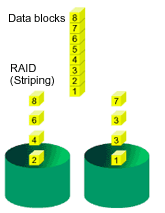
and writes sectors of data interleaved between multiple drives. When any disk
member fails, it affects the entire array. Performance is better than a single
drive since the workload is balanced between the array members. This array type
is for high performance systems. Identical drives are recommended for performance
as well as data storage efficiency. The disk array data capacity is equal to
the number of drive members times the smallest member capacity. For example,
one 1GB and three 1.2GB drives will form a 4GB (4 x 1GB) disk array.
Reads
and writes sectors of data interleaved between multiple drives. When any disk
member fails, it affects the entire array. Performance is better than a single
drive since the workload is balanced between the array members. This array type
is for high performance systems. Identical drives are recommended for performance
as well as data storage efficiency. The disk array data capacity is equal to
the number of drive members times the smallest member capacity. For example,
one 1GB and three 1.2GB drives will form a 4GB (4 x 1GB) disk array.
Stripe Size - a value can be set from 1KB to 1024KB sector size. The size can directly affect performance. In the FastBuild BIOS, the "Desktop" default is 8KB while "Server" and "A/V Editing" is 64KB.
- RAID-1 (Mirroring)
 Writes
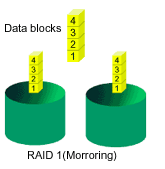
duplicate data on to a pair of drives while reads are performed in parallel.
ATA RAID 1 is fault tolerant because each drive of a mirrored pair is installed
on separate IDE channels. If one of the mirrored drives suffers a mechanical
failure (e.g. spindle failure) or does not respond, the remaining drive will
continue to function. This is called Fault Tolerance. If one drive
has a physical sector error, the mirrored drive will continue to function.
Writes
duplicate data on to a pair of drives while reads are performed in parallel.
ATA RAID 1 is fault tolerant because each drive of a mirrored pair is installed
on separate IDE channels. If one of the mirrored drives suffers a mechanical
failure (e.g. spindle failure) or does not respond, the remaining drive will
continue to function. This is called Fault Tolerance. If one drive
has a physical sector error, the mirrored drive will continue to function.
Review Pages