Breaking News

Sony Introduces New Colour to INZONE H9 II Headset and INZONE E9 In-ear Headphones Club 3D announces new products for October 2026 Razer Unveils All-New Wolverine V4 Line ASUS Republic of Gamers Ships ROG Rapture GT-BN98 Router GMK Unveils TriggerKey, a New Mechanical Key System for Greater Precision and Comfort

logo

  • Share Us
    • Facebook
    • Twitter
  • Home
  • Home
  • News
  • Reviews
  • Essays
  • About
    • Submit News

    • Contact Us
    • Privacy

    • Promotion
    • Advertise

    • RSS Feed

Search form

Shuttle SD32G2

May 9,2007 0

12. Installing a VGA card


Review Pages

1. Introduction
2. Full specifications
3. The Package
4. Opening the case
5. BIOS
6. Installation
7. Everest Ultimate Edition 2006 - SiSoft Sandra
8. PCMARK - 3DMARK
9. Science Mark - PovRay - Nero Digital
10. CINEBENCH -SuperPI
11. Overclocking
12. Installing a VGA card
13. Conclusion


The Shuttle SD32G2 offers a PCI-e slot. You can install a "standard" VGA card in order to improve the performance of the box, especially for 3D games. Due to the small dimensions, you can only install small sized VGA cards, like the 7600GT or 7900GS series. For our tests, we used MSI's 7600GT Silent VGA card. Our goal was to see how easy it is to install a VGA card and, if the PSU can handle powering up two HDD and one VGA card at the same time.

Installing the card was very easy, just remove the two screws on the back and the metal clip. Be careful when inserting the card. The MSI 7600GT doesn't need any external power, its powered from the PCI-e slot.
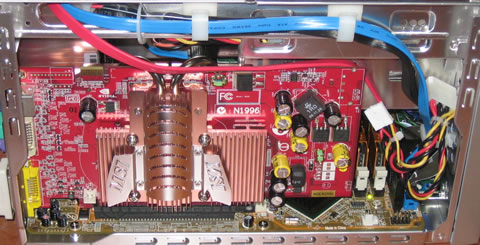
A top view of the box with the MSI 7600GT series installed. As you can see, the passive cooling comes close to the CPU area, adding more "heat" to the whole area.

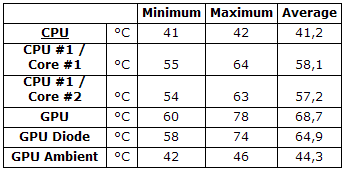
We closed the case and fired up 3D Mark06. Using Everest Ultimate Edition, we monitored the temperatures of the CPU and GPU. We plotted the temperature graphs, shown below:
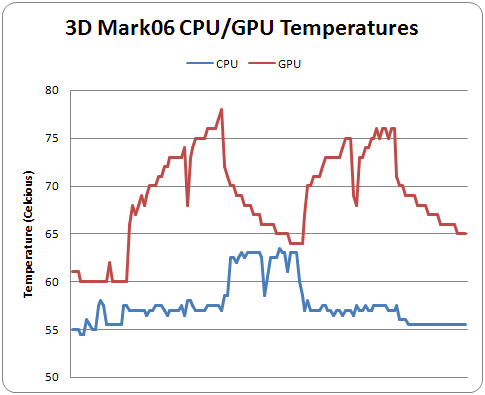
The CPU temperature starts from 55°C tops at 64°C. Without the VGA card installed it starts at 44°C and tops at 55°C. This means an increase of almost 10°C with the VGA card installed. Below is a table with all temperatures as reported from Everest Ultimate Edition:
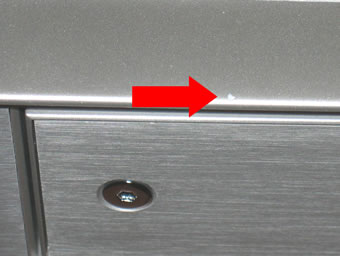
One last point. It seems the case can be easily "damaged". We are still trying to find the small chunk from our case...
 

Review Pages

1. Introduction
2. Full specifications
3. The Package
4. Opening the case
5. BIOS
6. Installation
7. Everest Ultimate Edition 2006 - SiSoft Sandra
8. PCMARK - 3DMARK
9. Science Mark - PovRay - Nero Digital
10. CINEBENCH -SuperPI
11. Overclocking
12. Installing a VGA card
13. Conclusion


Pages

  • « first
  • ‹ previous
  • …
  • 5
  • 6
  • 7
  • 8
  • 9
  • 10
  • 11
  • 12
  • 13
  • next ›
  • last »

SFF

Shuttle

Intel

Tags: SFF Shuttle Intel
Previous Post
Piel Frama Pearl case
Next Post
OCZ PC2-9200 FlexXLC

Related Posts

  • Akasa Launches Newton N16, Compact Fanless Case for ASUS NUC 16 Pro

  • Intel Gamer Days 2026 Kicking Off with AAA Gaming Bundle - Partnerships

  • Intel Arc G-Series Processors Set a New Standard for Handheld PC Gaming

  • Intel at Computex 2026

  • Intel Launches Intel Core Series 3 Processors

  • ASRock Unveils Intel Arc Pro B70 Graphics Cards, Redefining Professional Workspaces

  • G.SKILL DDR5 Memory Kits Confirmed as Intel XMP 3.0 'Ready' for Intel Core Ultra 200S Plus Series Processors

  • Shuttle Launches the XZ890G2

Latest Reviews

Fanxiang MP83 M.2 NVMe SSD Enclosure
Enterprise & IT

Fanxiang MP83 M.2 NVMe SSD Enclosure

Ugreen CM642 USB4.0 Enclosure
PC components

Ugreen CM642 USB4.0 Enclosure

be quiet! Dark Power 14 IO
PC components

be quiet! Dark Power 14 IO

SanDisk High Endurance 512GB microSDXC
Cameras

SanDisk High Endurance 512GB microSDXC

Samsung PRO Ultimate 512GB microSDXC
Cameras

Samsung PRO Ultimate 512GB microSDXC

Popular News

MSI’s Latest AMD X870E MAX & EVO Series Motherboards

MSI’s Latest AMD X870E MAX & EVO Series Motherboards

COLORFUL Launches iGame B850M ULTRA Series Micro-ATX Motherboards

COLORFUL Launches iGame B850M ULTRA Series Micro-ATX Motherboards

COLORFUL Presents Limited Edition Chitu MAG-60 Magnetic Keyboard Inspired by the Year of the Horse

COLORFUL Presents Limited Edition Chitu MAG-60 Magnetic Keyboard Inspired by the Year of the Horse

COLORFUL Launches iGame B850I MINI OC V14 Motherboard

COLORFUL Launches iGame B850I MINI OC V14 Motherboard

COLORFUL Presents iGame Z890 ULTRA-S W and iGame Z890M ULTRA Z Motherboards

COLORFUL Presents iGame Z890 ULTRA-S W and iGame Z890M ULTRA Z Motherboards

COLORFUL Launches the iGame X870E VULCAN W OC Motherboard

COLORFUL Launches the iGame X870E VULCAN W OC Motherboard

COLORFUL Expands B850 Motherboard Lineup with New CVN, Battle-Ax, and MEOW Models

COLORFUL Expands B850 Motherboard Lineup with New CVN, Battle-Ax, and MEOW Models

ASRock Adds Support for One Sub-Channel DRAM Module on Intel DDR5 Motherboards

ASRock Adds Support for One Sub-Channel DRAM Module on Intel DDR5 Motherboards

Main menu

  • Home
  • News
  • Reviews
  • Essays
  • About
    • Submit News

    • Contact Us
    • Privacy

    • Promotion
    • Advertise

    • RSS Feed
  • About
  • Privacy
  • Contact Us
  • Promotional Opportunities @ CdrInfo.com
  • Advertise on out site
  • Submit your News to our site
  • RSS Feed