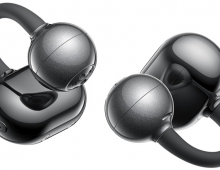
SoundPeats C30
4. Tests
The C30 has two identities depending on whether you engage the EQ. In default configuration, the tuning is warm, spacious, and bass-forward — but the elevated mid-bass (centered around 800 Hz to 2 kHz) pushes vocals back, compresses separation between voice and instrument, and produces the 'cave-like' character that polarizes opinion sharply. This default signature will satisfy listeners who prefer warmth over neutrality, but it actively works against vocal clarity, detailed midrange instruments, and accurate sound reproduction.
Post-EQ — either via the adaptive hearing test or the community-validated manual profiles — the character shifts dramatically. Vocals step clearly forward, instrument separation opens up, and the overall presentation becomes more balanced, airy, and competitive with earbuds at significantly higher price points. The transformation is not subtle. This is not a product where EQ is a fine-tuning option; it is the step that unlocks what the drivers are actually capable of. The five minutes required to run the adaptive EQ test is time well spent.
Bass
Bass is the C30's most consistent strength across both default and EQ-corrected configurations. Mid-bass is punchy and controlled — not bloated or muddy — with clear articulation in bass guitars, kick drums, and electronic bass lines. Sub-bass produces a satisfying rumble during drops without bleeding into the lower midrange or creating distortion at moderate volumes. Even in tracks with dense, layered low-frequency content, individual elements remain cleanly separated. The bass character is authoritative without being dominant: it supports the music rather than overwhelming it.
Midrange
The midrange is the C30's most complex frequency region. In default tuning, the 800 Hz–2 kHz elevation recesses center-frequency content and thickens vocal presentation — the result is accurate but congested, with voices sitting slightly behind the mix rather than naturally forward. For casual listening this is not necessarily unpleasant, but it falls short of the resolution that the drivers are capable of.
With the recommended EQ correction applied (800 Hz: -6 dB, 2 kHz: -4 dB), the midrange opens up entirely. Male and female vocals both become warm and resonant with clear separation, even in multi-vocalist tracks. Midrange instruments — piano, electric guitar, violin, trumpet — gain definition and detail. The corrected midrange is genuinely impressive at this price tier. For those who prefer a one-tap solution, the Treble Boost preset in PeatsAudio achieves a meaningful improvement without manual adjustment.
Treble
Treble is smooth and non-fatiguing in default tuning — present but restrained. Cymbals, hi-hats, and upper-frequency detail exist but are slightly understated, which makes the C30 comfortable for extended listening without ear fatigue. Post-EQ (3 kHz: +3 dB, 5 kHz: +5 dB, 8 kHz: +4 dB), treble becomes more prominent: female vocals gain air and clarity, cymbal overtones and string shimmer become more audible, and the overall presentation becomes brighter and more immersive. Activating ANC darkens treble further; for critical listening or treble-sensitive genres, ANC-off is the better configuration.
One consistent finding across the broader listening base is that the treble can feel harsh to some listeners even post-EQ, particularly at higher volumes. If you are fatigue-sensitive, the warmer Profile 2 setting or the Treble Enhancement preset used conservatively is preferable to the brighter Profile 1.
Soundstage & Imaging
Soundstage width is above average for a sealed IEM at this price. Instrument separation is a genuine strength — elements are clearly placed in the stereo field, with good lateral definition between left, center, and right channels. Vocals sit front and center. The 360° Spatial Sound and Movie Mode features add artificial widening and depth processing; these are useful for video content and atmospheric gaming but less meaningful for critical music listening where accuracy is preferred over effect.
LDAC & Hi-Res Audio
LDAC is a genuine differentiator in this price bracket. On compatible Android devices, the C30 streams at up to 990 kbps at 96 kHz/24-bit — a significant step up from the compressed detail of AAC or SBC. High-resolution tracks reveal improved separation and micro-detail that the 12mm PU/titanium composite driver handles well. The improvement is audible, not imaginary: instruments and spatial cues that are slightly blurred at AAC quality become cleanly defined at LDAC.
The trade-off is real and must be accepted as-is: LDAC disables multipoint connection and gaming mode. This is a Bluetooth bandwidth constraint — the Multi Point protocol and LDAC's high-bitrate stream cannot coexist on any current Bluetooth version. For daily commute use with multipoint switching between phone and laptop, AAC is the right configuration. LDAC belongs at home, with a single Android source, in focused listening mode.
Recommended EQ Settings
Both profiles below are entered via the PeatsAudio custom EQ screen's 10-band parametric interface. Bands not listed remain at 0 dB.
- Profile 1 — Brighter / More Vocal Separation (most recommended for pop, vocal-forward, and general listening): 800 Hz: -6 dB, 2 kHz: -4 dB, 3 kHz: +3 dB, 5 kHz: +5 dB, 8 kHz: +4 dB. Vocals step clearly forward, instrument separation improves significantly, the presentation becomes open and airy.
- Profile 2 — Warmer / Less Fatiguing (for fatigue-sensitive listening or darker genres): 800 Hz: -6 dB, 2 kHz: -4 dB, 3 kHz: -2 dB, 5 kHz: +5 dB, 8 kHz: +4 dB. Warmer signature with slightly recessed upper mids; less likely to fatigue on long sessions.
Quick option: the Treble Boost preset in PeatsAudio's preset library achieves a meaningful improvement without manual adjustments and is a good starting point.
The C30 uses a hybrid feedforward-feedback ANC topology. The outer microphone samples ambient sound before it enters the ear canal; the inner microphone monitors residual noise at the driver level. The processor generates an anti-phase waveform, achieving up to -52 dB suppression at its optimal cancellation frequency. In structured testing, the breakdown across four environment types is: static constant noise (HVAC, electronic hum) 5/5 — the strongest result — and traffic noise, shopping mall noise, and snoring each 3/5, producing a total of 14/20. The 5/5 on static noise is the headline result and explains why the C30 excels in exactly the environments most buyers need it for: commutes, offices, and aircraft. The 3/5 on irregular environments reflects the fundamental limits of a -52 dB system tuned primarily for low-frequency constant sources.
In real-world use, this profile is precise and consistent: the exhaust fan on a laptop disappears, the cabin drone of an aircraft drops to near-silence, and a loud open-plan office becomes significantly more manageable. Against voices in proximity, water running, wind noise, and sudden high-frequency sounds, the ANC offers minimal benefit. This is not a flaw — it is the honest ANC performance profile of a $40 hybrid system, and it is competitive at that tier. The C30 matches the Soundcore R60i NC on the 14/20 structured score, outperforms the CMF Buds 2 (10/20) and QCY MeloBuds N70 (12/20), and sits just below the SoundPeats T3 Pro (15/20) on irregular noise suppression.
ANC Mode Recommendations
Adaptive ANC is the best general-purpose setting and automatically adjusts to the environment. Indoor, Outdoor, and Transit modes deliver slightly less suppression but may suit specific contexts. The Environmental Adaptation toggle adds noticeable ambient noise and is not recommended for daily use. Four ANC intensity levels are available in the app for those who find full suppression uncomfortable or disorienting.
Transparency Mode
Transparency mode is rated positively in structured testing — more natural-sounding than most competitors at this price, with traffic noise passing through clearly and without over-amplification. In daily use, however, the difference between Transparency Mode and Normal Mode is difficult to detect. Voices nearby remain largely inaudible in both settings. This is a practical limitation worth knowing: the C30 should not be purchased for situational awareness use cases. If you need to hear conversations or traffic reliably while music plays, transparency mode is not a reliable tool on the C30.
Bluetooth 6.0
The C30 is among the first consumer earbuds to ship with Bluetooth 6.0, placing it at the current leading edge of TWS connectivity hardware. BT 6.0 delivers improved connection stability, reduced latency, and better coexistence with the 2.4 GHz Wi-Fi band compared to BT 5.x. Connection is reliable in daily use out to approximately 10 meters, with auto-reconnection to the last paired device on case opening. Multipoint pairing allows simultaneous connection to two devices — phone and laptop being the most common configuration — with clean switching between audio sources. For best stability, keep the source device on the same side as the primary earbud; the human body is the largest Bluetooth signal blocker and creates interference when the phone is in the opposite pocket.
LDAC / Multipoint Trade-off
Activating LDAC disables both multipoint and low-latency gaming mode. This is a fundamental Bluetooth bandwidth constraint — the Multi Point protocol and LDAC's high-bitrate stream require more bandwidth than Bluetooth 6.0 can allocate simultaneously. It is not a SoundPeats-specific shortcut. The practical implication: decide at the start of each session whether you want hi-res single-device listening (LDAC on) or practical multi-device daily use (LDAC off, multipoint on). For most daily scenarios, AAC with multipoint active is the right configuration.
Gaming Mode & Latency
In standard mode, audio latency is palpable during mobile gaming — approximately 3–5 frame-equivalent steps of delay in fast-paced titles like PUBG Mobile. Activating Gaming Mode brings audio essentially into sync with on-screen events, making the C30 suitable for casual and semi-competitive mobile gaming. Video streaming latency on iOS is well-synchronized. Note that Gaming Mode is unavailable when LDAC is active.
Microphone & Call Performance
The six-microphone AI ENC array is rated to 45 km/h wind resistance. In calm and moderately noisy environments, call clarity is strong — voice comes through with good volume and natural character, and background noise is suppressed to the point where ambient room noise does not intrude on the conversation. In wind conditions up to 45 km/h, performance holds adequately for mobile use. In comparison testing, the C30 handles wind noise better than the Soundcore P31i/R60i NC and reduces ambient call-side noise more effectively than the QCY MeloBuds N70. The ENC processing creates a slight robotic quality in voice recordings — a brief AI-processing shadow on noise events — which is characteristic of high-suppression systems at this price tier and not unique to the C30.
There is one important and reliable call quality finding: when ANC is active during phone calls, signal bleed from the ANC microphone array creates background noise interference that the person on the other end can hear. Disabling ANC before taking or making calls eliminates the problem entirely. This is confirmed independently across multiple users. It is not a hardware defect but a processing interaction, and the fix is simple: toggle ANC off before calls. Building this into a muscle memory habit resolves the issue completely.
Battery Life & Charging
Battery performance is one of the C30's strongest categories and a genuine competitive advantage at this price. The earbuds deliver 7.5 hours with ANC active and 10 hours with ANC off — consistent with manufacturer claims. LDAC mode reduces runtime to approximately 4.5 hours, which is a meaningful constraint on hi-res listening sessions. The 500 mAh case fully charges the earbuds four times, providing 52 hours total — sufficient for a standard five-day commuting week without recharging the case.
The fast charge implementation is outstanding: 10 minutes of charging delivers approximately 2–3 hours of playback. For users who commute daily, a 10-minute charge while getting ready in the morning effectively guarantees the earbuds never run out during the day. Charging uses USB-C; the manual specifies 2–5W as the correct power range. Standard 5W USB-A adapters are ideal. Fast chargers above this range risk battery and circuit damage and should not be used with the C30.
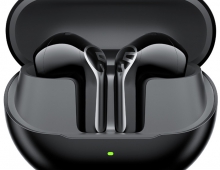
The case LED uses a clean three-color system: green for 70–100%, yellow for 20–69%, and red below 20%. During charging the LED breathes slowly in the corresponding color and holds solid green once both earbuds and case reach 100%. Opening or closing the lid shows case battery level; removing or inserting an individual earbud shows that earbud's level — a more useful implementation than the app's vague approximate percentage display.