Breaking News

Gemtek Unveils Wi-Fi 8 Vision at MWC 2026, Advancing Intelligent, AI-Driven Connectivity Kioxia Sampling UFS 5.0 Embedded Flash Memory Devices for Next-Generation Mobile Applications Sandisk Introduces Next-Generation Portable SSD Portfolio Nikon announces NIKKOR Z 70-200MM F/2.8 VR S II Casio to Release Full-Metal G-SHOCK

logo

  • Share Us
    • Facebook
    • Twitter
  • Home
  • Home
  • News
  • Reviews
  • Essays
  • Forum
  • Legacy
  • About
    • Submit News

    • Contact Us
    • Privacy

    • Promotion
    • Advertise

    • RSS Feed
    • Site Map

Search form

Stellar Data Recovery For Mac

May 19,2025 0

2. Installation


Review Pages

1. Introduction
2. Installation
3. Menus - GUI
4. Conclusion


Users can find the Mac FREE edition on the official website.

The latest build is v12.4.0.0 and you need to allow downloads to get it.

Users should expect a short download time for the 178 MB file size.

Opening the dmg package prompts you to move the StellarDataRecovery app to the App folder.

After a final security warning, we can finally open the main software.

Reading and agreeing to the License Agreement is mandatory.

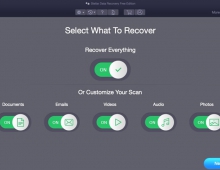
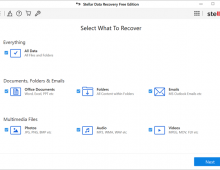
Finally, we can open the software.

For our tests, we used a Mac mini with an M1 processor with Sonoma macOS system, even though we also updated to the latest 15.xx macOS and the software ran just fine.


Review Pages

1. Introduction
2. Installation
3. Menus - GUI
4. Conclusion


Pages

  • « first
  • ‹ previous
  • 1
  • 2
  • 3
  • 4
  • next ›
  • last »

Stellar Data Recovery

Stellar

Tags: Stellar Data Recovery Stellar
Previous Post
EnGenius Wi-Fi 7
Next Post
Addlink P30 1TB Portable SSD

Related Posts

  • Stellar Data Recovery For Windows

  • Stellar SpeedUp Mac Software Review

  • Stellar Data Recovery MAC Edition

  • Stellar Data Recovery (Windows Edition)

Latest Reviews

Kioxia Exceria Plus G3 512GB microSD
Cameras

Kioxia Exceria Plus G3 512GB microSD

SoundPeats Cove Pro
Consumer Electronics

SoundPeats Cove Pro

Asustor AS5404T 4-Bay NAS System
Enterprise & IT

Asustor AS5404T 4-Bay NAS System

be quiet! Pure Power 13M 1200W
PC components

be quiet! Pure Power 13M 1200W

Server-Side Gaming Why Canadian Online Casinos Are Abandoning Local Clients for HTML5 Clouds
Enterprise & IT

Server-Side Gaming Why Canadian Online Casinos Are Abandoning Local Clients for HTML5 Clouds

Popular News

COLORFUL Introduces CVN B850I GAMING FROZEN Motherboard

COLORFUL Introduces CVN B850I GAMING FROZEN Motherboard

COLORFUL Presents CVN X870 ARK FROZEN Motherboard for AMD Ryzen 9000 CPUs

COLORFUL Presents CVN X870 ARK FROZEN Motherboard for AMD Ryzen 9000 CPUs

TEAMGROUP Launches EXPERT P34F Find My External SSD

TEAMGROUP Launches EXPERT P34F Find My External SSD

Samsung announces Galaxy Tab S11 and Galaxy S25 FE series

Samsung announces Galaxy Tab S11 and Galaxy S25 FE series

Viltrox Showcases Upcoming Lens Lineup and New TTL Flash at IBC 2025

Viltrox Showcases Upcoming Lens Lineup and New TTL Flash at IBC 2025

CORSAIR announces Vanguard Pro 96 and Vanguard 96 Gaming Keyboards

CORSAIR announces Vanguard Pro 96 and Vanguard 96 Gaming Keyboards

Panasonic Introduces the First Ultra-Telephoto Zoom Lens in the LUMIX S Series

Panasonic Introduces the First Ultra-Telephoto Zoom Lens in the LUMIX S Series

MSI Launches DATAMAG 40Gbps Magnetic Portable SSD

MSI Launches DATAMAG 40Gbps Magnetic Portable SSD

Main menu

  • Home
  • News
  • Reviews
  • Essays
  • Forum
  • Legacy
  • About
    • Submit News

    • Contact Us
    • Privacy

    • Promotion
    • Advertise

    • RSS Feed
    • Site Map
  • About
  • Privacy
  • Contact Us
  • Promotional Opportunities @ CdrInfo.com
  • Advertise on out site
  • Submit your News to our site
  • RSS Feed